
You have a WordPress plugin that costs $99. Black Friday is coming, and the question in the marketing meeting sounds straightforward: Should we give people 20% off?
But that question skips an important decision. Do you put a coupon code in the email? Drop the public price to $79.20? Or pair the plugin with a complementary tool and offer a package that solves a bigger problem?
All three can make someone feel they’re getting a deal. They do not create the same buying experience, attract the same customer, or give you the same information about what worked. A coupon gives you control over who gets an offer. A sale price removes a step at checkout. A bundle changes what the customer is buying. Pick the wrong one and you might generate more redemptions, or bigger orders, without creating more valuable customers.
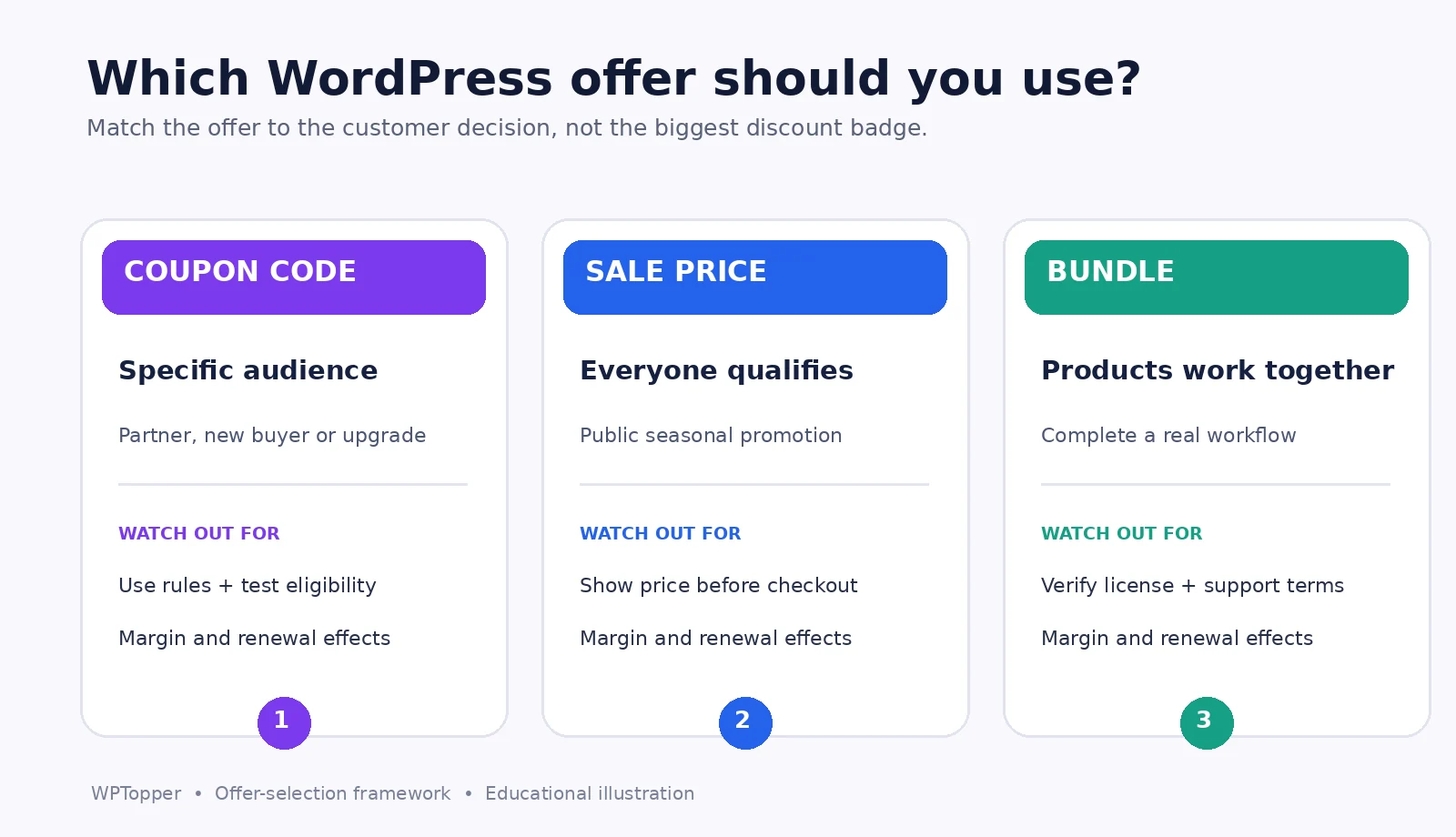
The quick answer: Use a coupon when eligibility, attribution, or a targeted incentive matters. Use a direct price cut when an offer should be easy for everyone to find and redeem. Use a bundle when two or more products solve a real job better together. Before choosing any of them, calculate the contribution left after the offer and verify its conditions at checkout.
This guide is about choosing the offer, not just clicking its settings. For discount depth and break-even calculations, see WPTopper’s companion guide, How Much Should You Discount a WordPress Plugin or Theme? For the broader strategy, read WordPress Discounts: How to Run a Sale Without Giving Away Your Profit.
Key Takeaways (TL;DR)
- Use coupon codes for targeted eligibility, partner tracking, or private incentives; don’t force every public shopper to hunt for one.
- Use a visible price reduction when everyone qualifies and simpler checkout matters more than tracking a code.
- Use bundles when products solve a meaningful problem together, but calculate the bundle’s actual contribution and support costs.
- Make the savings, eligible items, renewal prices, and claiming instructions clear whichever offer format you choose.
Three ways to make a deal, three very different customer experiences
Imagine a small WordPress agency owner shopping for a forms plugin. They need to collect leads, send automated follow-ups, and manage inquiries across several client sites. Here’s how the same seller could approach the promotion.
- Coupon code: The plugin remains $99, but subscribers receive a fictional 20% code for one eligible license. A new customer must have the code or an eligible promotional link to receive the saving.
- Direct sale price: The product page shows a genuine regular price of $99 and a temporary sale price of $79.20. Every eligible visitor sees the offer without hunting for a code.
- Bundle: The forms plugin and a related email automation product are offered as a package, with clearly stated license terms and a combined price lower than buying both separately. The customer buys a complete lead-generation workflow, not simply the original plugin at a lower price.
These are illustrative scenarios, not current WPTopper offers. There isn’t one correct answer for all three. The appropriate offer depends on what is stopping your audience from buying.
| Format | What the customer experiences | Where it shines | Main risk |
|---|---|---|---|
| Coupon code | Enter a code or follow a prefilled promotion link | Segment-specific or partner offers | Friction, expired codes, coupon hunting |
| Direct sale price | See the reduced price before checkout | Storewide events, simple public offers | Discounting buyers who would pay full price |
| Product bundle | Buy complementary items as one proposition | Workflows, agency packs, product education | Bundling things people don’t need or undervaluing each item |
When a coupon code is genuinely the right tool
Coupons are useful because they can have boundaries. A seller might want a special price for newsletter subscribers, a partner’s audience, new customers, a particular product category, or one license tier. A public price cut isn’t always the cleanest way to achieve that.
Take a plugin vendor working with a WordPress educator. The educator writes a tutorial about collecting event registrations. A coupon specific to that collaboration can make the offer easy to explain and help the team compare campaign results. The important part isn’t the string of characters. It’s the relationship between the offer, the audience, and a measurable reason to run it.
Good coupon use cases
- A partner-specific incentive: A tutorial audience receives a clear benefit with defined eligibility and an end date. Track referred purchases alongside the code; coupon redemptions alone do not prove the partnership created new demand.
- An upgrade incentive: A customer with a single-site license can receive a credit toward an agency license. Make sure checkout calculates the right upgrade value and doesn’t accidentally discount unrelated products.
- A controlled first-purchase offer: A newcomer receives an introductory saving. Put limits in place and avoid accidentally offering the same benefit repeatedly to returning buyers.
- A customer-service resolution: An individual buyer receives an appropriate courtesy coupon. It doesn’t need to become a public sitewide sale.
What makes coupons go wrong
The wrong coupon is the one that works perfectly in your dashboard but fails for the person you’re trying to help. It may exclude a product without saying so, have a minimum spend hidden in the terms, expire in the wrong timezone, or reject a customer who was eligible according to the campaign email. If customers encounter that at checkout, the promotion has created an objection instead of removing one.
WooCommerce core supports percentage, fixed-cart, and fixed-product coupons, with restrictions such as eligible products, minimum spend, expiry dates, and per-user limits. The official documentation says WooCommerce core does not automatically apply coupons; a shopper typically enters a code unless an additional implementation handles it. FluentCart’s documented Pro coupon editor supports fixed or percentage discounts, schedules, usage rules, maximum discount amounts, and stacking behavior. The precise interface and supported conditions depend on the version and extensions installed. Check the official documentation for the installed version before making implementation claims.
A coupon field has a cost even when no discount is used
Checkout UX research gives a reason to be careful with promotions. Baymard Institute observed shoppers stopping to consider prominent promo-code fields and sometimes leaving checkout to look for a discount. Its 2024 analysis recommends keeping the field collapsed instead of showing it as a prominent empty input. This doesn’t mean you should make legitimate codes hard to redeem. It means a public promotion shouldn’t require unnecessary effort from buyers, and a private code should be easy to use and clearly confirmed after application.
Practical rule: If everybody is eligible for the same price, consider showing that price directly or applying the offer automatically through a supported mechanism. Use explicit codes when the restriction or tracking value actually matters.
When a direct price cut is the better experience
A sale price works especially well when the promotion is simple enough to explain in one sentence: “This product costs $79.20 during our event.” No field, no copying text from an email, and no anxiety about finding a better code somewhere else.
For an established WordPress theme with a genuine, well-known regular price, a temporary public sale can make the purchase decision straightforward. For physical WooCommerce stores, sale prices can also be effective when clearing seasonal inventory or promoting a clearly defined product collection.
Make the reduced price visible before payment
A shopper should know the final product price on the listing and product page, not discover it only after adding an item to the cart. WooCommerce core supports a regular price, a sale price, and sale-price scheduling within the product editor. For variable products, pricing is managed at the variation level. That makes direct markdowns operationally different from asking buyers to redeem a coupon in checkout.
It also creates a responsibility: verify that the public sale price and any “was” price are legitimate. In the United States, the FTC’s former-price guidance warns against artificially inflated prior prices used to advertise fake savings. Other jurisdictions may have more specific price-history or comparison rules. When you sell internationally, confirm which requirements apply rather than relying on a generic label like “regular $99.”
Watch out for the blanket-sale problem
A public markdown is easy to claim because everybody can see it. That also means everybody who would have paid full price might receive it. A 20% sale on a high-demand plan can reduce revenue without changing many purchasing decisions. If you want to influence one audience, a narrower offer might be a better fit.
The opposite problem also exists. A public coupon code that everyone must copy and paste can create needless friction. The decision isn’t “coupons are better” versus “sale prices are better.” It’s whether the offer’s eligibility rules are worth the extra steps.
When a product bundle makes more sense than either discount
A bundle isn’t just a clever way to display two price tags. Its real promise is that buying the products together makes a customer’s job easier.
A forms tool and an email marketing plugin could be packaged around the outcome “capture and nurture leads.” A booking plugin plus a calendar setup service could make sense for an appointment business. A theme, a starter design library, and an onboarding session might be helpful for an agency building many similar websites. The best bundles explain the workflow before they explain the saving.
A weak bundle is a drawer of unrelated leftovers sold under the heading “ultimate toolkit.” It forces the buyer to pay for things they don’t want. That can look like a high-value offer in a graphic and feel like an expensive detour at checkout.
An example that separates basket size from actual value
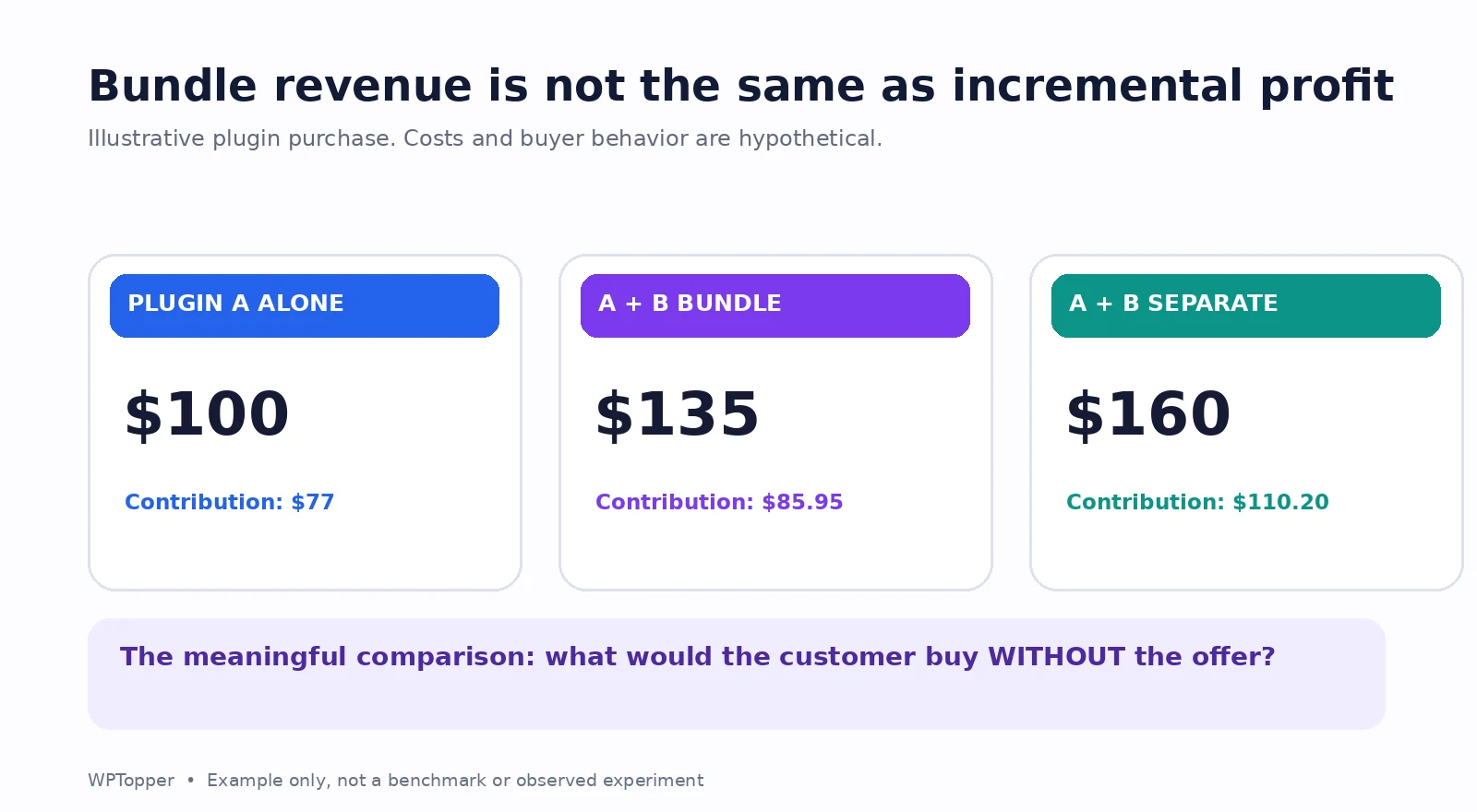
Imagine two downloadable WordPress tools: Plugin A is $100, Plugin B is $60. A potential buyer originally wants only A. You offer a bundle for $135, saving $25 compared with the authentic $160 combined standalone price.
If the customer buys the bundle instead of A alone, revenue per order rises from $100 to $135. But that does not mean the bundle is automatically more profitable. Plugin B may have its own support, licensing, processing, and update costs. A buyer who would already have paid $160 for both now gives you $25 less revenue, not $35 more. The right comparison depends on what customers would have purchased without the offer.
Here’s a deliberately simple illustration. Suppose A has $20 in variable delivery and support costs, B has $25, and processing fees are 3% of charged revenue. Buying A alone at $100 leaves $77 contribution. Buying the $135 bundle leaves $85.95. That is $8.95 more contribution only when the bundle genuinely adds B to an A-only purchase. If the buyer would otherwise have bought both at full price, those regular purchases would leave $110.20 contribution. Selling that same buyer the bundle gives up $24.25.
Every cost and counterfactual in this example is hypothetical. The point is to measure incremental contribution, not to celebrate a larger average order value and stop there.
A useful WordPress bundle has to survive licensing reality
Ask questions that banners rarely answer. Does each item have the same number of licensed sites? Do the renewals happen together or separately? Is support provided by one company or two? Can the customer remove a bundle item? Will an existing owner of one tool receive a fair upgrade or duplicate license? Are the tools actually compatible in the advertised workflow?
WooCommerce’s Product Bundles functionality is documented as an extension with multiple pricing approaches. It can handle bundled simple, variable, or subscription products and requires the appropriate extension rather than being treated as a feature of base WooCommerce. Individual store configurations can also affect whether bundle discounts interact with sale prices. Don’t promise a one-click bundle builder until you’ve confirmed the actual plugin and version.
Compare the three offers using the same questions
Before launching anything, sit down with the person responsible for product, marketing, and customer support. Answer these five questions together:
- What buying obstacle are we removing? The user needs a lower entry cost, a simpler checkout, or a more complete solution. These are not interchangeable.
- Who should qualify? Everyone, first-time buyers, a specific partner audience, existing license holders, or a segment with a real use case?
- What happens to contribution? Calculate costs after the offer, including future obligations on renewals and lifetime licenses. See WPTopper’s pricing guide for the break-even approach.
- What does the shopper have to do? Enter a code, click a campaign link, choose a variation, select bundle components, or read extra conditions? Every additional step needs a reason.
- What would count as success? New activated customers, incremental contribution, upgrades, higher product adoption, or more qualified leads? Don’t substitute coupon redemptions for business outcomes.
Use the answer to the first question to shortlist an offer. Use the next four to eliminate the bad versions.
Three common WordPress sales situations, and what I’d try first
Situation 1: A new plugin with a small but relevant email list
I’d consider a narrowly scoped first-purchase coupon, not a broad 40% public markdown. The audience is known, and you can follow up with helpful onboarding. Keep the saving modest enough to justify the extra demand you hope to create. Measure activations, refunds, and conversion among eligible readers, not just redemptions.
I’d also compare it with a short demo and an updated compatibility page. If prospects don’t understand the product, a lower price might not be the thing they need.
Situation 2: A mature WordPress theme during Black Friday
A clean public sale price might be better. The product is familiar, the audience expects a seasonal offer, and the central message should be the price and its genuine deadline. Show exactly which plans qualify and what renewals cost. Avoid forcing a customer to search social posts for a code that works for everybody.
If the theme offers an agency tier, test the economics separately. One percentage across every license can create very different outcomes.
Situation 3: Two products that are stronger together
I’d start with a bundle built around the actual task. Instead of “Buy these two plugins and save 15%,” try “Launch lead capture and follow-up on one WordPress site.” Explain the workflow, list exactly what is included, and show whether customers can buy each item separately.
Don’t invent a cross-brand bundle without legal and commercial permission. If you don’t control both products’ pricing and licensing, a curated recommendation or optional add-on is a safer editorial alternative.
A practical campaign test, not just a comparison spreadsheet
Suppose you have enough traffic to compare two options responsibly. You might test a public $80 sale price against a $20 coupon for the same ordinarily $100 product, with the same eligibility and offer window. In theory, the discount amount is identical. In practice, the code flow introduces an action and may behave differently for returning shoppers.
Keep other differences as stable as possible: landing page, offer dates, acquisition channels, device mix, and audience qualification. Track visits to eligible product pages, add-to-cart behavior, checkout starts, completed orders, contribution per visitor, refunds, and support issues. If the sample is small, treat results as directional rather than declaring a winner based on three extra sales.
Bundles need a different comparison. Track the percentage of buyers who use both products, extra support demand, and incremental contribution versus what those buyers plausibly would have purchased. A higher basket total doesn’t establish that the bundle created more value.
Don’t overlook the post-purchase experience
A buyer who used a coupon still needs to install and use the plugin. Someone who bought a bundle may need help connecting the tools. A customer who paid a holiday price needs to know the renewal cost. The campaign ends; the customer relationship doesn’t.
Make onboarding part of the offer design. For a bundle, consider sending a short setup sequence that gets the two products working together. For a new-customer coupon, give the buyer a clear first success milestone. This is where an offer that looks smaller on the banner can become more valuable in practice.
WordPress implementation checklist before any offer goes live
- Confirm the discount type and checkout capability in the installed versions of WooCommerce, FluentCart, or your actual commerce system.
- Check eligible products, variations, customer groups, minimum order amounts, and maximum discount caps.
- Decide whether other coupons or existing sale prices can stack; test the actual outcome rather than guessing.
- Confirm start and end times using the storefront’s configured timezone and payment flow.
- Test mobile and desktop checkout, logged-in and guest scenarios, and at least one ineligible cart.
- Verify that the email, landing page, product page, cart, and receipt all show consistent pricing.
- Document subscription renewal terms, lifetime support conditions, bundled license counts, and refund policies.
- Record the baseline you will compare against and assign someone to monitor checkout failures after launch.
The upcoming WPTopper guides on creating coupon codes and setting coupon restrictions will handle the interface-level instructions. This decision guide is deliberately about the offer choice itself.
What should a WordPress deals site recommend to buyers?
WPTopper has two audiences in this story: businesses running deals and people deciding whether a deal is worth claiming. The same framework helps both sides.
When evaluating a coupon, a shopper should confirm the code is active, applies to the intended product, and doesn’t hide a costly renewal. When evaluating a public price cut, check the actual former price and whether the terms are clear. For a bundle, ask if you’ll really use all the products, whether they share compatible licensing terms, and what support looks like after purchase.
A discount is not a good purchase merely because the percentage is high. If you want to compare the WordPress tools available for your next project, explore WPTopper’s curated product listings. Buy the workflow you need, not the loudest deal banner. For more buying guidance, see our free-versus-premium plugin guide and plugin selection checklist.
The decision worth making before designing the banner
Coupons, public markdowns, and bundles aren’t three interchangeable ways to move a price down. They’re different promises. A coupon says, “This offer is for you.” A sale price says, “This is the price right now.” A thoughtful bundle says, “These pieces belong together because they solve something useful.”
Pick the promise that is true for your customers. Make the economics work. Then make claiming the offer as straightforward as it deserves to be.
Frequently asked questions
Is a coupon code better than a sale price in WooCommerce?
Neither is universally better. WooCommerce core supports both coupon discounts and product sale prices, but their customer experience differs. Use a coupon when you need controlled eligibility or attribution. Use a sale price when the same reduction should be visibly available to everyone. Test checkout behavior on your installed setup.
Do WordPress coupons apply automatically?
WooCommerce core’s coupon documentation says shoppers enter codes themselves; automatic application requires an additional implementation. FluentCart documents coupon parameters in promotional checkout URLs, subject to eligibility and restrictions. Don’t promise automatic application without testing the specific flow and version.
Will a bundle always increase average order value?
Not necessarily. It may increase the amount some customers spend, but others could substitute a lower-priced bundle for items they would have bought individually. Even when average order value increases, profit can decline if additional support and license obligations outweigh the gain.
Can a coupon and a sale price stack?
That depends on the platform, coupon settings, and extensions. WooCommerce has an “Exclude sale items” restriction and an “Individual use only” coupon setting. Other extensions can change discount interactions. Test real carts rather than assuming a universal rule.
What’s the best discount for Black Friday WordPress plugins?
There isn’t one. Choose the format around the audience and buying obstacle, then calculate the expected contribution. A public sale can be clearer for a broad event, while targeted coupons and meaningful bundles can serve more specific groups.



Leave a Reply