
A sale can feel like a win right up until you open the numbers. Orders are up, revenue has jumped, and the coupon has been redeemed hundreds of times. Then the payment fees, support costs, affiliate commissions, and refunds arrive. Suddenly, the big promotional weekend looks a little smaller.
That is the uncomfortable side of WordPress discounts. A coupon makes it easier for someone to say yes, but it also changes what that yes is worth to your business. If you sell plugins, themes, WooCommerce products, memberships, or digital services, the question is not simply how much to take off. It is what you want the discount to accomplish, and whether the economics still work afterward.
This guide covers the decisions that matter before you switch on a coupon: defining a goal, finding a safe discount range, choosing the right buyers, protecting checkout, and measuring the result. No universal ‘best percentage.’ Just a process you can use.
Key Takeaways (TL;DR)
- Choose a business goal before choosing a percentage. Customer acquisition, upgrades, and clearing inventory call for different offers.
- Calculate contribution after variable costs, not just headline revenue. A sale can increase orders and still leave less money.
- Target discounts carefully. Bundles, upgrade credits, and useful bonuses may create value without reducing every price.
- Verify coupon rules, honest reference prices, and renewal terms; judge success against a credible no-sale baseline.
First, decide what the sale is supposed to change
Imagine two WordPress businesses. One is launching a plugin to an audience that has never heard of it. The other has an established product and a long queue of customers who would probably renew at the regular price. They might both choose a 20% coupon, but they are solving different problems. Treating those campaigns as the same is how money gets left on the table.
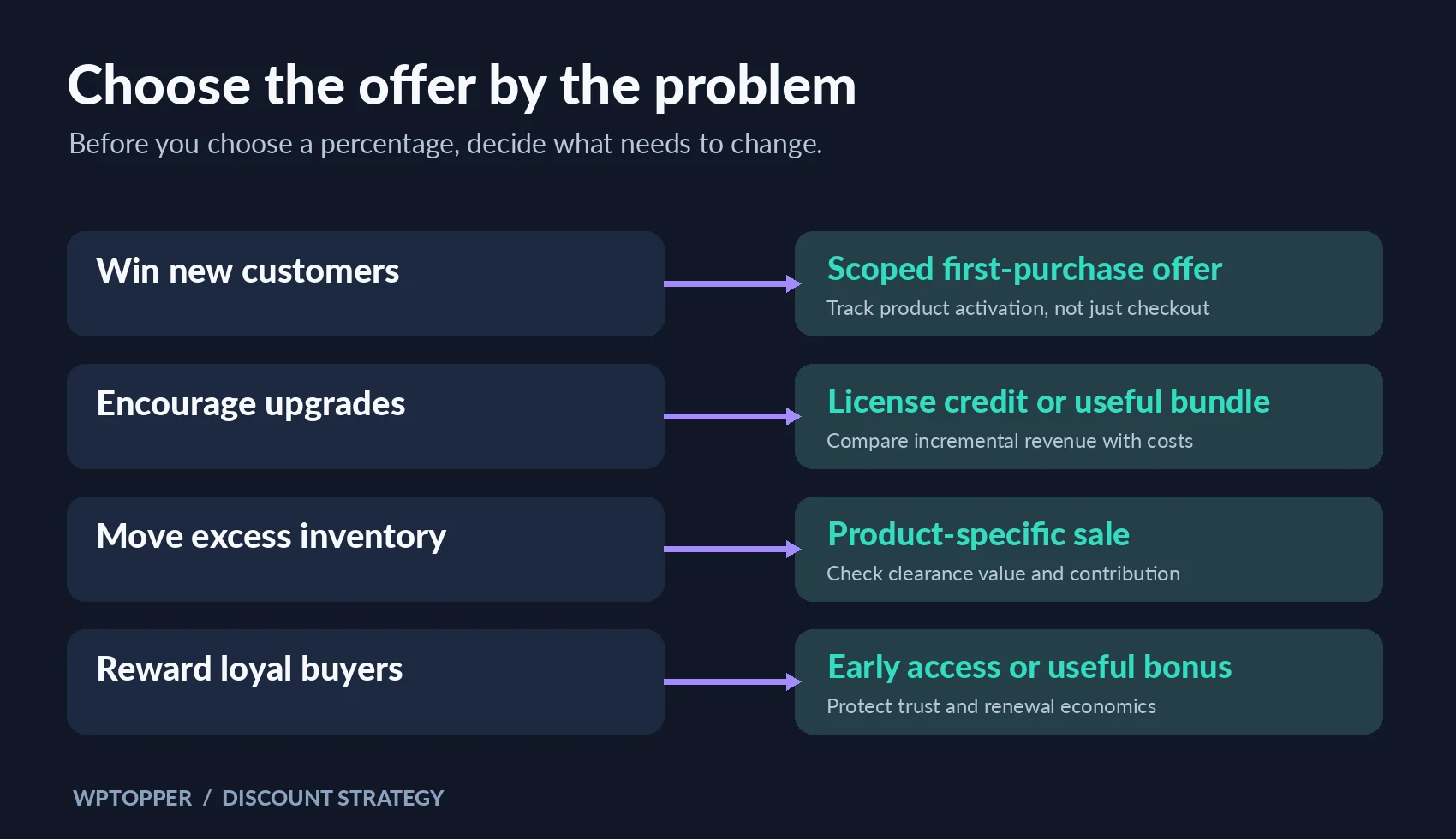
Give the campaign one primary objective. New customer acquisition, upgrading existing customers, moving slow inventory, increasing average order value, rewarding loyal buyers, and reviving genuinely inactive customers are different jobs. They call for different offers and different measures of success.
For example, if the goal is to win new plugin customers, restrict the introductory offer to eligible new purchases and track how those customers activate the product. If you need to sell excess physical stock before a model change, a product-specific markdown may make sense. If renewals are healthy, discounting them across the board may only reduce income that was coming anyway.
A useful test: finish this sentence before building the coupon. ‘We are willing to give up ___ per eligible order because we expect to gain ___.’ If you cannot complete it, you have a promotion idea, not yet a strategy.
The discount math most campaigns skip
Gross revenue is the headline number. Contribution profit tells you how much money each additional order actually contributes toward fixed overhead and profit. Start with what the customer pays, then remove the costs that rise with that order.
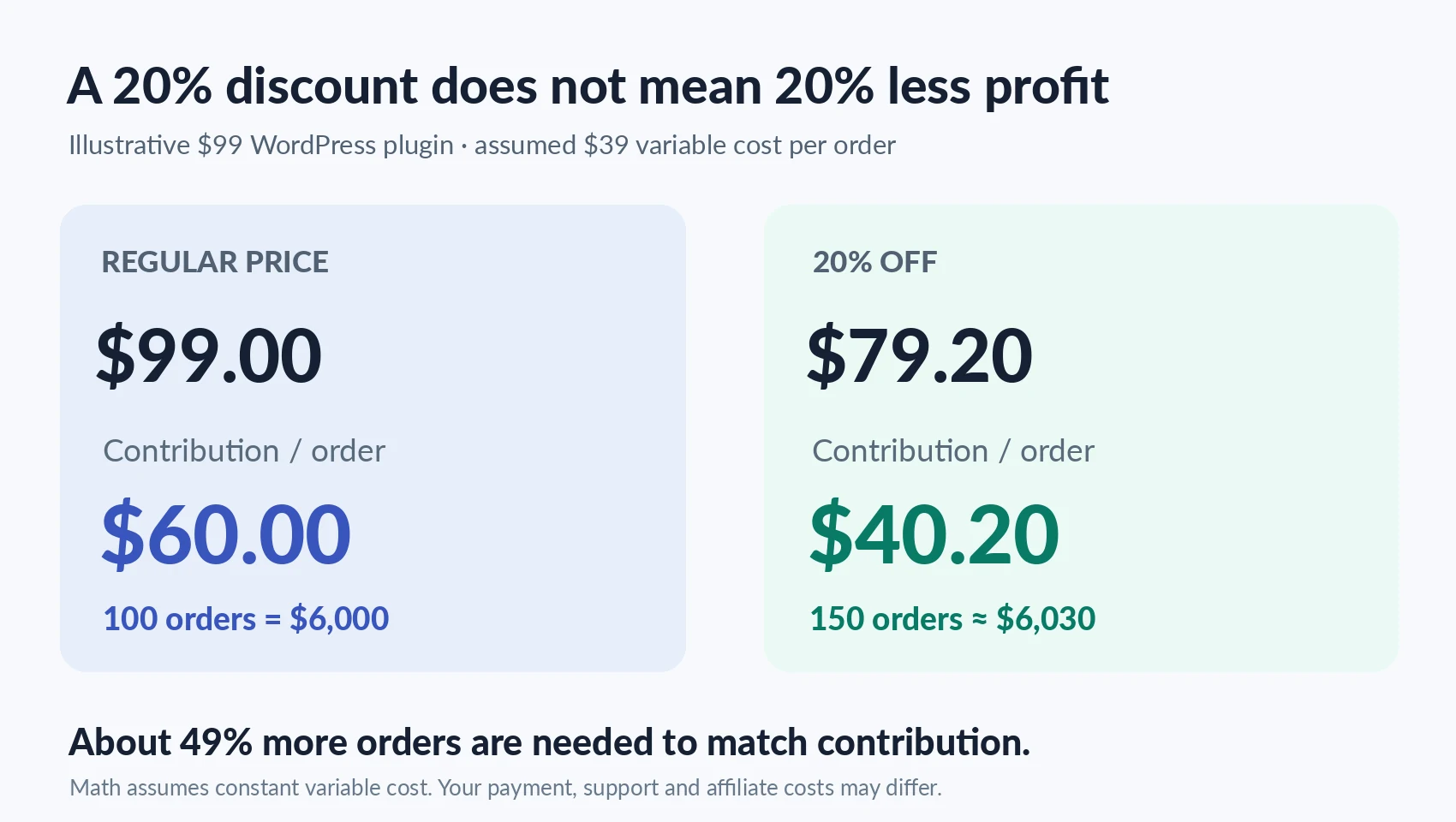
Use contribution profit, not just the sticker price
Contribution per order = selling price after discount − variable costs per order.
Variable costs can include payment fees, marketplace or affiliate commissions, delivery, packaging, incremental customer support, onboarding services, and expected refunds. Which items qualify depends on your business. Rent, salaries already committed, and most product-development work are generally fixed over a short promotion window, so do not automatically mix those into an order-by-order comparison.
Here is an illustrative WordPress plugin example, not an industry benchmark. The plugin normally sells for $99. You estimate $39 in variable costs for each incremental order. At full price, that leaves $60 in contribution. Apply a 20% coupon, and the buyer pays $79.20. If the variable-cost assumption stays unchanged, contribution drops to $40.20.
You did not give away 20% of the contribution. You gave away almost one-third of it.
Calculate the extra orders you need
Break-even order multiplier = regular-price contribution per order ÷ discounted contribution per order.
For this example: $60 ÷ $40.20 ≈ 1.49. If you would normally sell 100 licenses and earn $6,000 in contribution, you need roughly 150 sales at the discounted contribution to match that outcome. That’s about 49% more orders, merely to break even on contribution before any extra campaign setup costs. If the campaign produces only 120 orders, the impressive-looking increase in sales volume has still reduced total contribution.
The assumptions matter. Payment fees often change with order value, support costs differ between new and returning customers, and some discounted orders would never have happened without the offer. Recalculate with real costs and compare against a credible no-sale forecast, not just last week’s revenue.
A 20% discount can be even harsher for physical goods
Take a $75 product with $30 in product cost and another $15 in variable fulfillment and payment expenses. Full-price contribution is $30. With a 20% discount, the selling price becomes $60 and contribution drops to $15, assuming costs remain the same. You now need twice as many orders to generate the same contribution. That may be sensible when the alternative is unsold seasonal inventory. It’s far less appealing for a product that already sells steadily.
The useful rule is not ‘never discount.’ It’s ‘know what must improve enough to pay for the discount.’
Who should receive the offer? Everyone is rarely the best answer
A sitewide coupon is easy to announce and even easier to understand. It’s also blunt. You can end up rewarding people who already intended to pay full price while attracting shoppers who disappear as soon as the offer ends.
Start with the behavior you want to change. A carefully scoped first-purchase offer may help remove the risk of trying an unfamiliar plugin. An upgrade credit can persuade someone on a single-site license to move up a tier. A bundle can help an agency buy compatible tools together without reducing the price of every product in the catalog. A retention offer can be reserved for a customer who genuinely seems likely to leave.
Customer loyalty deserves nuance. Your most loyal buyers may value early access, a helpful add-on, or priority onboarding more than a perpetual stream of price cuts. And don’t assume that making existing customers pay more than newcomers will go unnoticed. Compare the total value of each offer and explain eligibility clearly.
Match the offer to the product, not the calendar
A lifetime plugin license, an annual subscription, a hosting plan, and a box of physical goods don’t carry the same ongoing obligations. Lifetime licenses can create years of support and update work after one payment. Annual plugins depend on renewals. Hosting promotions may have a first-term price that differs from the renewal rate. Physical products carry inventory, shipping, and return costs.
That’s why ‘40% off everything’ should be the last option you consider, not the first. Before choosing a percentage, check lifetime support exposure, first-year versus renewal pricing, stock limitations, and whether fees are calculated on the actual charged amount.
Five offers worth considering before a sitewide markdown
1. A first-purchase coupon with a clear boundary
Use this when trial risk is keeping qualified prospects from buying. Limit eligibility, set an expiration date, and track product activation as well as conversion. Don’t offer a first-purchase code so frequently that returning customers feel punished.
2. A product bundle with an obvious use case
A forms plugin paired with an email automation tool can be useful when they solve one workflow together: collect leads, segment them, follow up. Buyers should understand what they save compared with genuine separate prices, and what happens when the licenses renew.
3. An upgrade credit rather than a new coupon
If someone has already paid for one site, a credit toward a larger license can feel fairer than making them buy again. It preserves goodwill without changing the entry price for everybody. Check that the credit reflects your actual upgrade policy and remaining value.
4. A minimum-spend incentive
An offer such as ‘$15 off eligible orders above $150’ may encourage someone to add a useful second item. But calculate whether that item brings enough contribution to cover the incentive. A bigger average order value can still hide lower profit per order.
5. More value instead of a lower price
Templates, migration help, an onboarding session, or a relevant digital bonus can create a reason to buy without changing the core product price. Count the delivery cost of the extra, and make sure it’s something customers genuinely want. Calling an unwanted add-on a ‘$199 gift’ doesn’t make it valuable.
WordPress gives you the controls. It cannot make the pricing decision
WooCommerce includes percentage, fixed-cart, and fixed-product coupons, alongside eligibility restrictions, spending thresholds, expiry dates, and usage limits. Its core coupon workflow does not automatically apply coupon codes for shoppers. Those settings make targeted offers possible; they won’t tell you whether the offer is financially sensible.
FluentCart’s documented Pro coupon controls include fixed and percentage discounts, maximum discount amounts, scheduling, per-customer limits, and stacking rules. The exact setup differs by commerce platform and installed version. Test the configuration on the checkout your customers actually use before announcing the campaign.
This WPTopper series will also cover the technical steps for creating WordPress coupons and the rules that prevent costly misuse. This article stays focused on the commercial decision; use those implementation guides when they’re published.
The hidden problem with coupons is often the coupon field
Picture a buyer who has selected a plugin, checked compatibility, and reached payment. They notice a blank ‘Coupon code’ box and wonder whether they’re about to overpay. They leave the checkout to hunt for a code, find an expired one, and don’t come back.
That behavior is not just hypothetical. Baymard’s checkout research documents shoppers leaving to search for promo codes after seeing exposed fields. Its usability guidance recommends collapsing the coupon field and, where the system supports it, automatically applying eligible public discounts.
You don’t have to remove coupon codes. You do have to make the final price easy to understand. If a promotion applies to everyone, ask whether forcing people to paste a code serves any purpose. If the offer is private, confirm it works for the intended audience and explain exclusions before payment.
Treat a seasonal sale like a product launch
Black Friday is an easy moment to improvise. Competitors publish huge percentages, the team wants a banner, and someone proposes a coupon by lunchtime. That can mean inconsistent pricing across channels, wrong expiry timezones, nonworking codes, and support teams learning the offer terms from customers.
In a 2025 survey of 249 merchants, WooCommerce found that higher-revenue businesses tended to prepare further in advance for Black Friday and Cyber Monday. The useful lesson isn’t to copy their budgets. It’s to make enough time for a smaller team to pick the right offer, test the checkout, and build a consistent communication plan.
Assign responsibility for pricing, checkout, creative, email, support, and post-sale reporting. Decide who sees each offer, what the final price is, which products are excluded, whether other codes stack, what happens at expiration, and what a buyer should do if the code fails. Then run an actual test purchase on mobile and desktop.
Be honest about the reference price and the deadline
A 50% badge is only persuasive when the original price is real. The US FTC’s former-price guidance warns against inflated, fictitious reference prices presented as genuine savings. Laws vary by market, so check the rules for the countries where you sell.
Keep a record of the genuine prior price, campaign start and end times, eligibility, and advertised savings. If a promotion is extended, update the message transparently. If the discount covers only the first subscription term, put the renewal price near the offer. If the coupon can’t be combined with other codes, say so before checkout.
Clear terms might cost you a few impulsive clicks. They also prevent unpleasant surprises and unnecessary support tickets. For a WordPress product you hope customers will renew, that trust is worth protecting.
Measure the sales you gained, not only the discounts you gave
Coupon redemptions are an operational number, not a verdict. A campaign that distributes 1,000 codes and gets 300 redemptions can still underperform if most of those buyers would have purchased anyway.
Choose a baseline before launch: comparable periods, seasonality, traffic trends, and the share of new versus returning customers. Where practical, keep a comparable holdout audience that does not receive the offer to estimate incremental lift. A perfect test is hard during a major holiday, but a documented baseline beats celebrating raw revenue without context.
Review net sales, contribution per order, total contribution after campaign spend, refunds, average order value, acquisition cost, first-time buyer share, product activation, and renewal behavior. For WordPress software, support tickets per new customer can reveal whether a sudden wave of discounted buyers is actually ready to use the product.
Check whether the sale pulled demand forward, too. A spectacular Friday followed by an unusually quiet month may not be the same success as steady growth with genuinely new customers.
Your one-page WordPress discount planning worksheet
Before the next offer goes live, write down answers to these eight questions. The goal is not a complicated spreadsheet. It is making the decision explicit.
- Why are we discounting? Choose one primary business outcome.
- Who qualifies? New buyers, existing license holders, dormant customers, particular products, or everybody?
- What is the regular contribution per order? Show the variable-cost assumptions.
- What is the contribution after the offer? Calculate the additional order volume needed to break even.
- Could a bundle, upgrade credit, or helpful extra create value without a price cut?
- What are the rules? Dates, eligibility, stacking, usage limits, renewals, and refunds.
- How will we measure the result? Choose a baseline and a small set of meaningful metrics.
- What happens after the sale? Plan onboarding, support, follow-up, and customer-quality review.
If you can’t answer questions three and four, delay the announcement. If you can’t answer question eight, you may be treating the sale as the end of the customer relationship instead of the beginning.
The better deal is the one both sides can live with
A worthwhile discount helps a real customer make a good decision without turning a healthy business into an endless sale machine. Sometimes that means 15% off. Sometimes it means a bundle, an upgrade credit, or no discount at all. The number on the banner is the least interesting part.
If you’re shopping rather than selling, the same principle works in reverse: compare the features, license terms, renewal prices, support, and your actual use case instead of chasing the biggest percentage. Explore the WordPress products and deals curated by WPTopper, then confirm the current terms before you buy.
Frequently asked questions
What is a good discount percentage for a WordPress plugin?
There is no universal percentage. Start with contribution margin, the target audience, the reason for the offer, and ongoing support or renewal obligations. Choose a level that can meet the campaign objective without depending on unrealistic growth.
Is a sitewide sale better than individual coupons?
A sitewide sale is simple to explain, but it may lower income from customers who would have paid full price. Product-specific or audience-specific offers give you more control. The best choice depends on your goal and how clearly eligibility can be explained.
Should WordPress businesses offer Black Friday discounts?
Not automatically. Seasonal promotions can help with acquisition, upgrades, or inventory, but businesses with thin margins or strong renewals may do better with bundles, early access, or useful extras.
Does a coupon increase profit?
It can, if contribution from incremental orders and reasonable longer-term value exceeds the money given away and the campaign cost. Higher redemptions alone don’t prove profitability.
Sources and further reading
FluentCart: Adding and configuring coupons
Baymard Institute: Checkout form-field research
WooCommerce: 2025 merchant Black Friday survey



Leave a Reply