
You find a WordPress plugin you actually need. Its pricing card says 60% OFF, a timer insists the offer ends in six hours, and a bold button promises the biggest deal of the year. You click through. The 60% applies to a different license, the timer starts again tomorrow, and the renewal costs considerably more than today’s price.
Technically, the plugin may still be excellent. But you’re no longer weighing features against price. You’re trying to work out which parts of the promotion to believe.
That’s the moment a discount stops being helpful. A good promotion reduces the cost of something worthwhile and explains the conditions. A misleading promotion makes shoppers solve a puzzle before they can tell whether they’re saving anything at all.
For WordPress product businesses, this isn’t just a legal or design debate. Trust matters after purchase, too. The person who bought your plugin during Black Friday is the person you hope will install it, use it, recommend it, and possibly renew next year. For WPTopper and other WordPress deal publishers, trustworthy information is the product. A bad coupon listing can undermine the whole site.
This guide takes apart the claims that deserve a second look, shows how to rewrite them, and gives product teams and deal publishers a practical verification checklist. The prices and product examples are fictional. They are not live offers or allegations about any real brand.
Key Takeaways (TL;DR)
- A crossed-out price must reflect a genuine comparison; inflated reference prices turn savings claims into a trust problem.
- Countdown timers should reflect real deadlines rather than restarting to manufacture urgency.
- Disclose exclusions, subscription renewals, coupon validity, affiliate relationships, and extra charges before the buyer clicks.
- Audit offers against actual vendor terms and applicable local rules; remove or correct deals that can no longer be verified.
The short answer: seven checks before calling a discount a deal
A transparent WordPress promotion should pass these checks:
- A genuine comparison price. The crossed-out amount has a defensible basis rather than being increased to make the new price look spectacular.
- Accurate savings. The percentage and dollar reduction refer to the same plan, billing period, and eligible products.
- An honest deadline. If the offer ends on Sunday, the discount actually ends as advertised, subject to clearly disclosed extensions or new campaigns.
- Visible license and renewal terms. The buyer knows what they’re purchasing and what they’ll pay later.
- No surprise eligibility rules. The required code, exclusions, stacking restrictions, and conditions appear before checkout.
- A working destination. The CTA reaches the real product or eligible offer, not a generic homepage with a different price.
- An upfront relationship disclosure. A recommendation funded by an affiliate commission or placement makes that connection easy to understand.
Put these next to a real WordPress deals page and you’ll discover far more than you would from staring at the discount badge.
1. The crossed-out price needs a history
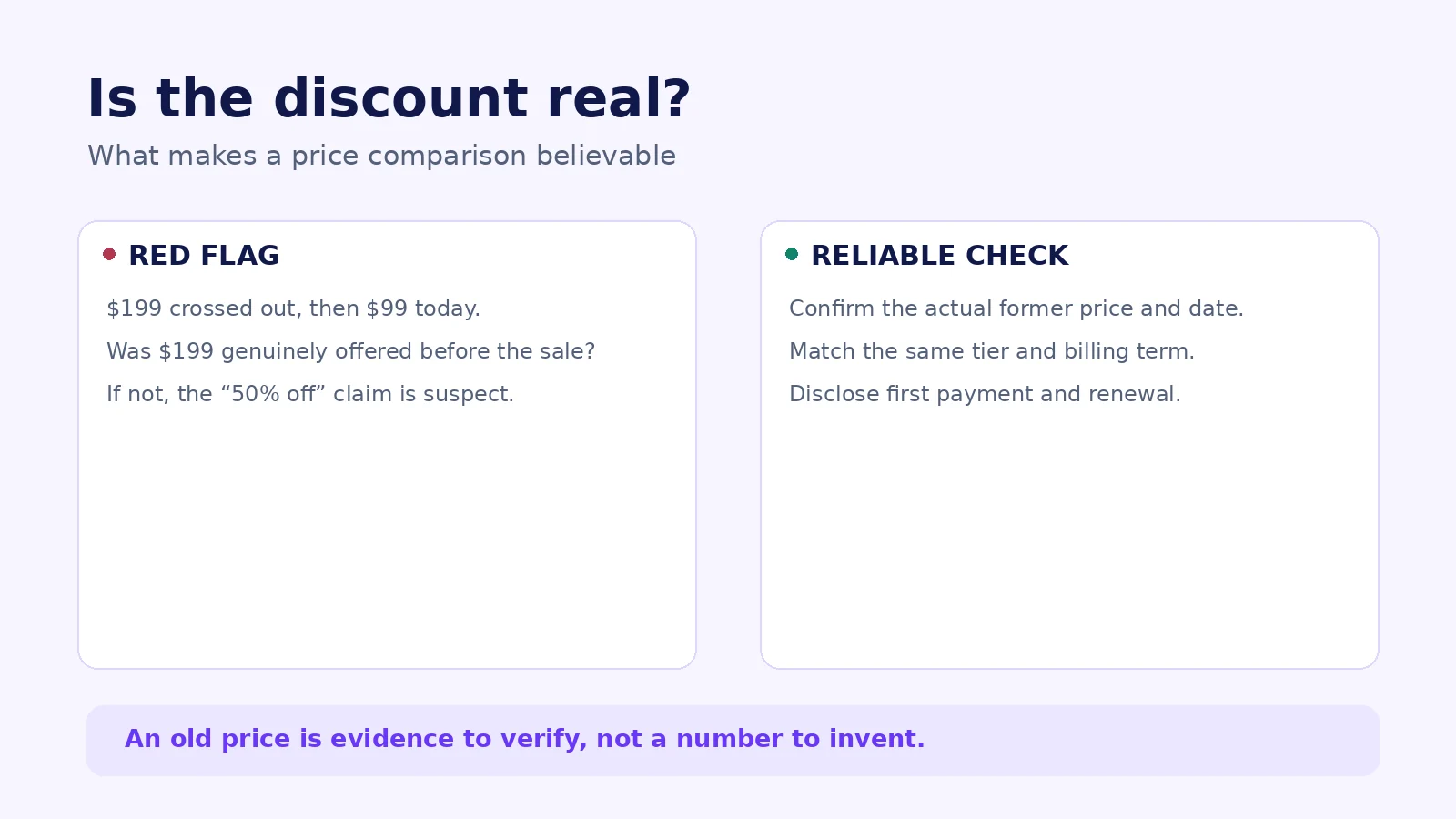
Consider a plugin that normally sells for $99. A week before Black Friday, the seller changes its listed price to $199, then announces it for $99 with a large 50% off banner. Customers see a saving even though the price they’re being charged is essentially the old price.
That’s not a clever marketing trick. It’s the kind of fictitious former-price comparison the US Federal Trade Commission warns about in its Guides Against Deceptive Pricing. The FTC’s guidance says that former-price comparisons should be based on bona fide prices, genuinely offered in the regular course of business, rather than artificial numbers created for a later markdown. The exact legal requirements depend on the market and circumstances, but the principle for an editor is uncomplicated: don’t invent the ‘before’ price.
A real former price also shouldn’t be confused with a manufacturer’s suggested retail price, the list price of another vendor, or the cost of buying components separately. Those can be useful comparisons when labeled correctly. Calling them the product’s own regular price creates a different impression.
How to audit a claimed discount
Ask the product owner or vendor for the relevant price history, including when the normal price was publicly available. Record whether the saving refers to the same exact license and billing term. If you cannot confirm the original number, show the current price without an unsupported percentage.
For a fictional $120 annual plugin temporarily selling for $90, the transparent version is:
Single-site annual license: $90 for the first year (normally $120). Save $30, or 25%, on the initial payment. Renews at $120/year unless cancelled or otherwise changed under the disclosed terms.
That is useful only if $120 is a legitimate price basis and the vendor actually honors the conditions. The arithmetic is simple: ($120 − $90) ÷ $120 = 25%. The verification is the hard part.
A necessary EU distinction
The European Union has specific rules for announcing price reductions in goods: subject to the relevant scope and exceptions, the reference price generally must be the lowest price applied in the preceding 30 days. The European Commission’s Price Indication Directive guidance explains this approach. It isn’t correct to claim that the same Article 6a rule automatically governs every digital subscription, software service, or licensing arrangement in exactly the same way. A WordPress seller operating across markets should assess product classification and local implementation with qualified advice.
The distinction is timely. On March 26, 2026, the European Commission reported a coordinated inspection of 314 online traders: 30% had presented discount references incorrectly. This is a finding about that screening, not evidence that 30% of all WordPress deals are misleading.
Image placement: Visual A, “What makes a price comparison believable?”, directly after this section.
2. A countdown should tell the time, not tell a story
A real deadline is helpful. Buyers need to know when an introductory rate ends, whether the coupon will work tomorrow, and whether they must finish checkout before a campaign closes. There’s nothing inherently wrong with a countdown that accurately reflects those facts.
The trouble starts when the clock is decorative. You visit the page on Monday and see “Only 06:12:34 left.” You visit again on Tuesday, and the same six-hour countdown appears. The copy has created pressure without a meaningful deadline.
The FTC’s 2022 Bringing Dark Patterns to Light report identifies countdown timers that reset, baseless limited-time messages, and false scarcity claims as examples of deceptive design patterns. The issue is not the animation; it is the impression that a customer may lose an opportunity that isn’t really going away.
What to use instead
If the campaign truly ends on November 30, 2026, write a time-zone-aware statement such as: “Offer ends November 30, 2026 at 11:59 p.m. Eastern Time.” Check that the code, pricing page, and checkout follow that deadline. If the offer is extended, update the page transparently instead of pretending the original ending never happened.
A WordPress business can also use scarcity honestly without a ticking clock. “Offer available to the first 100 successful eligible orders” may be legitimate when the rule is real, accurately counted, and disclosed. “Only three licenses left” is harder to justify for an unlimited digital license unless there is an actual, verifiable limit.
Ask your team a simple question before adding urgency: What real-world event will happen when this timer reaches zero? If no one can answer, remove it.
3. “Up to 70% off” isn’t the same as 70% off the product people want
An “up to” headline can be valid when some clearly identified, genuinely available products receive that maximum discount. It can also become a convenient shield for an unhelpful promotion. If the 70% applies to one minor add-on while the popular plugin tier is 10% off, shouting 70% in every social post gives readers the wrong expectation.
License tiers make this particularly easy to get wrong. A WordPress tool may sell a personal plan, a five-site plan, an agency license, and a lifetime option. The marketing card may show the deepest discount from one tier even while displaying the features of another.
A better card says exactly what qualifies:
Up to 40% off selected plans. Single-site annual plan: 25% off. Agency annual plan: 15% off. Lifetime plans excluded.
If that isn’t compelling enough for a banner, the answer isn’t to hide the exclusions. Improve the offer or write a more useful product story.
The renewal-price trap
Here’s another fictional example. A subscription normally costs $120 per year and is discounted to $72 for the first payment. The card correctly says 40% off, but nowhere above the CTA does it mention that the following year’s price is $120. Someone may reasonably assume the low price is the annual rate going forward.
There is no problem with a first-year-only discount when it is honestly explained. The problem is presenting the opening charge without the future commitment. Place renewal information next to the initial price and in the order summary; don’t rely on a tucked-away terms page to do the explanation.
For an actual lifetime license, clarify whether ‘lifetime’ refers to access, updates, support, number of sites, or the lifespan of the product. A lifetime purchase may have different entitlements from an annual subscription. Never add lifetime benefits to a deal listing without checking the vendor’s terms.
4. A working coupon code is part of the promise
A discount can be genuine and still create a miserable customer experience. Suppose an article says “Use SAVE40 today,” but checkout rejects the code because it expired last month. If the publisher keeps presenting it as active, the customer may waste time opening tabs, changing license options, and contacting a company that never authorized the listing.
On WPTopper, a coupon should have a small verification record: vendor, exact product and license, code or link, advertised percentage or fixed saving, restrictions, verification date, source URL, and any known expiry. If the claim cannot be verified, don’t label it ‘tested’ or ‘active.’
For store owners, a coupon configured in the dashboard is not the same as a coupon that works at checkout. WooCommerce core supports restrictions and usage limits, but no automatic coupon application without an extension or customization. FluentCart Pro documents its own schedule and eligibility controls. Actual behavior depends on the installed platform and extensions, so check an eligible cart and an ineligible cart rather than relying only on the editor’s Active badge.
The simplest policy is also the fairest: if a code is rejected, the customer sees a clear reason and a route to current pricing. If it expires, the listing updates or becomes explicitly historical. The original article can remain useful without pretending the old deal remains available.
5. Hidden fees and fine print change the offer
A $49 plan doesn’t always cost $49. There may be sales tax, a required onboarding charge, currency conversion, additional licensing fees, or a subscription renewal that starts at a different rate. Which amounts must be included in the advertised price depends on jurisdiction, context, and the kind of fee. But no marketing team should wait until the final payment step to reveal a mandatory cost it could have explained earlier.
The European Commission’s March 2026 review identified drip pricing in 10% of traders checked: additional charges surfaced late in the purchasing journey. Again, this describes a particular screening. It shouldn’t be converted into a global benchmark for WordPress stores.
For a software deal, scrutinize the words ‘included’, ‘unlimited’, and ‘free’. Does the discounted license include support and updates? Are premium templates or integrations included? Does “free migration” have eligibility or complexity limits? Is the customer automatically subscribed to a paid renewal?
You don’t need to place every term in a giant table above the fold. You do need to put material buying information near the decision. Keep a short disclosure beside the price and link to the full, accurate terms. If the deal is on another company’s site, state clearly that the vendor handles pricing, payment, refunds, and license delivery.
A simple before-and-after rewrite
Too vague: “Only $79! Everything included. Hurry, expires tonight.”
More useful: “$79 for the eligible one-site annual license through the stated campaign end time. Regular renewals are $129/year. Check included features and refund terms on the vendor’s checkout page.”
The second line doesn’t magically become true because it sounds responsible. It must match the actual offer. When details are still unverified, leave them out of the published claim until somebody confirms them.
6. Affiliate links: disclosure and link markup are different jobs
WPTopper may recommend a plugin because it solves a problem. It may also receive compensation when a reader buys through certain links. Those facts can coexist, but the financial relationship needs to be understandable.
The FTC’s endorsement guidance says affiliate relationships should be disclosed clearly and conspicuously, close to the relevant recommendation or link. A tiny statement hidden on an About page is not enough. The FTC also notes that the words “affiliate link” by themselves may not explain to every reader that the publisher earns a commission.
A suitable disclosure near a relevant link could say:
WPTopper may earn a commission if you purchase through this link. We recommend checking the seller’s current terms before buying.
Do not add “at no extra cost to you” unless that’s confirmed for the specific arrangement. Avoid claiming an independent ranking if a paid placement determines its order. An editorial list should explain its criteria and clearly identify promotional placement.
What nofollow does and doesn’t do
In WPTopper’s publishing workflow, all external links receive rel="nofollow". If an external link is sponsored or commission-earning, mark it rel="sponsored nofollow". Internal WPTopper links stay followable.
Google Search Central supports sponsored and nofollow link attributes, but an HTML rel value is not a reader-visible affiliate disclosure. Keep both: a visible, plain-language notice for people and the correct link attributes for search engines. Likewise, nofollow does not verify whether a promotion is legitimate.
7. A WordPress deal publisher has a second responsibility: freshness
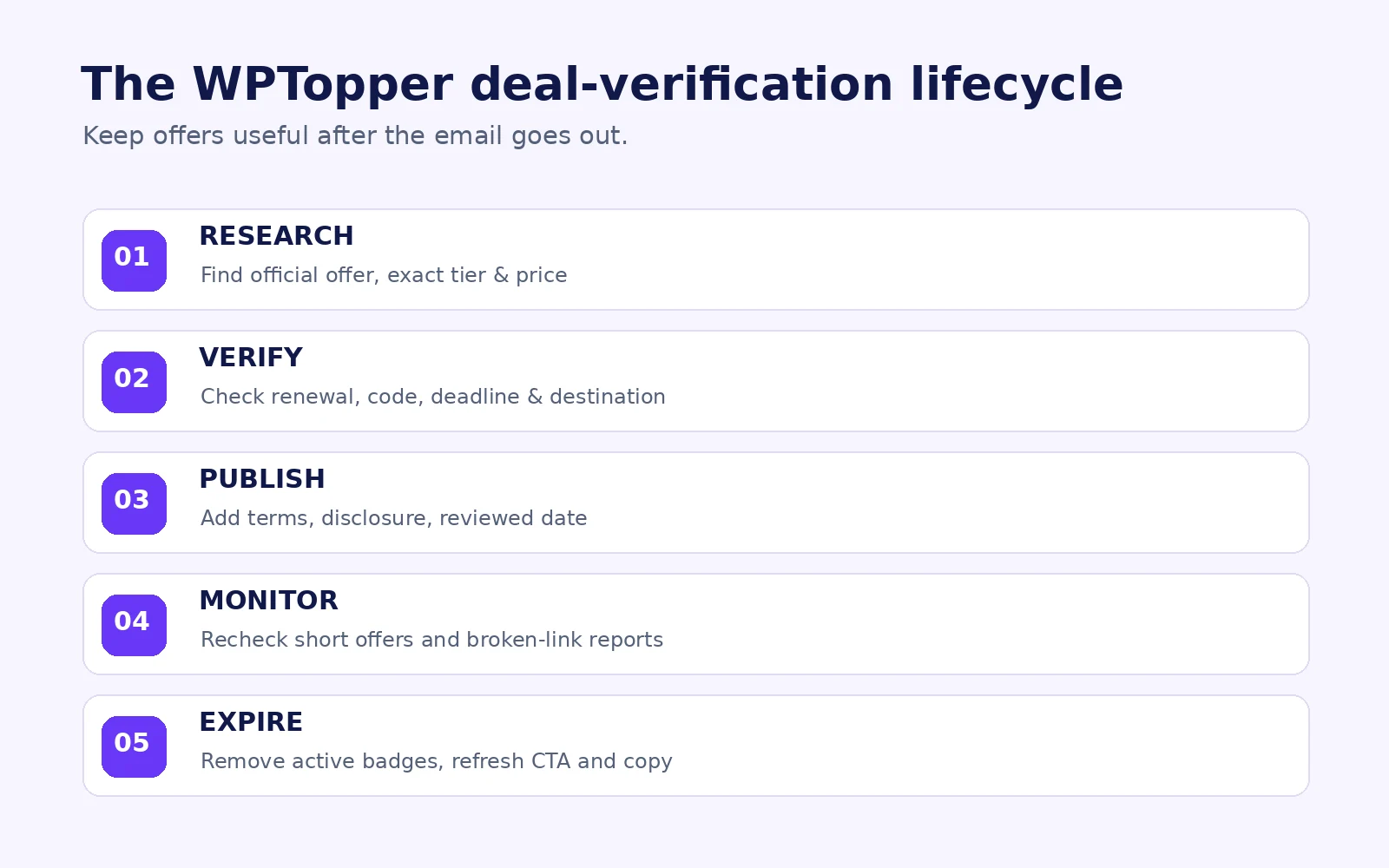
A vendor knows when its campaign changes; a deals directory often learns later. That gap needs a process. The site shouldn’t keep displaying “Black Friday live” just because last November’s article still receives search traffic.
For every WPTopper deal listing, record a status: Verified active, vendor-confirmed but not checkout-tested, expired, or unverified. Make each label mean something consistent. A vendor marketing page is evidence of an advertised offer, not proof that every customer can successfully redeem it.
A practical maintenance rhythm:
- Before publication: confirm the exact product tier, current price, redemption method, expiry, renewal, and destination.
- At launch: click the real button from the published page, including on mobile, and compare what appears at checkout.
- During a short promotion: recheck the vendor page and available terms when significant changes are reported.
- At expiration: remove ‘active’ labels, update buttons and structured data where relevant, and leave explanatory history only when useful.
- After a report: give readers an obvious way to flag a broken code or outdated deal; investigate before restoring a verified label.
Keep a record of when and how each offer was checked. That is considerably more trustworthy than a vague “100% verified deals” banner without evidence.
Don’t use structured data to preserve an expired bargain
Google documents sale start and end dates in merchant product structured data, including validFrom and priceValidUntil in applicable contexts. But not every deal blog is a merchant page: pages where people only read about products and leave to buy from another seller shouldn’t pretend that WPTopper is the merchant solely to pursue shopping features. Use schema appropriate to what the page actually is, and make sure any visible price and metadata agree.
For this educational article, Article/BlogPosting metadata and normal breadcrumbs are a more appropriate starting point than an invented product offer or rating.
Image placement: Visual B, “WPTopper offer verification lifecycle,” after this section.
8. How to write urgency and savings copy without sounding timid
Some marketers treat accurate terms as conversion killers. The opposite is often true in practice: uncertainty creates questions right at the moment someone wants to buy. Clear copy makes the value easier to recognize.
| Risky wording | Clearer alternative | What must be verified |
|---|---|---|
| “Biggest sale ever!” | “25% off the eligible annual plan through November 30” | Historical comparison or remove superlative; offer and deadline |
| “60% OFF WordPress plugin!” | “Save 60% on the specified entry-level plan; other tiers vary” | Which license gets the top rate |
| “Only 2 left!” | “Limited to 100 eligible redemptions” | Actual redemption limit and counting rules |
| “Price doubles at midnight” | “Introductory price ends at the published deadline” | Actual next price and cutoff |
| “Everything included” | “Includes updates and support during the active subscription” | Actual entitlement and exclusions |
| “Guaranteed best price” | “Check today’s price and renewal terms” | Any market-wide price guarantee would need substantiation |
These alternatives aren’t templates to paste blindly. They show a pattern: say what, for whom, until when, and under which terms. A straightforward promise is more valuable than a theatrical promise customers have to investigate.
9. The 15-minute honesty audit before publishing a deal
Use this audit on a real listing before writing the announcement email or scheduling an Instagram post.
Minutes 0–3: Verify the money. Open the vendor’s official page. Confirm product, license tier, currency, price today, legitimate comparison price, and percentage calculation. Screenshot the actual source or keep a dated record.
Minutes 3–5: Check the future. Record renewal amount and frequency, site limits, updates, support, optional add-ons, and whether the promotion is initial-term-only.
Minutes 5–8: Test the offer. Follow the CTA, apply the advertised code in a permitted checkout path if available, and inspect exclusions. Do not complete a real financial transaction without authorization. If you cannot test checkout, mark the limitation explicitly.
Minutes 8–10: Inspect urgency. Confirm the deadline, timezone, coupon schedule, and any claimed stock or redemption limit. Check that the timer is tied to a genuine event.
Minutes 10–12: Review relationships. Put clear affiliate or sponsorship disclosures near the recommendation. Confirm external links carry the appropriate rel attributes without nofollowing internal WPTopper links.
Minutes 12–15: Check publication hygiene. Look at mobile pricing and CTAs, update the last-verified field, plan an expiry check, confirm relevant internal links, and remove any unsupported review rating or product markup.
When one critical field is still unknown, the right action is not always to delete the listing. You can publish useful product context with an honest “Offer not independently verified” label. What you cannot do is call the unverified saving guaranteed.
10. What to do when a deal turns out to be wrong
Mistakes are inevitable in a changing software market. The response is what readers remember.
First, stop repeating the incorrect claim. Pause scheduled email and social messages if they point to it. Correct the visible offer on WPTopper and remove ‘active’ labels. If a reader reported the problem, thank them and give a practical current alternative rather than asking them to keep trying an expired code.
Second, document the issue. Was the reference price wrong? Did the vendor change a license? Did the coupon expire in a different timezone? Did an affiliate redirect remove the discount parameter? Each cause has a different fix.
Third, retest before restoring the claim. A vendor saying “fixed” is a useful update, but where possible the editor should confirm the buyer path. Keep an audit note and timestamp; don’t quietly mark it as verified without evidence.
Finally, learn from the failure. If most complaints involve renewal surprises, redesign the renewal field. If links often stop applying codes, check the URL handler and redirects. If expired deals linger, make expiration cleanup a standard publishing task rather than a reminder in someone’s inbox.
An honest discount can still be a strong offer
A discount doesn’t need a fake emergency or an inflated original price to get attention. It needs to answer a useful question: Will this product solve my problem at a price and set of terms I’m happy to accept?
For merchants, that means pricing history, real deadlines, accurate product eligibility, and a checkout that keeps the promise. For a deals publisher, it means verified listings, relevant CTAs, honest disclosures, and the willingness to say when an offer could not be confirmed.
WPTopper’s related guides help with the next steps: What Every WordPress Deals Page Should Show Before Someone Clicks Buy, Before You Share a Coupon Code, Make Sure These Rules Are in Place, How to Create Coupon Codes in WordPress Using WooCommerce and FluentCart, and Your WordPress Black Friday Campaign Should Start Before Black Friday.
When you’re ready to compare real tools, explore the WordPress products and deals on WPTopper. Check each vendor’s current pricing and licensing before buying. A good deal holds up after you read the fine print.
Frequently asked questions
Are countdown timers illegal on WordPress websites?
A countdown isn’t automatically unlawful. A genuine deadline can help shoppers. A timer that resets, invents urgency, or makes a misleading time-limited claim can create consumer-protection problems, depending on the jurisdiction and circumstances. Tie the display to the real offer deadline and update the page when the promotion changes.
Can a software company advertise a 50% discount if the original price was never charged?
That depends on what comparison is being made and the applicable law. Calling a fictitious price the company’s bona fide former price is precisely the type of practice the FTC’s former-price guidance cautions against. A legitimate comparison to an MSRP or another product requires distinct, accurate labeling and appropriate substantiation; it shouldn’t masquerade as the company’s own former price.
Does the EU’s 30-day reference-price rule apply to every WordPress plugin subscription?
Don’t assume so. The Price Indication Directive’s Article 6a framework concerns price-reduction announcements for goods, with scope questions and national implementation details. Digital content or services may raise different legal questions. Seek jurisdiction-specific advice instead of applying one short rule to every subscription or license.
Should a WordPress deal page display renewal prices?
Yes, when the offer involves recurring payments. A buyer should be able to see the initial price, renewal amount or the basis on which it is determined, billing interval, and material conditions before they decide. For editorial directories, use verified vendor terms and identify who actually handles checkout.
Are expired coupons worth keeping on WPTopper?
Historical information can be useful when clearly labeled. Remove any suggestion that an expired code still works, correct time-sensitive CTAs, and direct readers to verified current pricing. Keeping a factual archived promotion is different from advertising it as active.
Does rel="nofollow" count as an affiliate disclosure?
No. A nofollow or sponsored link attribute communicates information to search engines. Affiliate disclosure explains a financial connection to human readers. Under WPTopper policy, external links carry nofollow, compensated external links carry sponsored nofollow, and visible disclosure appears near the recommendation.
Sources and further reading
- FTC, Guides Against Deceptive Pricing: Former Price Comparisons (16 CFR §233.1)
- FTC, Bringing Dark Patterns to Light (2022)
- FTC, Endorsement Guides: What People Are Asking
- European Commission, EU check reveals misleading sales practices online (March 26, 2026)
- European Commission, Price Indication Directive and its guidance
- EUR-Lex, Guidance on Article 6a of the Price Indication Directive
- WooCommerce, Managing Coupons
- FluentCart, Adding Coupons
- Google Search Central, Qualify Outbound Links
- Google Search Central, Merchant Listing Structured Data
Research note: All example prices, coupons, and brands are fictional. This article explains general marketing and compliance considerations and is not legal advice. Statements about platform features are documentation-based, not hands-on tests of the currently installed WordPress versions.
For the offer behind this workflow, review WordPress discount strategy, choosing a sustainable discount, coupon codes, price cuts, and bundles.



Leave a Reply