
You’re about to buy a WordPress plugin. The license costs $99, the features check out, and you’re ready to pay. Then you notice a little box asking for a coupon code.
Did you miss a sale? Is everyone else getting a better price? You open another tab, search for a code, try two that have expired, and forget why you were buying the plugin in the first place.
Now picture the same checkout with a different message: “October offer applied: save $20.” The final amount is clear, and there’s nothing to copy, paste, or guess.
It’s tempting to declare automatic discounts the winner. Often they’re the friendlier experience. But that answer misses an important part of the decision. A private coupon can protect a partner offer, a loyalty benefit, or an upgrade campaign. Automatically discounting everyone may simply lower the price for customers who would have paid full price. The better checkout is the one that makes the promised offer easy to receive without creating a pricing problem behind the scenes.
This guide explains the difference, shows what WooCommerce and FluentCart actually support, and gives you a test plan for deciding which method works in your store. We will not invent a conversion uplift or claim these examples came from live WPTopper experiments.
Key Takeaways (TL;DR)
- An exposed coupon field can interrupt a ready-to-buy shopper by prompting a search for a better code.
- Public, broadly eligible offers often suit visible sale prices or tested automatic application; private offers may need codes or links.
- Don’t assume WooCommerce core automatically applies coupons; confirm each platform’s supported checkout behavior.
- Compare completion rate and contribution per eligible visitor in a controlled test, not conversion rate alone.
Quick answer: which should you use?
For public offers that every eligible shopper should receive, an automatic discount or clearly applied promotional price is usually the cleaner experience. For private, partner-specific, and audience-limited offers, a coupon code or a validated coupon link can give you more control. In either case, show the final price and renewal terms before payment. If you’re unsure, compare both approaches with a controlled experiment and measure profit as well as completed orders.
| Situation | A reasonable starting choice | Why |
|---|---|---|
| Sitewide seasonal sale | Automatic eligible discount or clear sale price | No scavenger hunt for a public code |
| Partner newsletter with a private benefit | Restricted code or unique coupon link | Preserves eligibility and attribution |
| Existing-customer upgrade offer | Account-aware offer or restricted coupon | Needs a reliable eligibility check |
| Cart recovery message | Targeted link when a discount is justified | Avoids handing every visitor the same incentive |
| Limited-use goodwill credit | Unique code or account credit | Explicit boundaries and auditability |
| Subscription introductory offer | Either method, but with verified renewal logic | The second charge matters as much as the first |
Why a harmless-looking coupon field can interrupt a purchase
An empty field doesn’t look like much. But it asks the shopper to make a decision that may have nothing to do with the product: Do I need a code to avoid overpaying?
The Baymard Institute's checkout research gives this problem a concrete basis. In its 2024 analysis, Baymard reported that promotional code fields appeared on 70% of benchmarked sites and that 35% of sites with those fields showed them by default. In usability sessions, some participants left checkout to search for discounts. Those numbers describe the researched sample, not the percentage of WPTopper buyers who abandon carts.
Baymard recommends keeping promo-code inputs behind a link so buyers who have a code can still find them, while other shoppers aren’t distracted by an unnecessary task. It also suggests applying eligible discounts automatically when appropriate.
That last clause matters. Automatic doesn’t have to mean public. A signed-in customer’s eligible reward might be applied automatically after the system verifies their account. A private marketing link might prefill a coupon. A visible sale price might require no coupon object at all. These are different implementation choices that lead to a similar outcome for the shopper: less work.
What buyers want isn’t always “the biggest discount”
A smooth checkout answers simple questions immediately. What’s the regular amount? What am I paying today? Why did the price change? Is shipping or tax included? Will I be charged the same price when the subscription renews?
A discount that appears mysteriously, disappears when the shopper changes a variation, or quietly applies only to year one can create as much confusion as an empty coupon field. Automating the coupon is useful only if the order summary remains understandable.
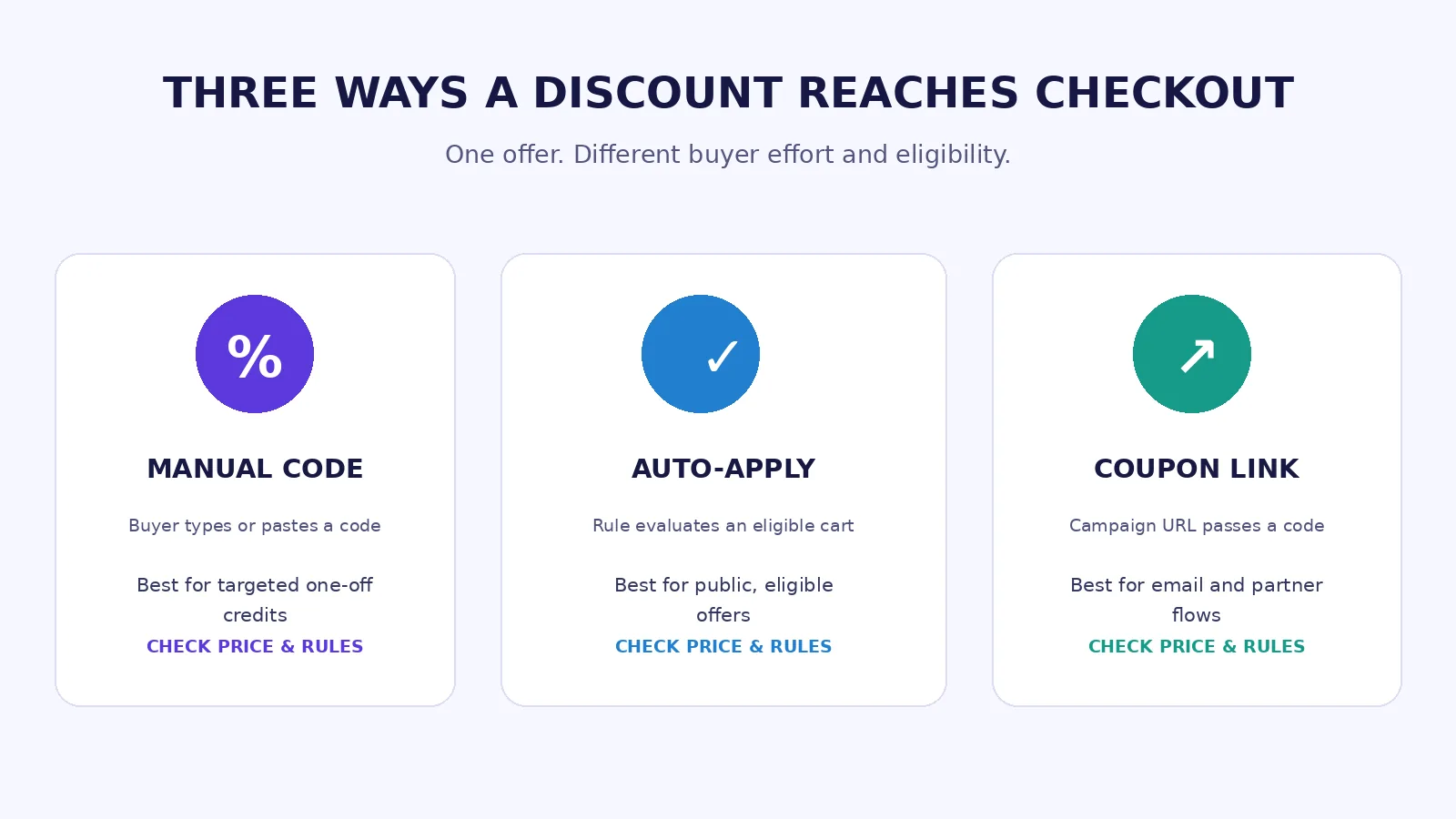
Four things people call “automatic discounts”
Before choosing a plugin, make sure everyone on the team is talking about the same mechanism.
1. A direct sale price
The product or pricing page shows a lower price during a defined sale period. Shoppers see the promotional amount without supplying a code. This can be the simplest presentation for a genuinely public campaign, but implementation and historical-price requirements vary by product setup and selling region. Keep the former-price claim truthful.
2. A coupon applied by checkout rules
The commerce system evaluates a cart, recognizes eligible products or customers, and applies an existing coupon automatically. This preserves coupon-level restrictions and reporting, but usually requires a plugin feature or extension. It’s not identical to manually changing the product’s sale price.
3. A coupon applied by a link
The shopper clicks a link from an email or relevant landing page. The link carries or triggers the coupon, so they arrive with the offer already associated with checkout. That can be ideal for a private campaign, provided expiry, eligibility, and product rules still apply. A forwarded URL isn’t inherently identity verification.
4. A code entered manually
The customer types or pastes a code and confirms it. Manual entry is not broken design. It still makes sense for a customer-service credit, a partner offer, a gift, or a code given outside your website. The design job is to make the input discoverable without demanding everyone’s attention.
If your checkout supports several of these approaches, establish a clear precedence rule. An automatically applied public offer should not unexpectedly stack with a private coupon unless you explicitly intended that combination.
What WooCommerce actually supports
There are two easy-to-confuse statements about WooCommerce. WooCommerce core can create and validate coupons. WooCommerce core does not, by itself, automatically apply those coupons at checkout. Its official coupon management documentation says shoppers must add the code in the cart or at checkout.
That distinction matters when writing tutorials or promising “one-click” promotions. Simply creating SAVE20 in Marketing → Coupons does not magically apply the coupon to everybody.
Option A: keep standard coupons and improve the field
If you don’t need automatic application, use core WooCommerce coupon restrictions and keep the promotional field behind a clear “Have a coupon?” link when your checkout design supports that presentation. Place the actual code in the email, and test that customers can enter it on mobile. Review how your theme, Cart and Checkout Blocks, and any checkout extensions expose the input before editing templates.
Option B: use WooCommerce Smart Coupons for auto-apply
The official Smart Coupons extension documentation describes an Auto apply? option on the coupon editor. With the extension installed, the store owner checks the Smart Coupons settings, creates or edits the coupon, enables auto-apply, specifies restrictions, and publishes the offer. The extension applies an eligible coupon when products are in the cart and evaluates its restrictions and limits.
That is extension behavior, not a hidden setting in WooCommerce core. Smart Coupons also documents coupon URLs, which let marketing links apply eligible codes without manual copying. The extension carries its own compatibility and maintenance considerations. Avoid recommending that merchants edit database options for auto-apply unless a qualified developer has reviewed that need and backup procedures.
Option C: build a focused customization
WooCommerce engineering published a July 2026 account of replacing a larger coupon extension on WooCommerce.com with a much smaller custom plugin. The lesson is not “every store should copy that code.” It’s that a narrow requirement can sometimes be handled by a carefully reviewed integration with WooCommerce’s existing validation rather than a broad discount engine.
For a small store, a supported extension may still be the better maintenance choice. Consider the expected scale, existing extensions, test capacity, and who will own the code after launch.
What FluentCart supports, and what it doesn’t
FluentCart Pro documents coupon creation, eligibility restrictions, scheduled promotions, per-user limits, and stacking rules. It also provides a method for passing coupon codes in supported instant-checkout links. The official Adding Coupons documentation includes a coupons URL parameter alongside the product-variation ID.
For example, the following is a fictional example of a coupon-bearing URL, not a live WPTopper offer:
https://example.com/?fluent-cart=instant_checkout&item_id=209&quantity=1&coupons=SAVE20
In that URL, item_id must be a genuine product-variation ID from the store, and SAVE20 must be a valid configured coupon. FluentCart documents that this URL method does not work with its modal checkout. It also explains that rejected coupons still undergo normal validity checks. The shopper may see a notice, rather than getting an incorrect discount.
A link that pre-applies a coupon is not the same thing as a universal automatic-discount rule. Do not claim FluentCart automatically discounts all eligible carts without code entry unless you’ve verified a separate relevant feature or implementation. This article’s recommendations are based on documentation, not a live test of every FluentCart version or checkout layout.
A practical email flow using FluentCart
Imagine you have a paid newsletter partnership promoting a WordPress plugin. You create a coupon restricted to the eligible product, set the start and expiry dates, decide whether it stacks with other codes, and generate an instant-checkout URL with the code. The email button says something simple, such as “Claim your eligible offer.”
Before sending, test the link in a private browser session, with the correct product variation. Then test it after expiry, with the wrong product, and with an ineligible customer state if restrictions depend on email. A code in the URL should never bypass the intended conditions.
One offer, three different buyer experiences
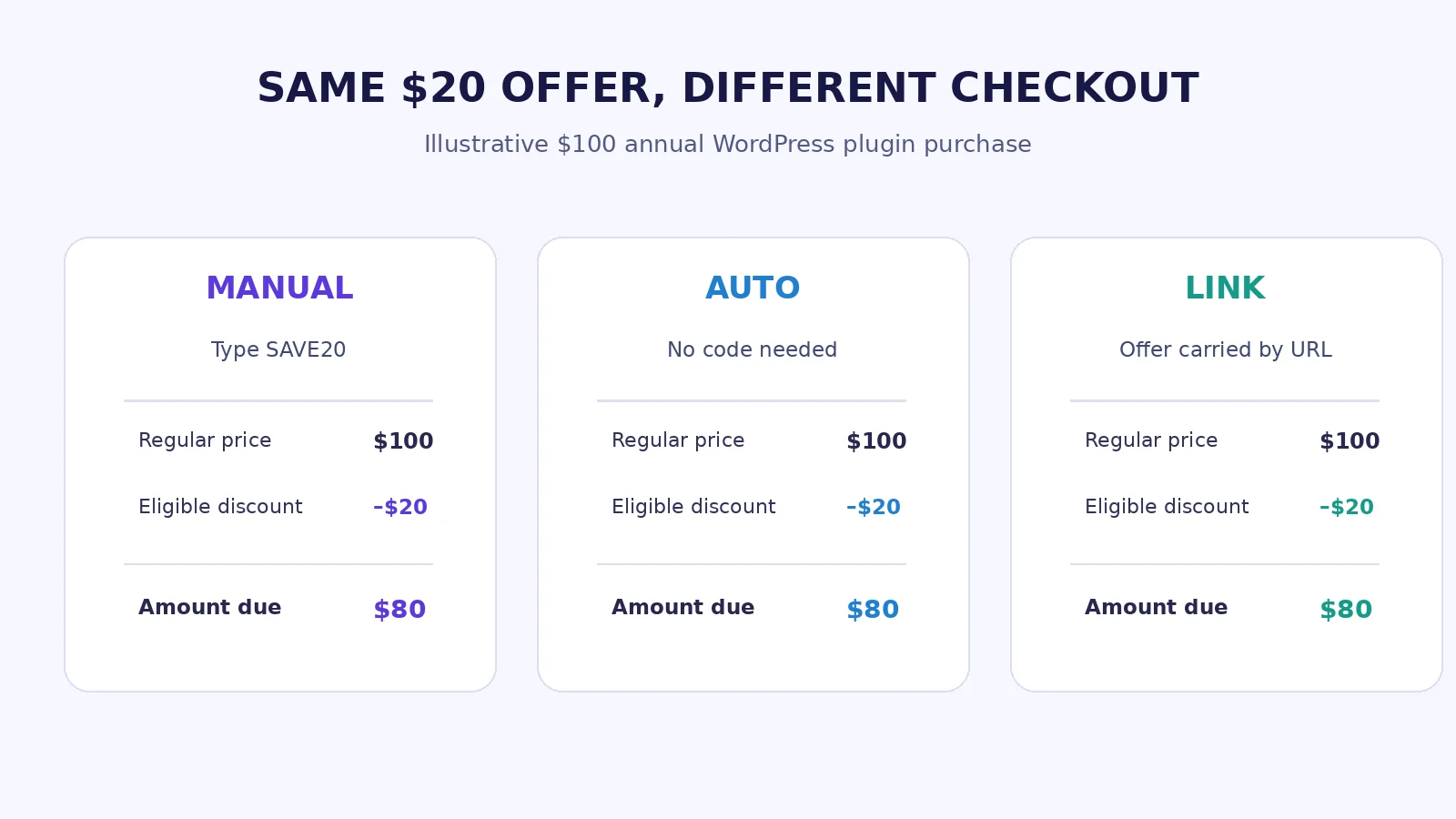
Take a fictitious $100 annual plugin license with a public 20% introductory offer. The intended first payment is $80; renewals are at the clearly stated regular rate.
Experience A: manual code. The product page says “Save 20% with OCT20.” Checkout shows $100 until the buyer enters OCT20 and selects Apply. Buyers who remember the code pay $80. Others might miss it or leave to look for alternatives.
Experience B: automatic coupon. The eligible buyer reaches checkout and sees a $20 discount line automatically. The $80 total is visible without a separate action. The order can still record which discount was applied, subject to the platform’s reporting setup.
Experience C: instant coupon link. The buyer clicks a campaign link and reaches a checkout that has already attempted to apply OCT20. If the coupon fails restrictions, the system should make that understandable. If it succeeds, the buyer sees $80.
In all three cases, the underlying discount amount is identical. The customer effort, eligibility, and attribution can be different. That’s why copying another site’s 20% campaign says almost nothing about which checkout treatment you should use.
The catch: easier checkout isn’t the same as more profit
Suppose your store would otherwise complete 100 sales at $100. A $20 public offer that automatically applies to every order costs $2,000 in gross discount value across those 100 orders. If the campaign doesn’t create additional eligible purchases, you’ve simply collected less revenue. Of course, some discounts can attract customers who wouldn’t have purchased; the point is to measure those extra orders, not assume them.
A manual coupon offers some control over distribution and redemption, but don’t build a strategy around shoppers failing to redeem a discount they were promised. If marketing says “20% off for everyone,” requiring secret knowledge at checkout is poor customer treatment. A better way to protect margin is to narrow eligibility openly, set an appropriate discount, or choose a different offer.
Think in two separate layers: the pricing decision (who gets how much) and the application experience (how the eligible shopper receives it). The pricing decision belongs in your discount-strategy and coupon-restriction plans; the checkout should faithfully carry out the promise.
For deeper planning, see WPTopper’s companion articles on WordPress discount strategy, choosing a sustainable plugin discount, creating WordPress coupon codes, and coupon restrictions.
When manual codes are genuinely useful
A customer-service credit that isn’t for everyone
A buyer experienced a problem, and support issues them a unique code. There’s no reason for the store to lower everyone else’s price. Give the affected customer simple instructions and a clear expiration or use policy. If the account is authenticated and the system supports applying the credit automatically, that may be even easier.
A partner campaign that needs controlled access
A newsletter author sends readers a dedicated offer. A restricted code or validated coupon URL can help with campaign attribution, but it should not be mistaken for identity verification. If the offer is intended only for partner subscribers, build real access controls rather than assuming an unguessable URL is sufficient.
A store-credit or loyalty situation
Not every credit behaves like a general-purpose percentage coupon. Smart Coupons, for example, documents limits on which credit-like offers can auto-apply. Verify store-credit behavior separately instead of copying ordinary coupon configuration into a more sensitive financial workflow.
An in-person event or printed promotion
Someone scans a QR code from a WordCamp flyer or receives a code during a workshop. Here, a code can give the campaign a recognizable identity. A validated link is still worth offering alongside the text code so mobile users don’t need to retype it.
When automatic application is worth prioritizing
A public Black Friday offer is the obvious example. If every eligible buyer gets the same deal, a code gate adds work without meaningfully protecting eligibility. Applying the discount on eligible items, or showing the correct promotional sale price, makes the promise easier to understand.
Another case is an earned account-level discount: if the store can reliably identify an existing customer who qualifies for a specific upgrade, the discount can appear after authentication. That lets the shopper see the relevant price without hunting through an old email. But verify how an account rule behaves with guest checkout and shared devices.
A third case is multi-item shopping. If a customer adds two products and the promotion applies to only one, an automatic system can clearly show the eligible line-item discount. The platform must still handle quantities, exclusions, taxes, and subscription renewals correctly.
The right checkout design for both approaches
The best UI isn’t necessarily the one with the most discount-related widgets. Keep the form focused on finishing the purchase.
Show the final total before asking for payment. Separate subtotal, eligible discount, taxes, shipping, and the total when those charges apply. Baymard’s payment UX guidance emphasizes that shoppers need clarity about the complete amount before payment details.
Use plain-language discount labels. “October offer applied: −$20” explains more than rule_7391. If a private offer is unavailable, a human-readable reason is better than a generic “invalid.” Avoid revealing sensitive account information in error messages.
Let buyers with a code use it. A collapsed but discoverable “Have a coupon?” link lets people apply legitimate offers without distracting those who don’t have one. Check keyboard navigation, focus states, touch target sizes, and screen-reader labeling.
Don’t let the amount jump without explanation. When a buyer removes a qualifying product, explain why the discount disappeared. If a user switches license tiers, refresh the total predictably. If a subscription renews at the regular rate, show that future amount near the purchase decision.
Keep promotional promises consistent. The landing page, email, cart, checkout, order confirmation, and WPTopper deal listing must describe the same eligibility and expiry rules. The checkout is where mismatched copy becomes a support ticket.
How to A/B test manual codes against automatic application
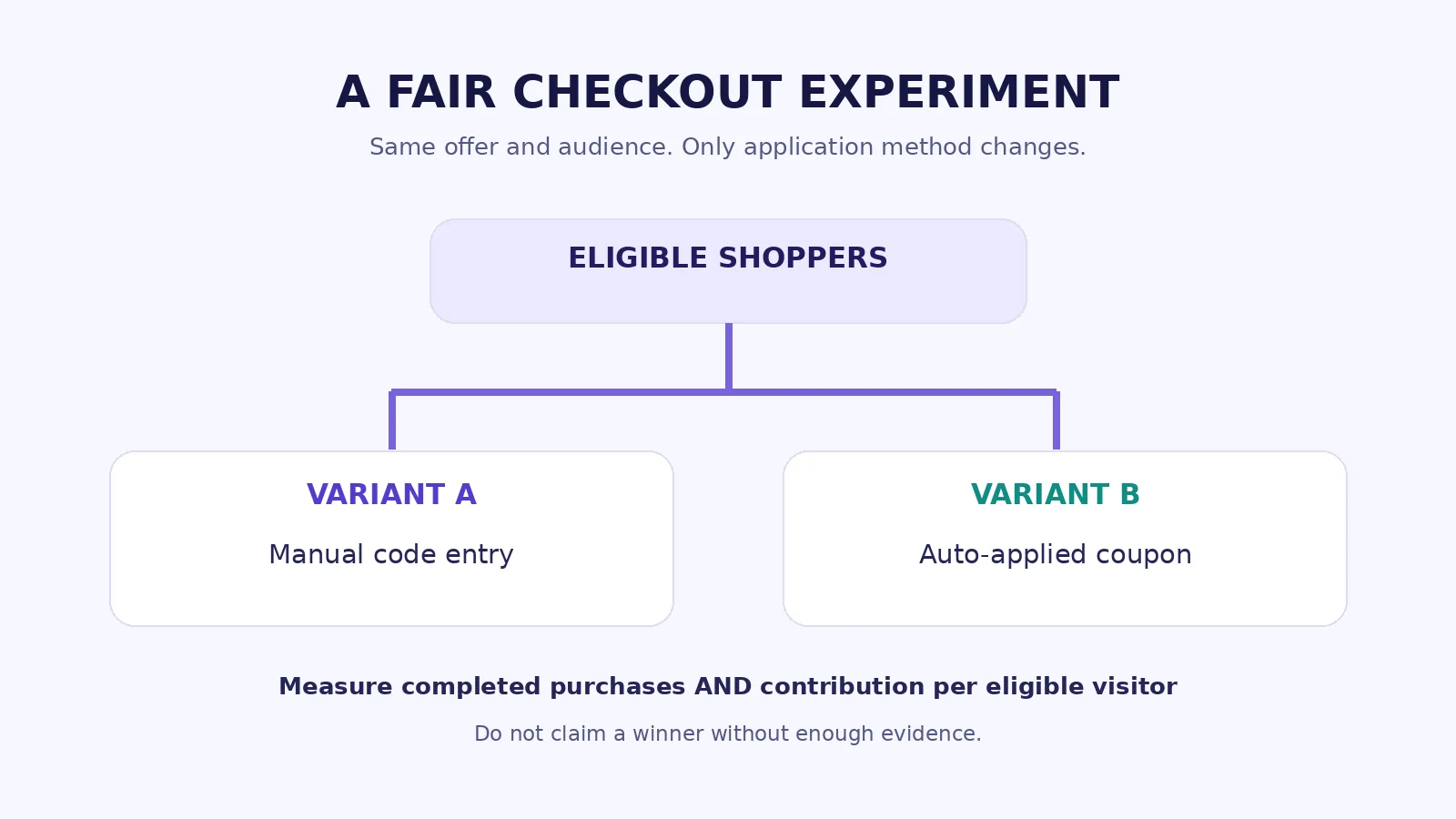
A test should answer one question, not change five things at once. For example: For eligible shoppers offered the same 20% first-purchase incentive, does removing manual code entry increase completed purchases enough to improve total contribution?
Step 1: hold the actual offer constant
Use the same discount amount, product eligibility, landing-page promise, time window, tax treatment, and renewal terms in both groups. In the manual variant, eligible visitors enter the provided code. In the automatic variant, the identical offer is already applied. If one group gets a larger discount, you’ve stopped testing application friction and started testing pricing.
Step 2: randomize before checkout friction starts
Assign eligible visitors to variants before they encounter the code field. Preserve the assignment during the session and ideally across return visits, subject to privacy rules. Avoid comparing Monday’s manual checkout with Friday’s automatic checkout; advertising mix, traffic source, product availability, and seasonal demand may all change.
Step 3: measure from the same denominator
Use completed eligible purchases / eligible exposed sessions as the primary conversion rate. Don’t divide one variant by all store sessions and the other by only shoppers who entered a code. Record checkout starts, coupon-search departures where measurable, error rates, mobile versus desktop, and support tickets. Identity and privacy restrictions may limit what can be observed.
Step 4: include the business guardrail
Report net revenue and estimated contribution per eligible visitor, not merely conversion. Review the distribution of order values, discount totals, refunds, and any additional extension or development cost. A higher conversion rate with much less contribution can still be a bad commercial decision.
Step 5: do not invent statistical certainty
Predefine a minimum detectable effect and sufficient sample size. Run the test long enough to cover a meaningful mix of days and campaigns. If you have a low-volume WordPress plugin store, the experiment may stay inconclusive for weeks. In that case, use usability sessions, error logs, and support feedback to improve the design without claiming an unproven conversion lift.
Illustrative example, not a result: If 1,000 eligible sessions generate 60 purchases with manual coupons (6%) and 70 with auto-apply (7%), the observed difference is one percentage point. This isn’t enough on its own to declare the automatic version a winner. You would need to examine randomness, sample size, the revenue and contribution earned by each group, and whether the difference persists.
How to track promotions without mixing up the numbers
Google Analytics 4 supports event-level and item-level coupon parameters. Its official event-parameter documentation treats those scopes separately. The order-coupons report guidance describes using the event-level coupon parameter with an online-sales event.
Useful fields for a practical reporting sheet include traffic source, campaign ID, variant assignment, eligibility, coupon applied, attempted code, final charged amount, order ID, discount amount, refunds, and estimated contribution. Collect only data you need and are authorized to process.
If the automatic version doesn’t use a literal coupon object, you may need a campaign or custom experiment identifier rather than relying solely on the coupon report. Never invent synthetic coupon redemptions to force a cleaner chart. Reconcile analytics figures with actual payment and store-order records before drawing commercial conclusions.
A good post-test report should tell the reader what changed, what the evidence shows, what remains uncertain, and whether the result is worth shipping broadly.
A pre-launch checklist for WordPress checkout discounts
Before announcing an offer, try these real test scenarios in staging or a controlled test environment:
- Eligible product and customer. The correct discount and final payment appear.
- Ineligible product or license tier. The discount does not leak to excluded items.
- Mixed cart. Only qualifying items receive the promised reduction.
- Manual code on mobile. The input is discoverable, usable, and displays helpful feedback.
- Auto-apply trigger. The discount appears when eligibility is met and disappears correctly when it isn’t.
- Promotional URL. A copied link works in a private session and fails safely for expired or invalid codes.
- Two discounts. Stacking and priority match the campaign terms.
- Expired or exhausted coupon. The error is understandable and the customer isn’t silently overcharged.
- Taxes, shipping, and currency. The final total matches the actual charge, including applicable extra costs.
- Subscription checkout and renewal. Today’s price and next renewal are correct and clearly explained.
- Guest and signed-in customers. Personalization rules do not expose a private offer to the wrong audience.
- Theme, blocks, caching, and other extensions. A checkout update or performance plugin doesn’t cause stale discount calculations.
Capture the test result, store and plugin versions, screenshots, and expected versus actual price. Neither an “Active” label in the coupon editor nor a polished promotional banner is proof of successful checkout behavior.
Three mistakes we’d avoid on a WordPress deals site
Promising a live coupon that nobody verified. Deal directories can help shoppers compare offers, but a copied code from an old campaign isn’t a verified saving. On WPTopper, a deal listing should state the actual eligible product, offer terms, expiry where available, and whether a code is required. If we cannot verify it, we shouldn’t call it active.
Sending users to a discounted price that disappears at checkout. A call-to-action such as “Get the deal” should lead to the relevant product or verified deal page, with the offer still visible or clearly explained. Avoid routing through an unrelated generic offer page just to capture a click.
Letting sales language hide renewal terms. A plugin may be $79 today and a different amount next year. That is not inherently bad, but it must be clearly communicated. For a reader evaluating WordPress tools, the renewal price and license rights are part of the deal.
If you are comparing tools for a real project, explore WordPress products and offers on WPTopper. Check the current offer before purchasing; the best discount is one attached to software you’ll actually use.
The decision to make before your next campaign
If the discount is public, eligible, and truly available to everyone in the advertised audience, don’t make customers solve a puzzle to receive it. Apply it automatically when the platform supports doing so safely, or show the honest sale price up front.
If the offer is private or conditional, keep the restriction and make redemption painless with a code, a validated link, or an account-aware discount. A manual field still has a place; it just shouldn’t become a distracting task for every shopper.
Most important, measure the outcome beyond clicks and redemptions. A trustworthy price, a clear checkout, and an affordable offer are three parts of the same customer experience.
Frequently asked questions
Are automatic discounts always better than coupon codes?
No. They can remove friction for eligible buyers, especially during public sales, but a private, unique, or account-based offer may require a restricted code or verified link. An automatically applied promotion can also reduce revenue from customers who would have paid full price, so measure the financial result.
Does WooCommerce automatically apply coupon codes without an extension?
Not with its documented core coupon workflow. WooCommerce core supports creating, restricting, and validating coupons, while automatic application requires an appropriate extension or tested customization. The WooCommerce Smart Coupons extension documents an Auto apply feature.
Can FluentCart auto-apply coupons from a URL?
FluentCart documents coupon parameters in instant-checkout links. The link attempts to apply an eligible existing coupon, but it doesn’t bypass coupon restrictions. The documented method is unavailable in modal checkout. A coupon URL is not the same as a storewide automatic application rule.
Should I remove the coupon field from checkout?
Usually not entirely. If customers legitimately receive discount codes, they need a way to redeem them. Consider keeping the field behind a clear link and automatically applying public offers when appropriate. Test the exact layout with keyboard, screen reader, mobile, and guest checkout flows.
How can I tell whether auto-apply improves conversions?
Run a controlled experiment where both groups receive the same offer and eligibility rules but use different application experiences. Track completed purchases per eligible exposed visitor, checkout errors, net contribution, and refunds. Treat small differences as uncertain until the test has enough observations.
Can automatic discounts apply to subscription renewals?
That depends on the coupon type, subscription extension, and configured billing rules. Verify the first charge and renewal separately; don’t assume a public offer applies to every billing cycle. Disclose the renewal amount before payment.
Sources and further reading
- Baymard Institute: Checkout Optimization, 5 Ways to Minimize Form Fields — https://baymard.com/research-articles/checkout-flow-average-form-fields
- Baymard Institute: Payment UX Standards — https://baymard.com/blog/payment-ux
- WooCommerce: Managing Coupons — https://woocommerce.com/document/coupon-management/
- WooCommerce: Smart Coupons Auto Apply — https://woocommerce.com/document/smart-coupons/how-to-auto-apply-coupon/
- WooCommerce Developer Blog: Auto-apply coupon engineering (July 2026) — https://developer.woocommerce.com/2026/07/01/auto-apply-coupons/
- FluentCart: Adding Coupons and Instant Checkout URLs — https://docs.fluentcart.com/guide/marketing-sales-tools/creating-managing-coupons/adding-coupons/
- Google Analytics Help: Ecommerce Coupon Parameters — https://support.google.com/analytics/table/13594742?hl=en
- Google Analytics Help: Order Coupons Report — https://support.google.com/analytics/answer/12931362?hl=en
Research note: The numerical examples in this article are illustrative and are not actual tests or conversion rates from WPTopper, WooCommerce, or FluentCart. Platform behavior is based on vendor documentation and must be verified on the installed versions before publishing interface screenshots or implementation guarantees.



Leave a Reply