
A WordPress business can have a genuinely good Black Friday offer and still send an email nobody wants to read.
The usual problem isn’t the discount. It’s the message. One email says “BIGGEST SALE EVER.” The next says “HURRY.” Then comes “LAST CHANCE,” followed by another last chance. Meanwhile, the subscriber still doesn’t know whether the plugin works with their website, which license qualifies, or what they’ll pay when the subscription renews.
Your inbox is a crowded place in November. The useful question is not How do we make our discount sound louder? It’s What does this person need to know to make a good buying decision?
This guide shows how to plan a Black Friday email campaign for WordPress plugins, themes, hosting, memberships, and WooCommerce stores. You’ll get a practical sequence, segmentation decisions, sample messages, deliverability checks, measurement methods, and the mistakes worth catching before Send. The examples are templates, not live WPTopper offers, and the performance figures are illustrative rather than results of a real campaign.
Key Takeaways (TL;DR)
- Give each Black Friday email a distinct job: early access, launch, relevant reminder, truthful last call, or post-sale help.
- Segment prospects, existing customers, agencies, and recent buyers instead of sending the same offer to everyone.
- Write specific, useful subject lines and make product, license, price, and deadline claims match the checkout.
- Check sender authentication, marketing consent, unsubscribe handling, and tracking; judge performance beyond opens and clicks.
The quick answer: one campaign, five different jobs
A good holiday email sequence doesn’t send the same message five times. Each contact has a job: explain why the product matters, establish who gets the offer, make claiming it simple, answer a real objection, and close a real deadline. After purchase, the job changes again: help the buyer succeed.
| Reader’s question | What the email should do | Suggested moment | |
|---|---|---|---|
| Useful preview | Is this relevant to me? | Show the problem, use case, and coming opportunity | 2–3 weeks before the sale |
| Early access | Am I eligible, and why? | Explain genuine early access to a defined audience | Several days before public launch |
| Launch | What’s the price and how do I get it? | State offer, license, renewal, deadline, one CTA | Actual campaign opening |
| Helpful reminder | Will this work for my project? | Answer compatibility, license, setup, and support questions | During the active sale |
| True last call | When does the offer actually end? | Repeat accurate conditions and a real cutoff | Near actual expiry |
| Post-purchase (conditional) | What do I do now? | Onboard buyers, don’t keep selling them the product | After purchase |
These are campaign roles, not a quota. Some audiences only need two emails; a new prospect may benefit from a genuinely useful explanation before an offer. Someone who purchased should not receive all the remaining sales messages.
Before writing, decide what the campaign is allowed to promise
Your email copy can only be as reliable as the offer behind it. Build a one-page offer sheet before drafting subject lines. Include the exact product and license tier, current price, genuine comparison price, savings amount, start and end time with time zone, eligible audience, coupon instructions, renewal amount, refund terms, and destination URL. Give the offer one approver who can answer questions across marketing, checkout, and support.
For example, imagine a fictional plugin that costs $120 per year. You decide to offer its single-site annual license for $90 on the first payment. The email may accurately say “Save $30 (25%) on the first year” only if the $120 reference price is genuine and the checkout is configured accordingly. If renewals cost $120, write that directly beside the $90 price. An email that shouts “$90 per year” would imply something different.
This is the natural next step after WPTopper’s guides on WordPress discount strategy, choosing a sustainable discount amount, coupon rules, checkout experience, and planning a Black Friday campaign. They explain how the offer works; here we focus on how to communicate it.
Segment by the question your buyer needs answered
Most WordPress lists contain people at different stages. Sending one enormous broadcast ignores those differences and often creates avoidable irritation.
Interested prospects who haven’t purchased
These subscribers may need proof that your plugin works with their theme, builder, payment gateway, or hosting setup. Lead with a practical use case and point them to accurate documentation or a short demo. The offer matters, but it isn’t the only reason they hesitate.
Email focus: “Here’s what this helps you do, and how the eligible offer works.” Avoid: unexplained product jargon, an untested “works with everything” claim, and talking as if they already own the product.
Existing customers on smaller licenses
If someone owns the single-site plan, pitching that same plan at a public discount makes the company look inattentive. Offer an upgrade comparison if one exists, show which site limits change, and verify any prorated credit before promising one.
Email focus: “If you’re managing more sites now, here is the upgrade path.” Avoid: “new customer only” promises accidentally sent to paying customers.
Agencies and multi-site buyers
A five-site or unlimited-site license needs an explanation of rights, support scope, transfers, and recurring terms. An agency managing client websites is often weighing risk, not simply price.
Email focus: practical workflow, site limits, support, and current approved license terms. Avoid: equating “unlimited sites” with unrestricted rights to resell licenses or transfer ownership without checking the agreement.
Recent purchasers and active buyers
Suppress recent purchasers from messages encouraging them to buy what they’ve already bought. If your sale starts just after a full-price purchase, have a documented customer-friendly policy rather than improvising a refund or credit promise from marketing.
Email focus: first-use help, product education, and support. Avoid: a “buy now” button for the same SKU.
Inactive contacts
An old address isn’t a standing invitation to increase your sending frequency. Check consent and engagement according to your audience’s applicable rules. A useful preference-update message can be better than five holiday promotions, but it must not circumvent an opt-out.
Email focus: relevance and respectful choice. Avoid: reactivating unsubscribed contacts or purchasing a list to create an instant Black Friday audience.
Five emails worth sending, with copy you can adapt
These examples use the fictional SiteFlow Pro plugin and hypothetical single-site pricing of $120 regular / $90 introductory, with a $120 annual renewal. SiteFlow Pro is a teaching placeholder, not an endorsed or available WPTopper product. Replace every price, deadline, claim, and CTA only after verifying the real offer.
Email 1: The useful preview
Subject: A better way to manage your WordPress workflow
Preheader: One practical use case before our seasonal offer begins.
Body:
If you’ve been piecing together tools to manage your site’s everyday workflow, it’s worth checking whether one simpler setup would do the job.
>
We put together a short walkthrough of how SiteFlow Pro handles your next website task, including what it does well and which setup requirements to check first.
>
We’re also preparing a limited seasonal offer for eligible licenses. We’ll share the exact price and terms when it opens. For now, start with the walkthrough and see if the product fits your site.
>
CTA: See the workflow
Why this works: It gives the reader a reason to pay attention that survives even if they never buy. Don’t “tease” a deal to someone with no interest in the product’s actual purpose.
Email 2: Genuine early access
Subject: Early access to the SiteFlow Pro offer
Preheader: Eligible subscribers can review the plan and terms before public launch.
Body:
You asked to hear about SiteFlow Pro updates, so here are the details before the public announcement.
>
The single-site annual license is available for $90 on the first payment, compared with its genuine regular price of $120. That saves $30 (25%) today. It renews at $120/year under the published terms. Other plans are not included in this example.
>
You can check the license details, supported integrations, and refund policy before deciding. The offer closes at the deadline and timezone shown on the offer page.
>
CTA: Review the eligible offer
Why this works: It makes early access concrete. If everyone can get the same price right now, don’t call the audience “exclusive” without another real benefit.
Email 3: The launch message
Subject: Black Friday: $30 off the SiteFlow Pro single-site plan
Preheader: $90 first year; regular renewal pricing applies.
Body:
The Black Friday offer is live.
>
SiteFlow Pro, single-site annual license: $90 for your first year instead of the regular $120. Save $30 (25%). Renewals are $120/year. The offer applies only to the named license and ends the published deadline.
>
If SiteFlow Pro solves your next website task for your website, you can check the plan and complete purchase on the official product page. No surprise plan changes or mystery coupon required.
>
CTA: View the single-site offer
Why this works: The main price, plan, renewal, and next step arrive before decorative claims. If the store does require a coupon, add the real code and accurate checkout instructions rather than pretending it applies itself.
Email 4: The helpful reminder
Subject: Three questions to ask before buying SiteFlow Pro
Preheader: Compatibility, license limits, and what support includes.
Body:
Still deciding whether SiteFlow Pro is right for your website? Before you buy, check these three things:
>
1. Compatibility: Does it support your specific WordPress version and the tools you use? See the current integration list.
>
2. License scope: The promoted price covers the single-site annual license, not every plan.
>
3. After checkout: Check the onboarding steps, support policy, and the $120/year renewal terms.
>
The introductory price remains $90 until the published deadline. If it’s the right fit, the details are here; if not, you’ll have a clearer decision.
>
CTA: Check compatibility and offer details
Why this works: It tackles real objections instead of sending the same sale graphic again. Update the three questions from support tickets and pre-purchase conversations, not generic marketing assumptions.
Email 5: A last call that is actually last
Subject: SiteFlow Pro offer ends the published deadline
Preheader: The eligible first-year price closes at the stated deadline.
Body:
One final note: the SiteFlow Pro single-site introductory offer ends the deadline and timezone shown on the offer page.
>
Until then, eligible buyers can get the first annual term for $90 instead of $120. That’s $30 off the initial payment. Future annual renewals are $120 under the stated terms.
>
If you’ve already purchased, thank you; you don’t need to act again. If you’re still comparing options, review the license terms and make the decision that fits your website.
>
CTA: Review the offer before it ends
Why this works: It is short, unambiguous, and respectful. Don’t schedule a “last chance” email if the campaign is simply going to restart under another name tomorrow.
The post-purchase email is a different kind of campaign
After buying, readers need activation help: download/access instructions, how to install and license the product, the first useful workflow, support contact, and clear billing information. Send purchase receipts and access notifications as transactional messages when appropriate, but keep commercial upsells properly classified and unsubscribe-compliant. This handoff belongs to the retention article later in the WPTopper series.
Subject lines: write about the offer, not a mystery
Subject lines should tell readers why the email deserves attention. Curiosity can help when it points toward a relevant answer; false urgency or bait-and-switch makes a subscriber less likely to believe the next message.
A few adaptable directions:
- Problem-led: “Still managing setup workflow manually?”
- Use-case-led: “A faster setup for building a working contact form”
- Product-led: “What’s included in the single-site license plan?”
- Price-led: “Black Friday: the saving shown at checkout on eligible single-site plan”
- Customer-led: “Managing five sites now? See the upgrade options”
- Evidence-led: “See the setup workflow before deciding”
- Deadline-led: “Your introductory offer ends the deadline and timezone shown on the offer page”
- Support-led: “Before you buy: compatibility and licensing answers”
Avoid “RE: your invoice” when no invoice exists, “Urgent account notice” for a promotion, exaggerated “guaranteed best price” claims, or inserting a person’s name when you aren’t confident the profile is correct. The US FTC requires truthful subject lines in commercial messages.
Make the preheader finish the thought. If the subject says “$30 off SiteFlow Pro,” the preheader can specify “First-year single-site license; $120 renewal.” It should not duplicate the subject or contain leftover template text such as “View this email in your browser.”
The email itself: one clear journey from promise to CTA
A useful promotional email doesn’t need a hero banner, three product carousels, two pop-ups, and seven buttons. Start with the reason the recipient is receiving it. State the qualifying offer early; show the actual product benefit; explain key terms; offer one obvious next action. Include sufficient disclosure and an easy unsubscribe path.
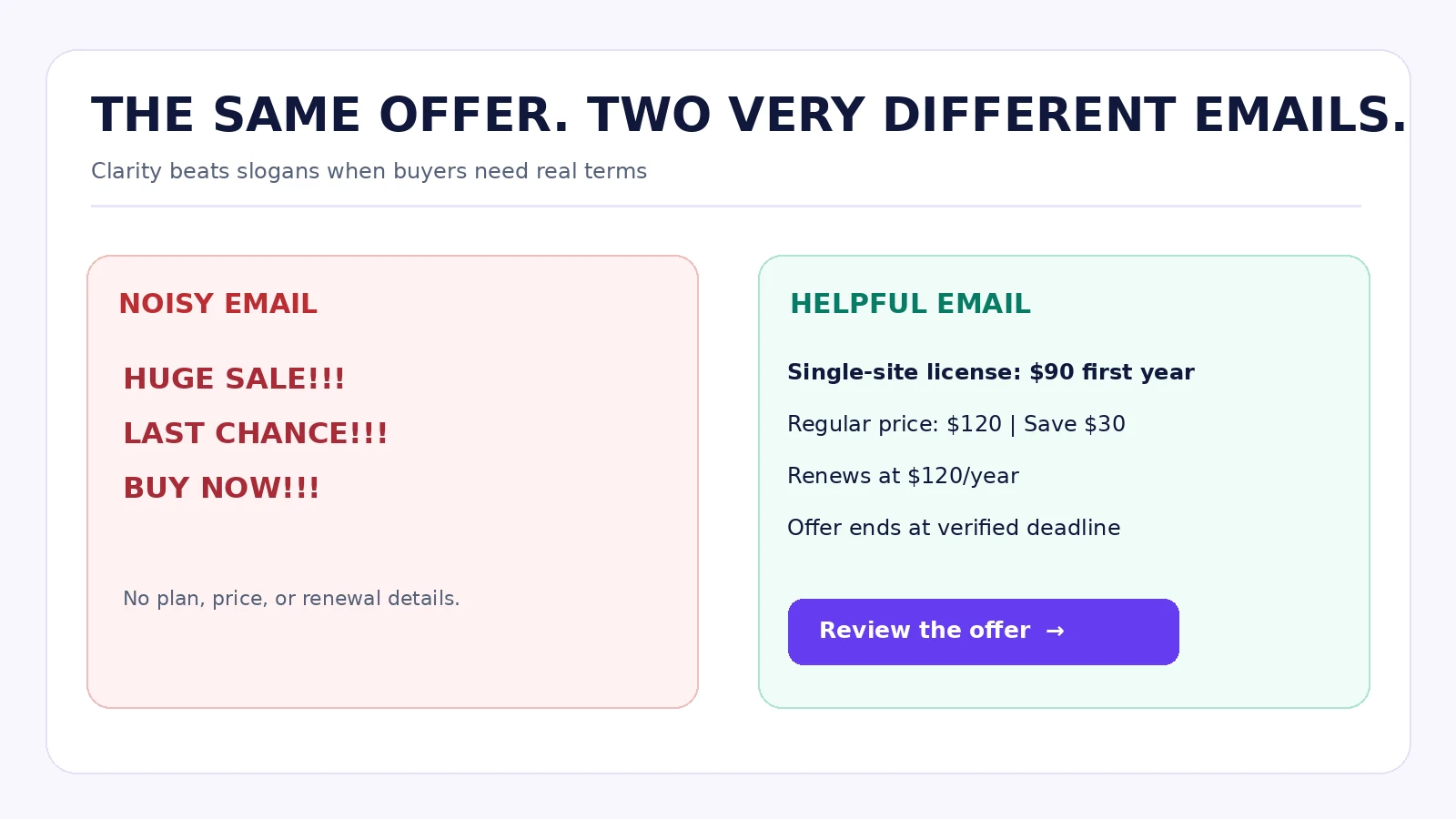
Keep images supportive, not essential. Some recipients won’t download remote images. Use live text for prices, renewal amounts, important terms, and buttons rather than burying them in a poster. Add meaningful alt text; use accessible color contrast and real link labels. Send a plain-text part as well as HTML when your platform supports it, and test both desktop and mobile.
Image placement: a side-by-side infographic, “The same offer, two emails,” showing a noisy graphic-only promotional message versus a compact, readable text-first version. This diagram is illustrative, not evidence from a usability experiment.
Build a frequency plan with suppression, not just a calendar
Black Friday falls on November 27, 2026, and Cyber Monday falls on November 30, 2026. Those dates are milestones, not permission to email every subscriber daily.
A practical send plan for a small WordPress product team might be: useful content earlier in November; a genuinely qualified early-access note; launch when the actual offer starts; one answer-focused reminder; and a final notice near the real deadline. Send fewer messages to people who have already received several recent campaigns or have low engagement. Suppress purchases and unsubscribe events promptly.
Campaign timing also depends on the customer’s timezone and the store’s configured offer window. If the coupon expires at midnight Eastern Time, write that exact time; don’t assume a subscriber in another country will interpret “tonight” the way your support team does. Check that countdowns, emails, and checkout use the same time reference.
The technical sending checklist that protects the entire campaign
A good message is useless if it never reaches inboxes. Sending email from WordPress requires a delivery system, authenticated domain, maintained list, and monitored sending process.
Gmail and Yahoo requirements are not optional extras
Google says domains that send around 5,000 or more messages per day to personal Gmail accounts count as bulk senders, including mail sent from the same primary domain’s subdomains. Gmail’s guidance requires relevant authentication, good sending hygiene, and one-click unsubscribe support for marketing mail; it says to aim for user-reported spam rates below 0.1% and avoid reaching 0.3%. Google began ramping up enforcement on non-compliant traffic in November 2025. Its rules distinguish promotional messages from transaction notifications, but sending both types through the same badly managed infrastructure can still create delivery problems.
Yahoo’s Sender Hub also requires appropriate authentication and straightforward unsubscribe for bulk marketing messages. Yahoo does not publish the same fixed 5,000-message threshold. Its public guidance calls for processing unsubscribe requests within two days, and a visible in-message option in addition to the relevant headers. Don’t assume a footer link alone meets a mailbox provider’s one-click header requirements.
Review SPF, DKIM, DMARC and alignment, valid DNS, TLS, complaint reporting, bounce handling, and gradual sending volume changes with whoever administers your email provider. A successful SMTP test to your own address proves only a narrow part of readiness.
CAN-SPAM and consent: distinguish regions and message types
For commercial email subject to US law, the FTC’s CAN-SPAM guidance requires accurate sender information and subject lines, a valid postal address, clear opt-out instructions, and honoring unsubscribe requests within 10 business days. Different consent and privacy requirements may apply under GDPR, UK, or other local rules; CAN-SPAM compliance alone does not mean your international list is legally ready to mail.
Keep unsubscribed users out of promotional sends, even if they have purchased something. Don’t relabel a sale newsletter “transactional” just because you include a product update. Work with your email provider to ensure bounce and complaint events suppress future campaigns appropriately.
FluentCRM, FluentSMTP, and WooCommerce: a WordPress example
A WordPress-first setup might use FluentCRM to segment opted-in contacts, create campaigns, schedule sends, and manage automations. Its current documentation describes a block-based composer, email templates, sequences, scheduling windows, and automation-based email actions. Some automation actions require FluentCRM Pro; verify license-specific features before promising a workflow.
FluentCRM handles campaign content and queueing; FluentSMTP can relay mail through a configured email provider. The actual provider still controls account sending limits and many deliverability characteristics. WordPress cron processing and integration health matter, especially for scheduled campaigns. Verify the sending queue, domain authentication, unsubscribe headers, and actual delivery across mailbox providers.
A WooCommerce shop may segment by prior orders, eligible product ownership, or renewal state if its CRM integration and privacy basis support it. Don’t assume every order immediately produces a usable marketing subscription. Consent and order data are separate concepts.
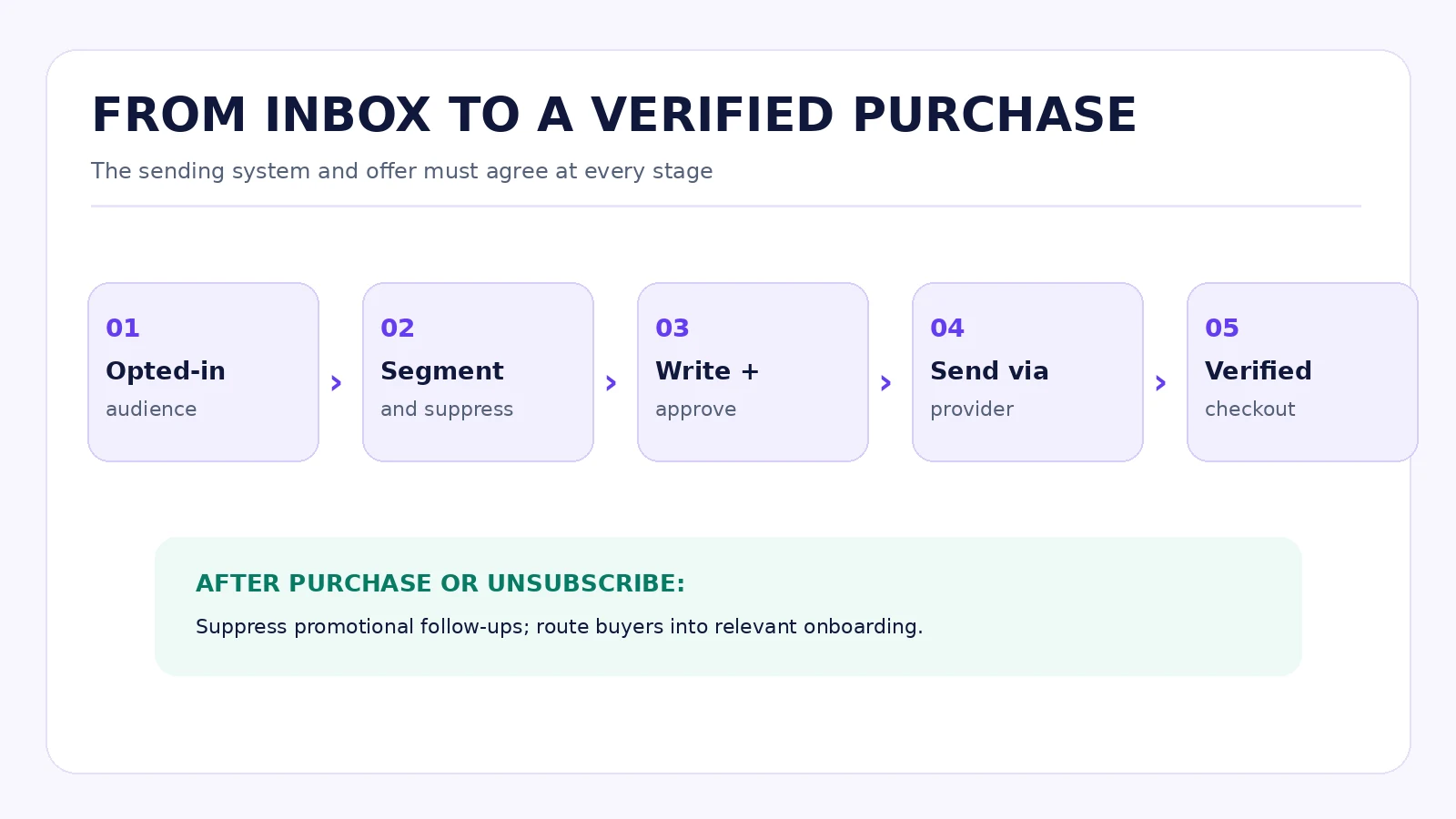
Image placement: an original flow diagram showing opted-in audience → segment → campaign/automation → sending provider → inbox → WPTopper or vendor landing page → verified checkout; with a suppression branch after purchase/unsubscribe. This is a conceptual workflow, not an unverified admin screenshot.
Tracking: opens are not the finish line
Email “open rates” are imperfect indicators of human attention. Apple’s Mail Privacy Protection can load remote email content in the background regardless of whether someone engages with a message. That weakens open data as a clean measure of who read your campaign. Treat opens as directional, and avoid automations that assume an open means real interest.
Track delivery failures, complaints, unsubscribes, clicks, eligible landing sessions, completed purchases, refunded orders, contribution after the discount and campaign spend, and product activation. A click is not an order; an attributed order is not always incremental profit.
Use consistent GA4 campaign tags, for example:
https://example.com/verified-offer/?utm_source=newsletter&utm_medium=email&utm_campaign=bfcm_2026&utm_content=launch_main_cta
This is a fictional tracking URL. Google Analytics documents utm_source, utm_medium, and utm_campaign as core campaign fields, with utm_content useful for distinguishing links or creative variants. If your checkout crosses domains, test that attribution survives the journey. Reconcile conversion reporting with real store and payment records; do not call every link click a sale.
Compare performance without inventing certainty
Suppose Email A brings 400 qualified visitors and 24 purchases; Email B brings 420 visitors and 28 purchases. Those observed rates are 6.0% and about 6.7%. Without controlled assignment, matched eligibility, sufficient sample size, and comparable offers, that difference is not proof that subject line B won. Segment mix, checkout failures, or holiday timing may explain it. Decide in advance whether you’re testing an email subject, an offer, an audience, or a checkout presentation; changing all of them destroys the lesson.
Six common Black Friday email mistakes
1. Sending the same “last chance” message repeatedly. Reserve deadline language for a genuine deadline and stop it after expiry.
2. Giving a coupon code without a verified path. Test the exact plan and variation, the eligible customer state, whether a code auto-applies, and the renewal amount. A landing page isn’t enough.
3. Mailing every subscriber the same product. Tailor to meaningful interests and ownership where lawful, and suppress people who already bought.
4. Putting every important detail into an image. Images may be blocked, and small renewal text is hard to read on a phone. Use HTML text for essential information.
5. Mistaking opens or clicks for success. Measure paid orders, refunds, support demand, contribution, and subsequent activation.
6. Skipping the unglamorous technical tests. Broken SPF/DKIM alignment, inactive cron, outdated redirects, a missing one-click unsubscribe header, or a bad checkout URL can ruin a carefully edited campaign.
A 20-minute pre-send rehearsal
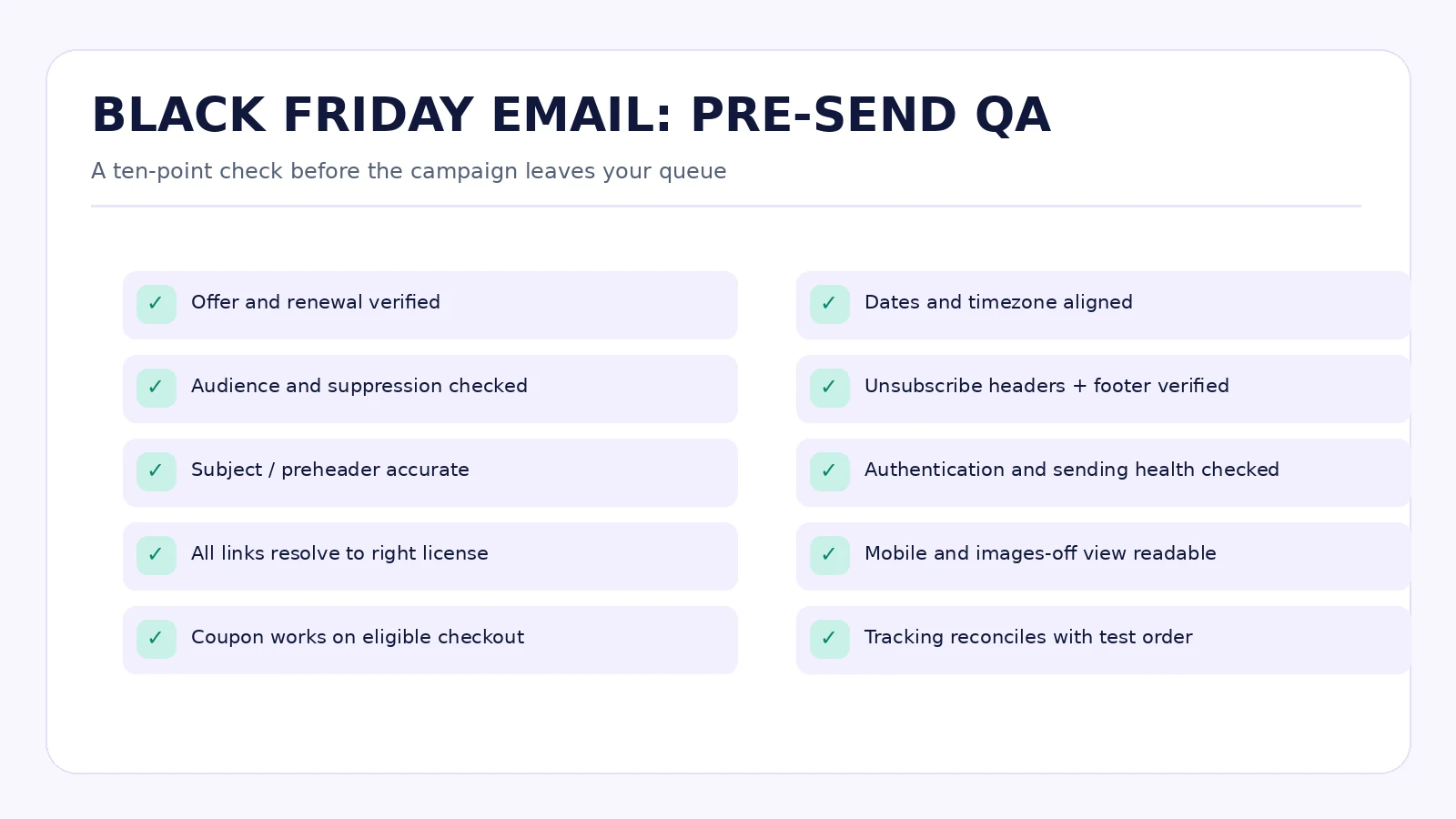
The final review should involve marketing, the person who owns pricing, and someone who can verify checkout or payment behavior. Here is a compact test plan:
- Read the email without images. Are the price, product, deadline, renewal, and CTA still obvious?
- Check the subject and preheader for truthfulness and mobile truncation.
- Inspect the recipient segment. Remove purchasers, unsubscribers, ineligible tiers, and duplicate records as required.
- Click every CTA from the actual test email. Verify the product, license, discount, and final charge in a permitted test checkout.
- Confirm the landing page, coupon end date, email deadline, timezone, and countdown agree.
- Inspect the From address, Reply-To, postal address, footer, unsubscribe link, and one-click unsubscribe headers using a suitable provider test.
- Check authenticated delivery to Gmail and Yahoo test accounts, plus a mailbox with images blocked.
- Verify tracked URLs and UTM naming, and ensure a completed test purchase records once in your analytics.
- Have support review the three questions most likely to arrive after the email.
- Assign the person who can stop queued sends and correct the page if a critical issue appears.
Image placement: a printable pre-send QA checklist graphic next to this section. It’s an editorial resource, not proof that the recipient’s site has passed the tests.
What comes after Send
A campaign doesn’t end when the last email leaves the queue. Monitor bounces, complaints, coupon failures, incorrect renewal questions, and transactional receipts as the sale runs. If the checkout breaks, pause subsequent promotional sends rather than funneling more people into a known problem. When the offer ends, remove expired CTAs and stop deadline-based automations.
For buyers, prioritize installation and first value. For the broader audience, don’t immediately switch from Black Friday pressure to Christmas pressure without considering their recent messages and expressed preferences. Our companion WPTopper retention guide will address onboarding and repeat purchases after the sale.
A good Black Friday email should feel like help, not an interruption. It gives someone enough context to recognize a useful product, a real offer, and a clear next step. When the economics, eligibility, checkout, and inbox experience all agree, the copy can be simpler. That’s usually a better place to start than another row of exclamation marks.
WPTopper CTA: Compare WordPress tools and verified offers on WPTopper. Check the product, license, renewal terms, and seller’s current checkout before deciding; an editorial link is not a guarantee that a particular coupon remains active.
Frequently asked questions
How many Black Friday emails should a WordPress business send?
Enough to serve distinct, useful purposes, not to meet a fixed sequence count. Preview, launch, an objection-answering reminder, and a real deadline can be a useful starting plan. Send fewer messages to customers who already purchased or have little reason to hear another promotion.
When should I start Black Friday email marketing in 2026?
Black Friday is November 27, 2026. An early-November educational note, verified pre-sale details, and a tested launch email are reasonable for a small team, provided product terms and sending infrastructure are ready. Bigger programs may need more preparation.
What belongs in a Black Friday subject line?
A truthful reason to open: a relevant benefit, exact product, eligible discount, licensing answer, or real deadline. Avoid fake replies, counterfeit alerts, inflated savings, and misleading urgency.
Are email open rates reliable enough to judge the campaign?
No, not alone. Privacy-protection features can fetch remote content without a person reading the message. Review clicks, purchases, refunds, complaints, and contribution alongside delivery data.
Can I run Black Friday campaigns from WordPress using FluentCRM?
Yes. FluentCRM documents campaigns, sequences, automation actions, and scheduling, while FluentSMTP can relay WordPress email to a configured provider. Check feature-specific licensing, cron health, authentication, unsubscribe support, and the provider’s volume limits before sending.
Do I need one-click unsubscribe in promotional email?
Gmail and Yahoo apply one-click or list-unsubscribe requirements to qualifying bulk promotional traffic, alongside authentication and other sender rules. A visible body link by itself may not satisfy the technical header requirement. Also comply with local unsubscribe laws and process requests promptly.
Should I send a last-chance email on Cyber Monday?
Only if the email describes an actual qualifying offer and its real expiration. Cyber Monday falls November 30, 2026, but your campaign may end earlier or later. Confirm the exact deadline and destination before scheduling the message.
Sources and further reading
- Google, Email sender guidelines FAQ: https://support.google.com/mail/answer/14229414?hl=en
- Yahoo Sender Hub, Sender best practices: https://senders.yahooinc.com/best-practices/
- Yahoo Sender Hub, Sender FAQs: https://senders.yahooinc.com/faqs/
- US FTC, CAN-SPAM Act: A Compliance Guide for Business: https://search.ftc.gov/business-guidance/resources/can-spam-act-compliance-guide-business
- Apple, Mail Privacy Protection & Privacy: https://www.apple.com/legal/privacy/data/en/mail-privacy-protection/
- Google Analytics, URL builders and campaign parameters: https://support.google.com/analytics/answer/10917952?hl=en
- WooCommerce, Black Friday email marketing: https://woocommerce.com/posts/black-friday-email-marketing/
- FluentCRM, Overview of Emails: https://docs.fluentcrm.com/overview-of-emails-from-fluentcrm
- FluentCRM, Automation Email Actions: https://docs.fluentcrm.com/automation-email-actions
- FluentCRM, Email Delivery: https://docs.fluentcrm.com/sending-emails-and-email-deliverability
- FluentCRM, Email Sequences: https://docs.fluentcrm.com/email-sequence
Research note: SiteFlow Pro, example discounts, subject lines, campaign statistics, and CTA URLs are fictional teaching examples. No real WordPress installation, billing platform, mailbox infrastructure, or WPTopper live deal was tested while preparing this article. Confirm the relevant details before launching your own campaign.



Leave a Reply