

Your Black Friday campaign has ended. The banners are down, the coupons have expired, and the sales report finally has a number everyone wants to share. But one of those new customers is staring at a WordPress plugin zip file, wondering where to upload it. Another can’t find the license key. A third discovers that the discounted first year renews at the standard price and isn’t sure what happens next.
Their experience of your product is just beginning. The sale may have persuaded them to buy; what happens after checkout determines whether they actually benefit from that decision.
This is the part of holiday marketing that often gets squeezed out by the next campaign. Instead of another “Christmas sale starts now” email, new buyers need a welcome that works, an achievable first win, honest billing information, accessible support, and room to decide what they want next. That’s especially true for WordPress plugins and themes, where installation, compatibility, licensing, and future updates can make a new purchase feel more complicated than buying a physical item.
This guide shows how to turn seasonal purchases into successful customer relationships during the first 30 days. It includes a practical timeline, segmentation rules, five adaptable messages, WooCommerce and FluentCRM automation examples, honest review requests, and a retention scorecard. It does not promise that every customer will become a repeat buyer. The job is to make that outcome possible by helping people use what they bought.
Key Takeaways (TL;DR)
- Treat purchase confirmation as the start of the customer relationship: deliver access, billing clarity, and a reliable support path.
- Help new plugin or theme buyers achieve one practical first win before sending another promotional offer.
- Segment onboarding by product, activation, order status, and consent; stop irrelevant emails after refunds, cancellations, or opt-outs.
- Invite honest feedback after genuine use, and track activation, support needs, refunds, and renewals rather than email opens alone.
The quick answer: stop treating the order confirmation as the finish line
Give every new buyer four things before sending another sales pitch:
- Access: a reliable receipt, download or delivery status, license instructions, billing terms, and a place to get help.
- Activation: a short route to the first meaningful result, not a 40-page manual dropped into their inbox.
- Reassurance: accurate compatibility, refund, support, and renewal information, stated without surprises.
- Choice: an appropriate way to request help, leave honest feedback, or receive future product education and optional marketing according to their preferences.
A customer who purchased at 40% off is not necessarily a poor-quality customer. They’re also not automatically a loyal customer. Start with their actual product journey rather than assigning value based on which coupon they used.
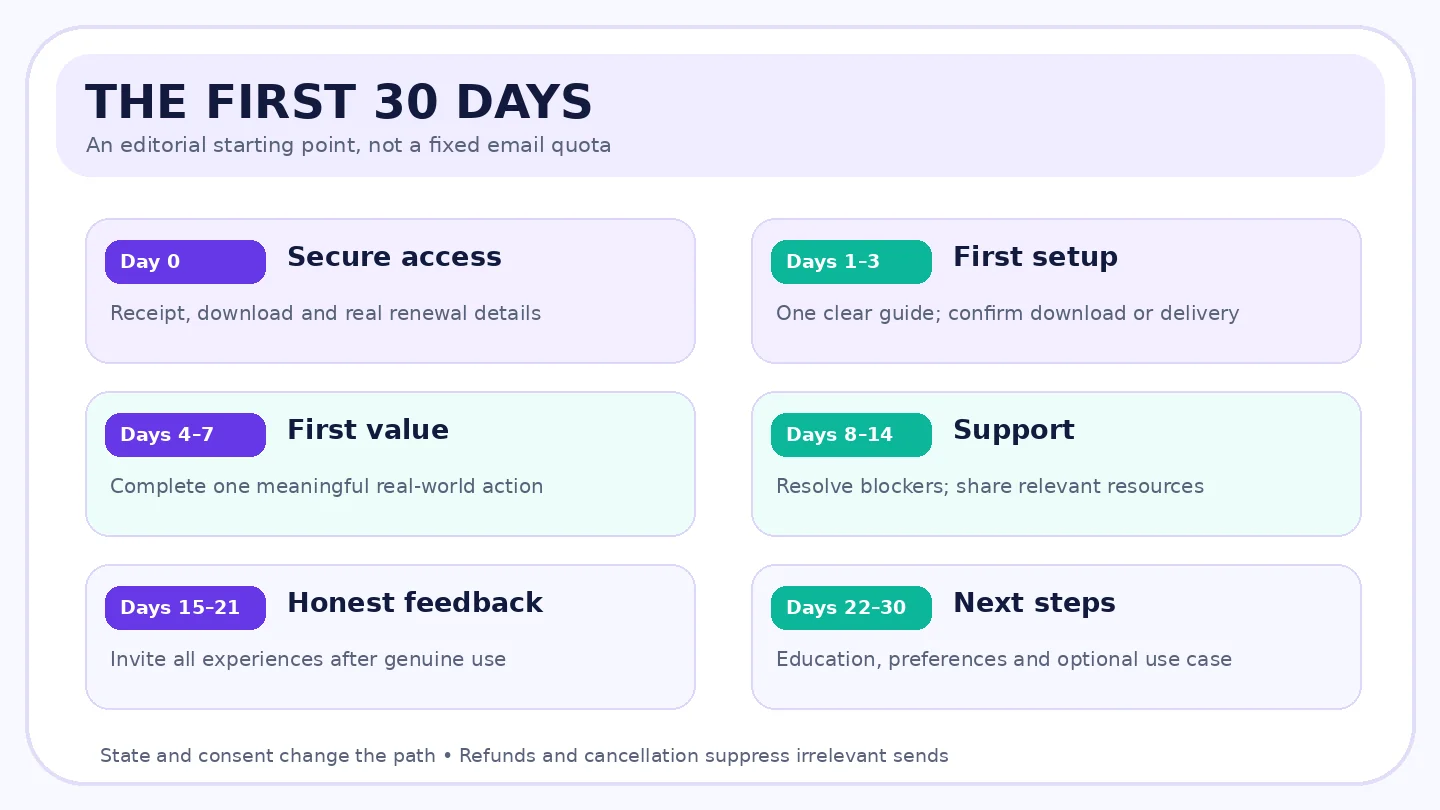
Graphic 1 placement: First 30 days after Black Friday: Purchase → Access → First value → Useful support → Feedback and next steps.
1. A new customer doesn’t need another discount on day one
It’s easy to carry the momentum of Black Friday straight into December. Your marketing calendar still has Christmas, New Year, and other year-end opportunities. But think about the customer who bought a premium forms plugin yesterday. Their next useful email is probably not “Buy our CRM plugin at 20% off.” It might be “Here’s how to publish your first working form, connect notifications, and test a submission.”
The difference is timing and relevance. A new customer’s attention is focused on making the purchase worthwhile. If they cannot get the product installed, yet another offer can make the original sale feel like the start of an endless promotion rather than the start of a useful relationship.
For physical goods, the first problem may be tracking or delivery. For a WordPress theme, it may be starter templates, customization, or mobile settings. For a subscription product, it may be getting into the account, understanding the license tier, or knowing what will be charged next year. Your follow-up sequence should match the thing purchased.
A worthwhile retention strategy begins by asking: What would the buyer consider their first successful outcome? Not your team’s preferred feature demo. Their outcome.
2. Map the first 30 days before you automate them
There is no universal best send time. The timeline below is an editorial starting point for a small WordPress product company. Use event triggers where you can, and send less when the customer doesn’t need more messages. The purchase date starts the clock; product activation, delivery, refund, and consent may change the path.
| Stage | Customer question | Best response | Signal to watch |
|---|---|---|---|
| Day 0: successful payment | Did my order go through? | Receipt, access, product/plan, support and billing | Delivery of access, failed emails, login issues |
| Days 1–3: first setup | What do I do first? | One short getting-started path and a helpful contact | Installation or download, first-use completion |
| Days 4–7: first value | Can I actually do the job I bought this for? | Role-specific tutorial, compatibility help | Meaningful first action, unresolved tickets |
| Days 8–14: confidence | What if I get stuck or want to do more? | Common pitfalls, support check-in, relevant resource | Repeated errors, usage, helpful replies |
| Days 15–21: feedback | Is someone listening? | Open invitation to describe the experience | Unfiltered feedback, review eligibility |
| Days 22–30: next step | How do I keep using this? | Education, account settings, optional next use case | Active usage, unsubscribe, refunds, early repeat intent |
Don’t interpret the table as six emails everyone must receive. Some customers will be confident on day one; others will still be waiting for delivery or an approved migration. A smart sequence responds to their state. When a buyer has refunded the product or cancelled access, ordinary onboarding should stop. When they’ve completed a milestone, they should not receive “Have you installed it yet?” three days later.
A useful operational rule: Never send an email that implies a milestone you haven’t confirmed. “Great job publishing your first form!” is awkward if the contact only purchased the license and hasn’t installed anything. If event tracking isn’t available, say “Here’s a quick way to get started” instead.
3. The first post-purchase email should remove doubt
Transactional notifications and optional marketing messages do different jobs. A receipt, license access message, or delivery update is essential to fulfilling an order. A promotional newsletter or cross-sell is marketing. Don’t assume that entering an email at checkout grants unrestricted promotional permission in every jurisdiction; configure consent and unsubscribe handling for the audience and message type. Google’s sender guidance distinguishes transactional from marketing messages for one-click unsubscribe requirements, but the legal requirements still depend on the message and location. (Source: Gmail Email Sender Guidelines FAQ; see references below.)
What the welcome should contain
For a WordPress plugin or theme, show the buyer what they paid for: product name, license tier, number of supported sites if applicable, download or account access route, legitimate renewal amount or how it is determined, support path, and the next safe setup step. A permanent “Download” button can be useful, but test that it doesn’t reveal private license information to other people through an unprotected URL.
For physical goods, order tracking and delivery expectations matter more than installation steps. For a service, explain how and when onboarding takes place. Whatever you sell, keep the initial message plain. If the product has a renewal at a different price from the holiday offer, say so clearly. Don’t wait until renewal week to reveal the ordinary rate.
Example email 1: a useful purchase handoff
Subject: Your your plugin purchase: access and next steps
Preheader: Your license, first setup guide, and support details in one place.
Thanks for choosing your selected plugin and plan. Your order is confirmed, and your next step is simple: open your secure account page to download the product and find your license details.
If you’re installing it on WordPress for the first time, this short guide explains the setup and the first test you should run. Your order includes the updates and support described in your order confirmation, and the renewal terms in your order confirmation apply to your subscription.
CTA: Open your account and setup guide
Questions about your license or installation? Reply here or visit the support page in your account. We’ll help you identify the right next step.
This is a framework. Replace every bracket with actual order and product information. A seller should send the genuine receipt using its reliable transactional system rather than trying to turn a marketing automation into a payment record.
4. Help customers achieve one small, meaningful win
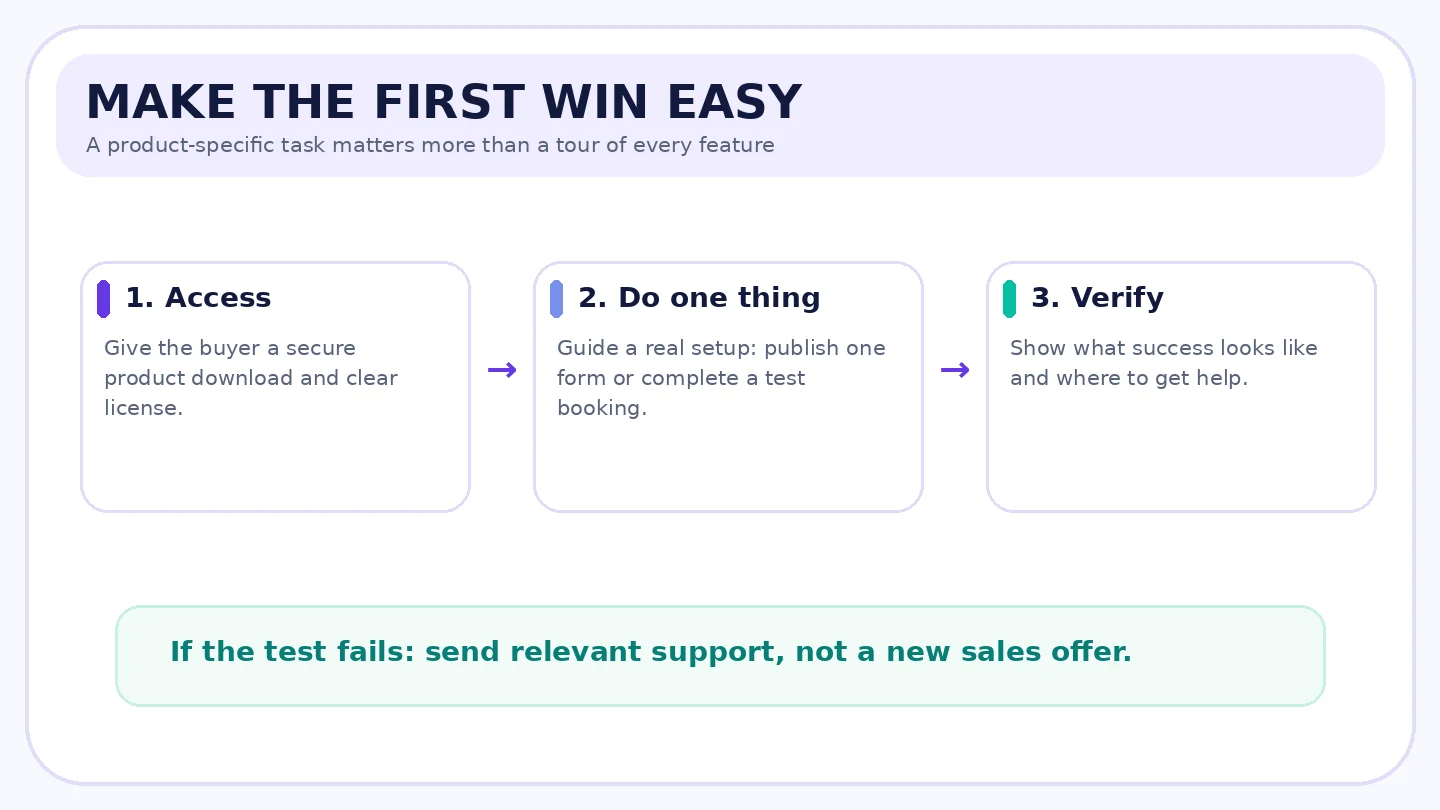
A successful installation is sometimes enough for a theme, but often it isn’t. A forms plugin is valuable when a real form accepts a submission and notifies the site owner. A booking plugin is valuable when a customer can reserve a slot. A CRM becomes useful when a contact arrives correctly and a real follow-up workflow works. The first win should tell the buyer, in a way they can observe, “This product can do the job.”
For WordPress software, create a first-value checklist with no more than three or four steps. Each step should have an expected result. “Configure everything” is not a step; “Create one test appointment and confirm the notification” is. Provide a low-risk way to check integrations, payment settings, and notifications before a merchant uses the workflow for a real customer.
Suggested first-win examples:
- Forms plugin: create a simple contact form, publish it, submit a test, and confirm the email arrived.
- Booking plugin: add availability, make a test booking, and review the confirmation.
- WooCommerce extension: configure the rule on staging, test with an eligible cart, and confirm totals at checkout.
- Theme: import a suitable starter layout, replace demo content, and check one page on a phone.
- CRM plugin: import or capture one permitted test contact, assign the right segment, and verify a safe test email.
A common mistake is showing off the most advanced feature first. New buyers need confidence, not a guided tour through 60 settings. An optional “advanced workflows” link can wait until they’ve completed the basics.
Graphic 2 placement: A three-step first-win checklist: Access → Configure a real use case → Confirm it worked, plus a help branch when the test fails.
Example email 2: the first win
Subject: Your first useful your plugin result, in a few steps
You don’t need to configure every feature to get value from your plugin. Start with one task: complete one working setup.
- Open the plugin settings in your WordPress dashboard.
- Follow the current getting-started guide.
- Run a test using your own sample data and confirm the confirmation shown in the guide.
If the test doesn’t match what you see, use the current setup guide or contact the support team through your account. You can come back to advanced settings later.
CTA: Try the first-use walkthrough
Send this only if it’s relevant to what the customer purchased and their current stage. Don’t claim the product was activated unless you’ve measured activation.
5. Separate the customer journeys before building the automation
A 30-day email plan becomes annoying when it ignores the differences between buyers. At minimum, distinguish the product or license purchased, whether the buyer is new or returning, and whether access is active, cancelled, refunded, or still pending. If you genuinely have product-usage data and a lawful basis to use it, you can further distinguish activated from not-yet-activated customers.
| Customer situation | Helpful message | What to suppress |
|---|---|---|
| New plugin customer, access active, not yet activated | First-use guide and support check-in | Upgrade push, premature review ask |
| New plugin customer, already active | Next relevant workflow or quality-of-life tip | Repetitive installation reminders |
| Existing customer upgrading license | What’s changed, site limits, migration/upgrade help | First-time buyer onboarding |
| Physical-order customer, not delivered | Tracking, delivery questions, relevant support | “How do you like the product?” review request |
| Buyer with refund or cancelled access | Receipt/status and appropriate support | Ordinary upsells, success congratulations |
| Marketing opt-out | Required order/service communications as appropriate | Promotional sequences and cross-sells |
Consent is an attribute of the communication, not just the customer. An account that may receive an order receipt should not automatically receive a Christmas campaign. Keep that boundary clear in your CRM and test it using contacts with different subscription statuses.
This approach may sound less glamorous than sending the same sequence to the entire Black Friday cohort. It’s also more respectful: a person who has already bought should not keep receiving the original sales email, and a person whose purchase was refunded should not receive a cheerful “ready to upgrade?” message.
6. How to automate post-purchase follow-up in WordPress
There are several legitimate workflows, but the details matter. FluentCart’s commerce triggers are included in FluentCRM core, while FluentCRM’s WooCommerce-specific commerce automation triggers require FluentCRM Pro, according to current FluentCRM documentation. Do not assume that installing FluentCRM free gives every WooCommerce store the same post-purchase automation controls. (Source: FluentCRM Ecommerce Triggers; see references below.)
FluentCart and FluentCRM: a product-aware welcome
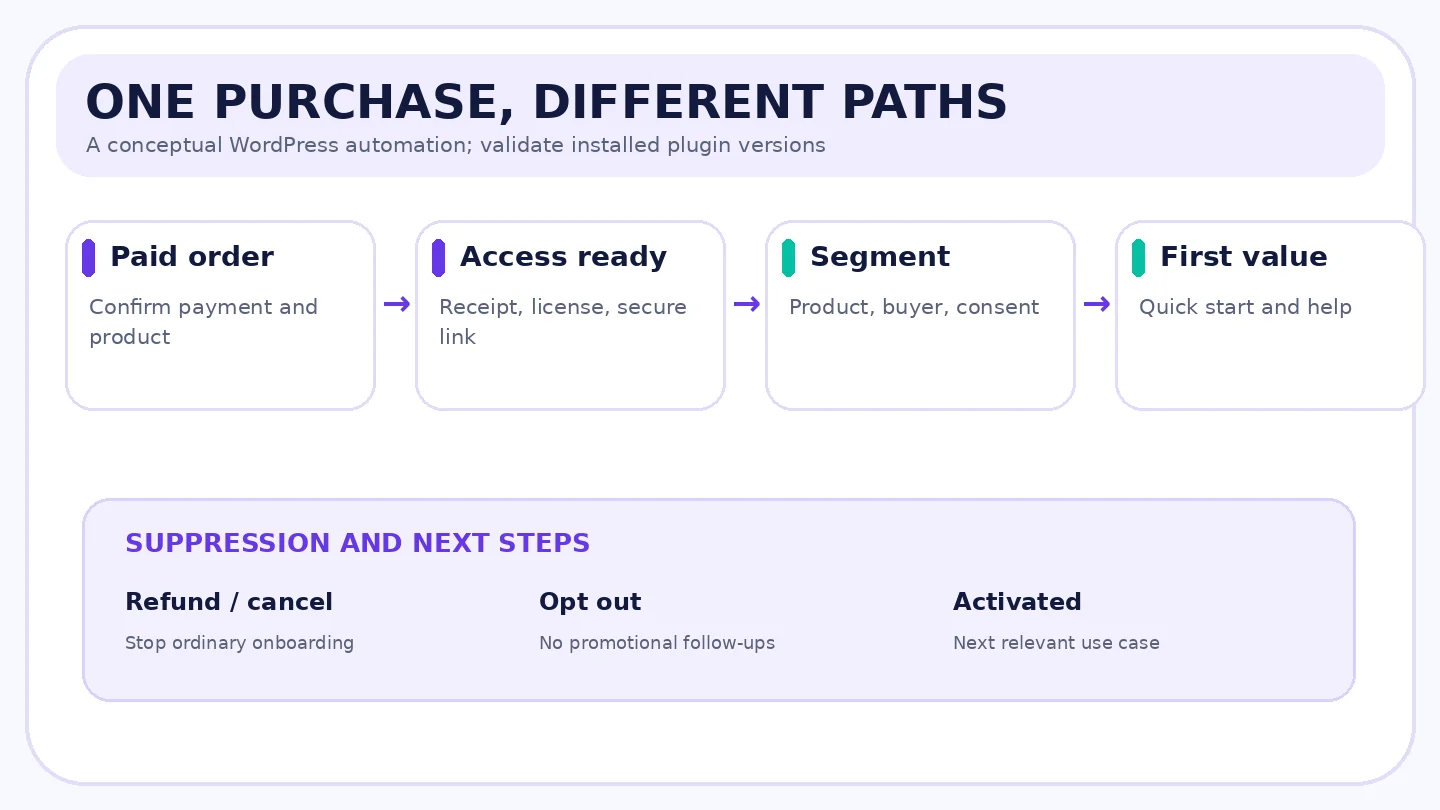
A documented FluentCart workflow begins in FluentCRM → Automations → New Automation, with a FluentCart trigger such as Order Paid (Payment/Subscription). Filter for the right product or category, then apply a product tag, wait a suitable period, and send the next appropriate onboarding message. FluentCRM documents further events including Order Refunded (Full), Subscription Activated, Subscription Renewed, and Subscription Canceled that can support a lifecycle workflow. (Sources: FluentCRM FluentCart Integration; FluentCRM Ecommerce Triggers; see references below.)
A safe sequence for a hypothetical premium plugin might be:
- Successful paid order: start onboarding and assign the product-specific tag.
- Purchase-access message: handled by the store’s genuine transactional system; avoid duplicate receipts.
- Wait until access should be available, then send one getting-started guide where the contact’s communication eligibility allows it.
- If a documented activation event exists, branch to a next-use-case tip. Without such an event, don’t imply activation has happened.
- On refund, cancellation, or loss of access, remove the customer from inappropriate lifecycle messages and update the relevant tags.
- On subscription renewal, send the appropriate acknowledgment; don’t restart the original first-day setup sequence.
A FluentCart integration feed can also apply tags and lists on product/global events. Its documentation recommends double opt-in for new marketing subscriptions and shows refund/expiration removal options. Configure those choices deliberately: a paid order, a newsletter opt-in, and a product entitlement are related but distinct states. (Source: FluentCart FluentCRM Integration; see references below.)
WooCommerce and FluentCRM: choose the correct order event
WooCommerce stores can use native order notifications for standard transactional messages. For richer onboarding, the FluentCRM Pro WooCommerce trigger list documents New Order, Order Processing, Order Completed, Order Refunded, and order-status changes. An order in processing may be paid but not fulfilled; a completed order may be a more reliable moment for a physical-goods review request. Check which event matches the actual customer experience and the installed versions. (Source: FluentCRM Ecommerce Triggers; see references below.)
For a WordPress plugin with digital delivery, a successful payment or access entitlement might be the right beginning. For physical goods, wait for dispatch or delivery milestones when available. In a test store, check duplicate webhook/event handling, guest checkout, subscription renewals, multiple items in one order, refunds, and unsubscribe behavior.
These are documentation-based implementation patterns, not screenshots or tests of a live WPTopper store.
Graphic 3 placement: Event-driven WordPress automation: paid order → access → segment → first-win email → activated/not activated branch, with refund, purchase and unsubscribe suppression.
7. Ask for feedback when the customer has actually used the product
An email asking “Would you give us five stars?” two days after purchase doesn’t tell you whether the buyer succeeded. Worse, it can discourage honest feedback by signaling that the only welcome response is positive. A better question is “What worked, and what was difficult?” followed by an easy route to real help.
WooCommerce currently documents a Customer review request (beta) feature, disabled by default, that can schedule an email after an eligible completed order. The documented default delay is seven days, and the review system can show a verified-owner label. This is a configurable feature, not evidence that every WordPress site has review requests running automatically. (Source: WooCommerce Product Reviews; see references below.)
For a digital product, don’t ask for a public review simply because seven days elapsed. A buyer may still be setting up. If usage data is available, consider requesting a review after an actual success milestone, and invite all honest experiences rather than filtering away dissatisfied customers. For physical goods, ask only after the customer had a reasonable chance to receive and use the item.
The US FTC’s consumer review rule prohibits fake reviews and compensation conditioned on positive or negative sentiment, among other practices. A genuine review should reflect a real customer’s experience. If you offer any incentive for feedback, obtain legal guidance and disclose material connections where required; never exchange a perk for a specific star rating. (Source: FTC Consumer Reviews and Testimonials Rule FAQ; see references below.)
Example email 3: a feedback request that doesn’t demand praise
Subject: How has your plugin worked for you so far?
You’ve had some time with your plugin, and we’d appreciate hearing what the experience has been like. Was setup straightforward? Did anything surprise you? Is there a feature or guide that needs a clearer explanation?
You can share an honest review here: the product review page in your account. If you’re stuck, this support route may be more helpful right now: the support page in your account. We read both kinds of feedback and use them to improve the product and its documentation.
CTA: Share your experience
Don’t route only four- and five-star customers to a public review while silently diverting negative experiences. Make sure the request complies with local requirements, platform rules, and your actual email consent model.
8. Reassure customers about renewals before renewal anxiety appears
The Black Friday discount may have applied only to the first payment. A buyer who paid $79 for a plugin normally priced at $129 deserves to know when the next charge is expected and under which terms. This isn’t an upsell. It’s basic billing clarity.
Subscription behavior varies by plugin, billing extension, gateway, and license agreement. WooCommerce Subscriptions documents renewal notices and separate paid reminder extensions, while FluentCRM has FluentCart subscription lifecycle triggers. Confirm the actual payment schedule, customer notification rules, upgrade eligibility, and cancellation route instead of copying a generic “Your plan automatically renews” line into every product email. (Sources: WooCommerce Subscription Emails; WooCommerce Subscription Notifications; FluentCRM Ecommerce Triggers; see references below.)
For the first 30 days, a simple account checklist can be more useful than a renewal reminder months early: where to see the plan, how many sites it covers, where updates appear, what changes if the customer upgrades, and how to contact billing support. For lifetime plans, don’t invent “lifetime support” or “lifetime updates” unless the license explicitly includes them. A lifetime purchase is not necessarily identical to unrestricted lifetime service.
If the first-month communication contains an optional education newsletter invitation, ensure that choice is actually optional. Suppress promotion emails after unsubscribes; necessary service messages must remain carefully classified and limited to the customer’s account needs.
9. A second purchase should follow usefulness, not pressure
There is nothing wrong with suggesting another WordPress tool when it genuinely completes a workflow. A user who built a lead form might later benefit from connecting a CRM; a store owner who launched checkout may want better reports. The problem is recommending a bundle before the first purchase has delivered value.
Make cross-sells conditional on product fit. A forms-plugin customer struggling to receive a notification needs delivery help, not three recommendations for marketing tools. An agency with ten client sites may need a site-license comparison. Someone on a lifetime plan doesn’t need a second promotion for the same entitlement.
Instead of “You’ve bought A, so buy B,” say “If you’re ready to accomplish your next website task, here’s a guide that explains the options, including when you don’t need another plugin.” That is helpful even if the reader never purchases anything else.
For WPTopper as an editorial deals publisher, the distinction is sharper. WPTopper often does not operate the vendor’s checkout and may not know whether a reader bought or activated a plugin. It shouldn’t claim access to merchant purchase histories it doesn’t have. The useful role is providing independent buyer education, a maintained link to the vendor’s current product information, and contextual recommendations with honest affiliate disclosure and validated deal status.
10. Measure activation and customer health, not just follow-up opens
A post-sale newsletter can have a high click rate and still fail to help customers start using a product. Conversely, a single well-placed setup guide may prevent many support tickets without creating a dramatic spike in email engagement.
Choose a few product-specific milestones. For a plugin, activation rate might mean the share of eligible paying customers who installed the plugin and completed a confirmed key first action within 14 days. For a theme, it could mean a site is configured and launched. For physical goods, fulfillment and delivery are prerequisites before use can be measured. Define the milestone before measuring the number.
A simple scorecard:
| Metric | Useful definition | Watch-out |
|---|---|---|
| Access success | Paid buyers who successfully reached account/download | Email sent does not prove access received |
| Time to first value | Median time from purchase to verified core action | Installation is not always value |
| Activation rate (14/30 days) | Activated buyers ÷ eligible paid buyers | Define eligibility and trackable event |
| Support need | Meaningful tickets or setup blockers per cohort | More tickets can reflect better help discovery |
| Refund rate | Refunded orders or buyers ÷ comparable paid cohort | Include refunds arriving after sale week |
| Repeat purchase / upgrade | Eligible verified second purchases | Don’t mistake a click for a purchase |
| Renewal / retention | Paid renewals or active cohorts when due | Not measurable at day 30 for annual plans |
What a hypothetical improvement might be worth
Consider 600 fictional Black Friday buyers. Suppose 120 eventually request refunds, leaving 480 retained customers in an initial comparison period. After you improve onboarding, a later comparable 600-buyer cohort has 84 refunds, leaving 516. That is 36 additional retained buyers in the second group. If each retained order contributes a hypothetical $60 after order-linked costs, the gross contribution difference is $2,160. If that onboarding program required $800 in incremental costs, the modeled difference after program spend is $1,360.
That is arithmetic, not evidence that the onboarding caused the change. Later shoppers may have bought different products, come from different channels, or behaved differently because the season changed. A controlled experiment or careful matched-cohort comparison is needed to isolate causation. The example also ignores whether service costs, later renewals, and other expenses differ. Its purpose is to show why activation and refunds belong next to the original sales report, not to promise a benchmark result.
A WordPress deal directory should be particularly careful with attribution. Outbound “View Deal” clicks are not completed merchant transactions. Only report product purchases, refunds, or renewals when the actual provider or reliable affiliate reporting makes those outcomes observable. GA4 purchase and refund events can help stores measure commerce events when correctly implemented, but those events don’t turn click tracking into verified merchant revenue. (Source: Google Analytics Ecommerce Measurement; see references below.)
11. The 30-day email sequence worth testing
Here is a simple framework. Use it as a starting point, not a sending quota; suppress people when the message no longer applies. Emails 1–3 above cover access, first value, and feedback. Two later messages can help with next steps without turning December into another sales blitz.
Example email 4: a useful next-use-case guide
Subject: One more thing you can do with your plugin
If you’ve already completed your first working setup, here’s a short way to use the next feature in the guide for your next project. The walkthrough explains when it helps, what settings to check, and how to avoid the most common mistake.
If you’re still getting started, there’s no rush. The original setup guide and support link are here too.
CTA: Explore the next workflow
Trigger this with a verified milestone where possible. Otherwise, keep the language conditional. Don’t send it to buyers who no longer have access or who opted out of the relevant kind of communication.
Example email 5: a respectful month-one check-in
Subject: A month with your plugin: anything we can clarify?
It’s been about a month since your plugin purchase. We hope the product is helping with the task you bought it for. If anything was harder than expected, we’d like to hear it.
You can revisit the quick-start guide, see the current support options, or update which educational emails you’d like to receive. If you’ve completed the basics, we’ve also put together a guide to an optional project.
CTA: Choose your next step
This is not a disguised renewal warning or another “last chance” email. The best response may be no response at all; people who are already using the product successfully need room to get on with their work.
12. A launch checklist for the post-purchase automation
Before turning on a customer lifecycle flow, test these scenarios in staging or a permitted test environment. Record the installed versions, consent status, expected email, actual result, and owner of each problem.
- A first-time paying customer receives one correct receipt and one correct access route.
- A guest order and a logged-in order create or match the intended CRM contact without inappropriate duplicates.
- A buyer of product A receives A’s setup guide, not an unrelated product B tutorial.
- A failed payment or pending unpaid order does not start a “welcome, your purchase is complete” path.
- A refund or cancelled entitlement stops ordinary onboarding and inappropriate upsells.
- A returning customer who upgrades doesn’t restart first-time installation reminders.
- The workflow doesn’t send promotional messages to contacts who opted out.
- A physical-order buyer is not asked for a product review before realistic delivery/use.
- A subscription renewal doesn’t trigger a brand-new first-purchase welcome sequence.
- A customer’s license and renewal terms match the links and words in every email.
- A link with customer account information is secure and accessible only to the intended recipient.
- A genuine activation branch works only with reliable activation data; otherwise the copy stays conditional.
- The sender domain, authenticated delivery, list-unsubscribe headers where applicable, and support reply address are checked.
- Scheduled email tasks fire in the expected timezone and don’t duplicate sends after queue retries.
- The reporting dashboard distinguishes sent messages, activated customers, actual purchases, refunds, and estimated future value.
Don’t mark the test suite as passed simply because the automation is visible in the dashboard. Real event, data, and checkout tests are needed, especially when several WordPress plugins participate in the same purchase journey.
13. What a WordPress deals publisher can do after the sale ends
WPTopper’s job is not the same as the plugin maker’s. A seller may have customer accounts, usage events, invoices, and support tickets. A deals publisher may have only an editorial page, an optional newsletter subscription, and verified affiliate outcomes when a vendor shares them. The publisher should not pretend to know that a particular reader has purchased, renewed, or succeeded with a product.
Its post-sale contribution can still be meaningful: update expired Black Friday banners; keep deal statuses honest; explain the differences between annual and lifetime licensing; maintain product tutorial links; surface vendor documentation; and help readers compare compatible tools without promising nonexistent coupons. Where WPTopper has an opted-in audience, it can send useful buying and setup education aligned with the subscriber’s preferences.
This article closes WPTopper’s 15-part WordFlow series. The preceding guides cover discount strategy, how much to discount, offer formats, coupon setup and restrictions, manual versus automatic discounts, Black Friday planning, deal-page design, honest pricing claims, holiday emails, organic deal promotion, abandoned-cart recovery, coupon troubleshooting, and campaign profitability.
When you’re comparing a WordPress tool, start with a problem you want solved. Then evaluate compatibility, support, licensing, renewals, and verified current offers through WPTopper’s product guidance. A discount should make a useful purchase easier, not become the only reason to make it.
The sale is finished. The work that earns a second purchase isn’t.
A Black Friday campaign can bring a lot of new people into a WordPress business. That is an opportunity, not an outcome. The strongest next move is usually unglamorous: make access reliable, help customers get one result, answer questions quickly, explain billing honestly, and ask for feedback without demanding praise.
Then look at what happened. Did customers activate the software? Did the setup instructions work? Were refund reasons avoidable? Did people get the promised value? Those answers are more useful for the next campaign than another celebratory screenshot of coupon redemptions.
You don’t need to keep shouting about the sale. You need to make the purchase worth keeping.
Frequently asked questions
How soon after Black Friday should I email new customers?
Send necessary receipts and access information promptly when payment or order state warrants it. Follow with a relevant setup guide at a sensible point for the product. There isn’t one universal sequence for all stores; segment by product, fulfillment, and customer eligibility rather than emailing everyone on a fixed daily schedule.
What is a good post-purchase email sequence for WordPress plugins?
Start with access and installation, then help buyers complete one actual task, provide support for common obstacles, invite honest feedback after use, and offer an optional next-workflow resource. Stop messages that no longer fit the customer’s progress, refund status, or preferences.
Can FluentCRM automate follow-ups after FluentCart orders?
Yes. Current official documentation lists order paid, order shipped/delivered, refund, and subscription lifecycle triggers for FluentCart in FluentCRM core. Confirm the exact feature availability and behavior for your installed versions before building a live automation.
Does FluentCRM free include the same WooCommerce automation triggers?
No. FluentCRM’s current ecommerce-trigger documentation distinguishes FluentCart triggers in core from WooCommerce-specific automation triggers that require FluentCRM Pro. You can still use WooCommerce’s own order notifications, and suitable extensions can provide additional follow-up behavior.
When should I request a customer review?
After the customer has had a genuine chance to use the product. WooCommerce documents an optional beta review-request email after completed orders, but your policy should be appropriate to the actual use case. Invite honest reviews without incentives tied to the rating or sentiment.
Should I send Christmas discounts to everyone who bought on Black Friday?
No. Start with product help and respect promotional consent. A relevant, permission-based offer can make sense later, but it shouldn’t displace basic onboarding or be sent to someone who has already bought the same entitlement.
How do I measure whether onboarding helped retention?
Define a product-specific first-value event, track the percentage of eligible paying buyers who reach it, and follow refunds, support needs, verified second purchases, and renewals when due. Compare similar cohorts or run a controlled experiment where feasible. Email opens and clicks alone do not establish customer success or incremental profit.
Does WPTopper know when a visitor buys through an external deal link?
Not necessarily. Outbound deal clicks are not completed sales. Verified merchant or affiliate reporting may supply purchase information, but WPTopper shouldn’t claim to see a customer’s usage, renewal, or refund records without authorized evidence.
Sources and further reading
- FluentCRM — Ecommerce Triggers: https://docs.fluentcrm.com/fluentcrm-ecommerce-triggers
- FluentCRM — FluentCart Integration: https://docs.fluentcrm.com/fluentcart-integration-with-fluentcrm
- FluentCart — FluentCRM Integration: https://docs.fluentcart.com/guide/integrations/fluentcrm-integration
- FluentCRM — WooCommerce Automation: https://docs.fluentcrm.com/woocommerce-automation-with-fluentcrm
- WooCommerce — Product Reviews and review-request email: https://woocommerce.com/document/product-reviews/
- WooCommerce — Email Settings: https://woocommerce.com/document/configuring-woocommerce-settings/emails/
- WooCommerce — Subscription Emails: https://woocommerce.com/document/subscriptions/subscription-emails/
- WooCommerce — Subscription Notifications: https://woocommerce.com/document/subscriptions/subscriptions-notifications/
- Google — Gmail Email Sender Guidelines FAQ: https://support.google.com/mail/answer/14229414?hl=en
- FTC — Consumer Reviews and Testimonials Rule FAQ: https://www.ftc.gov/business-guidance/resources/consumer-reviews-testimonials-rule-questions-answers
- Google Analytics — Ecommerce Measurement: https://developers.google.com/analytics/devguides/collection/ga4/ecommerce
Research note: Illustrative customer stories, metrics, calculations, and message examples are fictional. Product setup is based on official documentation, not live admin tests. Confirm the relevant details before launching your own campaign.


Leave a Reply