

The Slack channel is celebrating. Black Friday revenue is up 24%. Orders are climbing. Your coupon code has been used hundreds of times. Someone has already suggested running the same promotion at Christmas.
Before you book the next campaign, there is one question worth asking: how much did the business keep?
A holiday promotion can generate more purchases and still leave you with less money after discounts, payment charges, delivery, commissions, refunds, support, and extra marketing work. That is especially easy to miss with WordPress plugins and themes, where an attractive first-year price may bring customers who will need help and updates long after checkout.
This guide is for WordPress product companies, WooCommerce merchants, FluentCart store owners, and marketers who need to explain performance without cherry-picking the biggest number. We’ll build a simple contribution model, inspect what store reports can and cannot tell you, separate coupon attribution from genuine incremental sales, and work through a practical post-sale review.
Key Takeaways (TL;DR)
- More holiday revenue is not proof of more profit. WooCommerce and FluentCart sales reports don’t include every relevant cost.
- Calculate contribution after discounts, refunds, order-linked costs, and extra campaign spending; compare against a credible baseline.
- Coupon attribution doesn’t prove incrementality. Use a suitable holdout or clearly qualified estimate when possible.
- Reconcile store and GA4 events with payment records, then revisit delayed refunds, activation, and renewals before declaring success.
The quick answer: revenue growth is not a profit report
There are four different questions hiding inside the phrase “Our sale worked.”
- Did more orders come in? Count paid orders and separate them from pending, failed, test, and fully refunded transactions.
- Did customers spend more overall? Compare net merchandise sales, not just the total collected including tax or shipping.
- Did those orders generate enough contribution? Deduct variable product, payment, fulfillment, affiliate, support, and refund-related costs before celebrating.
- Did the discount create extra demand? Estimate what would have happened without the promotion rather than assigning every discounted purchase to the coupon.
A discount campaign can score well on the first two and badly on the last two. That does not automatically make it a mistake. You might accept a lower immediate contribution to acquire customers who later renew or make a valuable second purchase. But that trade-off should be intentional, supported by reasonable evidence, and communicated transparently.
1. Understand the numbers inside your WordPress store report
“Sales” is an imprecise word. It can refer to order value before discounts, merchandise sales after discounts, the cash collected, or the amount left after refunds. Those are not equivalent.
WooCommerce’s current Analytics documentation provides a concrete example. It defines Gross Sales as the sale price of items multiplied by quantity before coupons, returns, taxes, and shipping. Net Sales is Gross Sales minus Returns and Coupons. Total Sales adds Taxes and Shipping back to Net Sales. Its Average Order Value uses Net Sales divided by orders. These are WooCommerce reporting definitions, not universal accounting rules. (Source: WooCommerce Analytics and Sales Reports; see references below.)
FluentCart’s documented Revenue report also presents gross sales, refunds, discounts, taxes, and revenue views. Its Sales report separates one-time payments, subscriptions, and renewals. Those dashboards are valuable for understanding orders and cash flow, but neither a net-sales figure nor a revenue label automatically deducts all the costs necessary to calculate contribution or profit. (Sources: FluentCart Revenue and Sales reports; see references below.)
| Measure | What it can tell you | What it does not prove |
|---|---|---|
| Gross sales | Merchandise value before certain deductions | Money retained after coupons and refunds |
| Net sales / revenue | Revenue after the deductions defined by that platform | Contribution profit or incrementality |
| Orders | How many orders met the report’s status filters | How many buyers were truly persuaded by the discount |
| Average order value | Merchandise revenue per counted order | Margin per order |
| Coupon redemptions | Orders in which a coupon was used | Purchases that would not otherwise exist |
| Contribution after campaign spend | Money left after modeled variable and promotional costs | Full GAAP/net business profit or future customer value |
The important distinction: Contribution is a managerial decision metric. It is not necessarily the same as net income on financial statements. You still need to consider fixed salaries, rent, product-development costs, tax treatment, and the allocation conventions your finance team uses. For a short promotion, separating costs that change with orders from costs that stay mostly fixed helps you understand the actual price of selling one more unit.
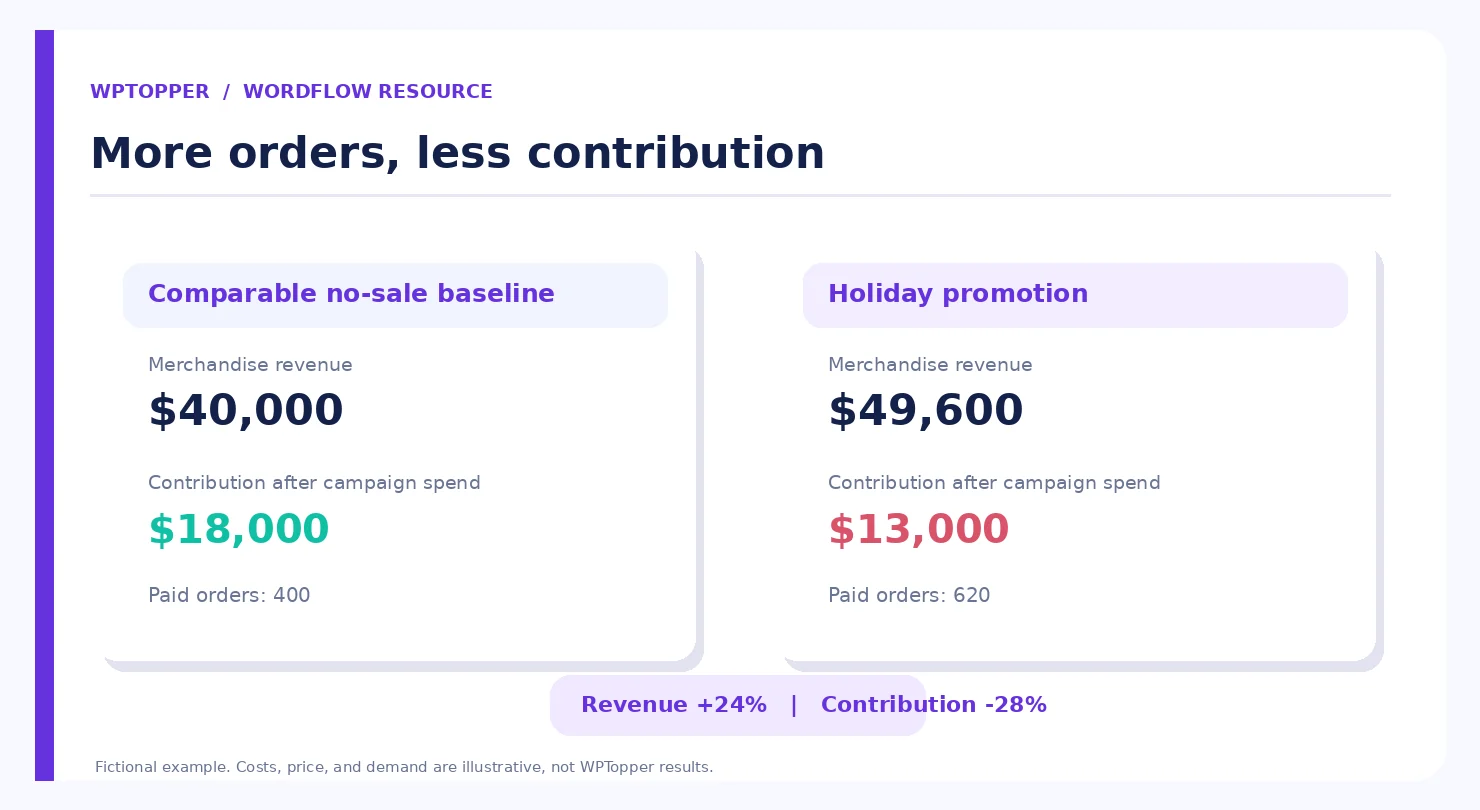
Graphic 1 placement: “More revenue, less contribution” with two side-by-side campaign scorecards using the illustrative values in the next section.
2. A holiday sale that made 24% more revenue and less money
Imagine a store selling a product for $100. Its variable cost per fulfilled order averages $55, including the costs that rise with each purchase. This is a fictional example, not a benchmark for plugin margins, and it assumes the variable cost stays at $55 during the sale.
Without a promotion, the store expects 400 paid orders in the comparable period. Revenue would be $40,000. Each order contributes $45 before fixed overhead ($100 minus $55), making total contribution $18,000.
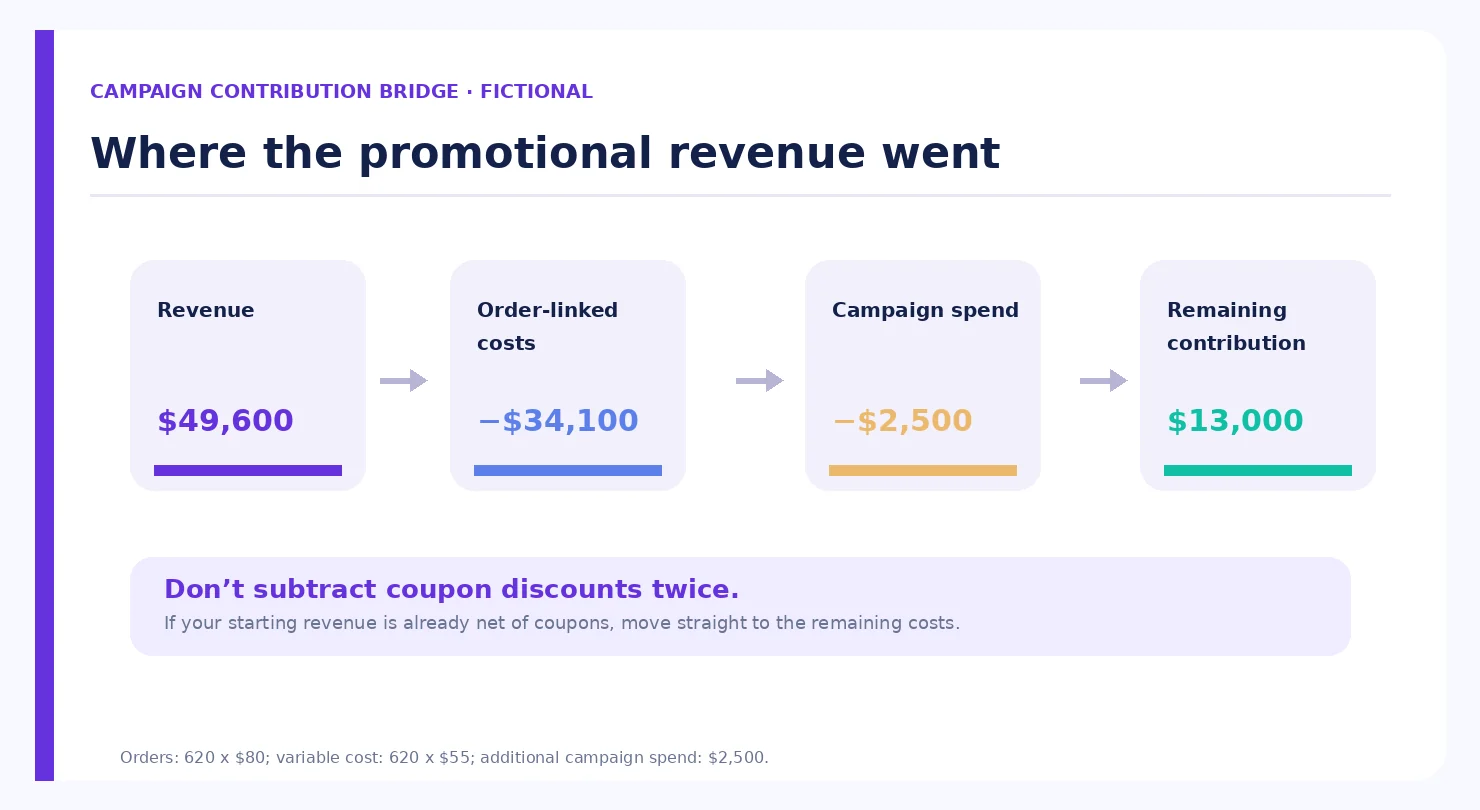
During the holiday promotion, the store offers 20% off and books 620 paid orders at $80 each. Revenue rises to $49,600, a 24% increase. But after the $55 variable cost, each order contributes only $25. Across 620 orders, that is $15,500 in contribution. Subtract the $2,500 in extra campaign costs, such as a paid placement, temporary creative help, or overtime, and the campaign contribution falls to $13,000.
| Metric | Comparable no-sale baseline | Holiday sale |
|---|---|---|
| Paid orders | 400 | 620 |
| Price paid per order | $100 | $80 |
| Merchandise revenue | $40,000 | $49,600 |
| Variable cost per order | $55 | $55 |
| Contribution before campaign spend | $18,000 | $15,500 |
| Incremental campaign spend | $0 | $2,500 |
| Contribution after campaign spend | $18,000 | $13,000 |
Revenue is up 24%. Orders are up 55%. Contribution after campaign spend is down about 28%. The sale drove attention and activity, but with those assumptions it did not improve near-term economics.
Does that mean 20% off was inherently wrong? No. Perhaps the store cleared obsolete inventory that would soon become worthless. Perhaps some of those 220 extra customers will renew a plugin license next year. Perhaps the no-sale baseline was badly estimated. Those are separate hypotheses that need evidence; they are not reasons to automatically label the campaign profitable.
Also note that a real payment processor may charge a percentage of the discounted amount, fulfillment costs might vary by order composition, and refunds might arrive later. The $55 assumption intentionally keeps the example readable. Your own model should use the actual cost structure.
3. Calculate the break-even order volume before the sale
A straightforward contribution equation helps you decide how much extra volume is required when you cut the price.
Contribution per order = net selling price − variable cost per order.
Break-even order multiplier = ordinary contribution per order ÷ promotional contribution per order.
In the example above, an ordinary $100 order contributes $45, while a discounted $80 order contributes $25. The multiplier is 45 ÷ 25 = 1.8. With no additional campaign costs, you would need 720 discounted orders to match the $18,000 contribution generated by 400 full-price orders. If the campaign adds $2,500 in extra spend, you need 820 promotional orders: ($18,000 + $2,500) ÷ $25.
The actual campaign delivered 620. Now you know where the gap came from.
This is not a claim that all discounts require 80% more sales. If your cost is different, the multiplier changes. For digital products with relatively low order-linked costs, the effect may be smaller. For physical products with merchandise and delivery costs, it may be larger. If the promotional contribution per order is zero or negative, simply selling more at that price will not rescue contribution economics.
Practical move: Decide the maximum discount and minimum allowable contribution before announcing the campaign. Add a stop or review threshold if refund rates, support volume, or checkout failures exceed expectations.
4. Separate order-linked costs from costs that happen anyway
Campaign reporting gets messy because teams talk about expenses using different definitions. A developer might say the marginal cost of another plugin license is nearly zero. Finance might point to support staffing, transaction fees, cloud services, a customer-success team, and chargebacks. Both may be describing different time horizons.
For WordPress software, consider payment and reseller fees, affiliate commissions on qualifying orders, licensing infrastructure costs tied to activations, actual incremental support or onboarding effort, expected refunds, and any bonus you promised during the sale. Annual license renewals deserve their own forward-looking view. A first-year deal that attracts low-activation customers may create more support tickets than a full-price customer cohort.
For a WooCommerce shop selling goods, include the actual item cost, packaging, shipping subsidy, warehouse picking, payment charges, returned-product handling, and any per-order bonus. If a bundle changes the items bought, do not simply assume the usual variable cost remains unchanged.
Some costs should be considered at the campaign level instead: extra ad placements, sponsored newsletter fees, temporary designer hours, influencer compensation, specialized email-service charges, or extra staffing specifically approved for the promotion. Attribute these consistently so the same expense is not counted once per order and again as a lump sum.
Fixed overhead matters to overall business profitability, but a short-run discount decision becomes harder to interpret when someone arbitrarily spreads a year’s office rent over one holiday weekend. Use contribution for the campaign decision; reconcile to your finance team’s full profit view separately.
5. Discounts affect future renewals, not just today’s order
WordPress plugins, themes, memberships, and hosted services often make the first payment only the beginning of the customer relationship. A first-year promotion and a recurring discount can produce the same initial checkout price but very different economics across two or three years.
Take a fictional plugin priced at $120 per year. Suppose its first-year contribution would normally be $90 after variable costs, but only $66 after a 20% introductory discount. These are illustrative contribution values. If 60% of the acquired buyers renew one year later and the normal renewal contribution is $90, expected two-payment contribution for the introductory-discount customer is $66 + 0.60 × $90 = $120. If the discount also applies to the renewal and the contribution there is only $66, expected two-payment contribution is $66 + 0.60 × $66 = $105.60.
Neither number is a lifetime-value estimate. Customers may renew for multiple years, upgrades may occur, support usage may rise, and churn can change for discounted cohorts. Still, the difference illustrates why the finance owner must approve whether the advertised coupon is first-term only or recurring. If you publish renewal information, ensure it matches the billing platform’s behavior.
Don’t add hypothetical future renewal revenue to today’s cash report as if it were collected. Keep observed results and projected customer value in separate rows, with the assumptions plainly stated.
6. What coupon reports reveal, and what they never reveal
In WooCommerce, go to Analytics → Coupons to compare the orders and discount amounts associated with specific codes. The report also supports examining multiple coupons. The Analytics → Revenue view shows gross sales, returns, coupon discounts, net sales, taxes, shipping, and total sales. The Orders report can filter by coupon code, customer type, and refunds. These can show where discounts were used and which products or orders were involved. (Sources: WooCommerce Coupons, Revenue, and Orders reports; see references below.)
In FluentCart, go to FluentCart → Reports and review the Revenue and Sales views, checking the documented controls for date comparison, product filters, and payment-type breakdowns. The reporting hub also includes refund, subscription, and order-source views, though you should check the installed version and license before promising a specific tab or filter. (Sources: FluentCart Revenue, Sales, and Reporting overview; see references below.)
Neither platform’s report can automatically answer this question: Would that buyer have purchased at the regular price anyway? A coupon being present on a completed order does not establish that the coupon caused the order.
Think of an existing customer who has been waiting all month to renew. If they discover a public 30% discount on checkout day, the coupon report will show another discounted order. It won’t tell you whether the customer was already committed to purchasing.
This is why “revenue attributed to coupon BF2026” should not be presented as “incremental revenue generated by coupon BF2026.” Those are different statements.
7. Estimate incremental profit, not just attributed sales
The cleanest approach, where lawful and practical, is a randomized holdout: comparable eligible customers are assigned either to an offer group or a control group without the incentive. Make sure the groups are similar, the timing and checkout paths are consistent, and no one receives conflicting promises. A/B-testing tools or CRM audience randomization can help, but you still need business and consent safeguards.
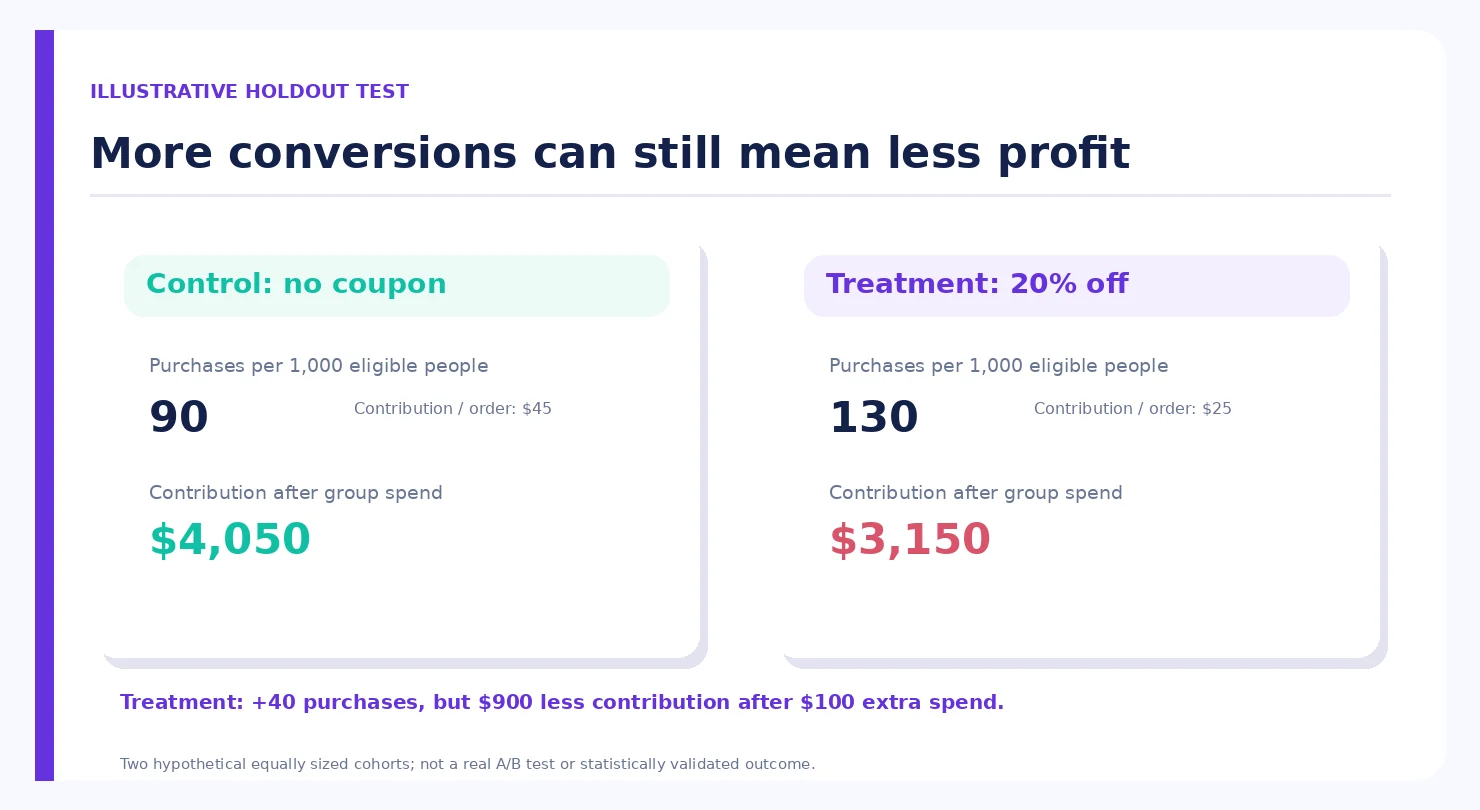
Consider a fictional experiment with 1,000 eligible people in each group. Ninety people in the no-coupon control buy at a $45 contribution per order, generating $4,050. In the discount group, 130 buy at $25 contribution per order, generating $3,250. If the promotional segment required another $100 in incremental spend, the contribution is $3,150. The offer yielded 40 more observed purchases per 1,000 eligible recipients, yet contribution is $900 lower than the control after the extra spend.
That is a lesson about this made-up example, not evidence about actual WordPress shoppers. A real experiment should use a sufficiently large sample, account for random variation, define the outcome before launch, and avoid presenting tiny differences as causal proof. The value is not just the extra count of orders, but the incremental contribution per eligible customer.
If you cannot randomize, build a cautious baseline: compare similar periods adjusted for seasonality, traffic mix, inventory availability, site changes, and major launch announcements. Call the result an estimate, not proof. A Black Friday week cannot simply be compared with a quiet August week and treated as the discount’s effect.
Graphic 2 placement: “More conversions can still mean less contribution” showing a no-coupon group versus a discount group with the illustrative values above.
8. Attribution: track the journey without calling a click a sale
A WordPress deal publisher may know when someone clicked a “View Offer” button but not whether the customer purchased on a third-party vendor site. WPTopper should report those actions accurately: outbound offer clicks are not completed purchases. A vendor or affiliate partner may be able to provide valid attributed order data, subject to its terms, but that still does not automatically prove incremental profit.
For a store you operate, GA4’s recommended ecommerce events can record purchase and refund with a transaction ID, currency, item data, and coupon information. Google also documents item-level discount values and the distinction between order-level and item-level coupons. Its discount guidance warns that the item discount parameter should be an amount, not a percentage, and that the price parameter should reflect the actual amount paid per unit to keep revenue metrics correct. (Sources: Google Analytics ecommerce and discount measurement; see references below.)
Use consistent external-campaign UTM parameters on email and partner links. Track relevant promotion views and selections if you have implemented GA4 view_promotion and select_promotion events. Do not append UTM parameters to internal links simply to count clicks, because that can disrupt attribution. Use normal click events for internal navigation.
Before taking any chart at face value, reconcile analytics purchases to paid store orders: test orders removed, duplicated purchase events handled, currency consistent, refund events present, and transaction IDs stable. If a customer pays on another domain, verify that the cross-domain journey has not lost attribution. GA4 reports are a diagnostic layer, not a replacement for finance and payment records.
9. Refunds and delayed returns can rewrite a successful weekend
One reason marketing teams celebrate too soon is timing. An order can be placed during Black Friday and refunded in December. WooCommerce’s Analytics documentation notes that refunds appear on the date the return occurred, not necessarily the original purchase date. That makes a narrow November-only report and a later report of the same buyer cohort tell different stories. (Source: WooCommerce Analytics definitions; see references below.)
For a complete campaign assessment, prepare two views. A transaction-period view tells you what revenue and orders were recorded during the sale dates. A cohort follow-up view starts with customers acquired in that period and then tracks their subsequent refunds, support issues, activation, and renewals over a defined window. Both are useful. Don’t secretly move returns into whichever month makes the graph look better.
For physical goods, capture the cost of returns as well as the refunded item amount. For digital subscriptions, examine cancellations and refund requests after the first onboarding period. A sudden surge in sales with heavy refunds can be a sign of poor product fit or confusing discount terms, not just unlucky buyers.
10. The ten-metric holiday campaign scorecard
Make a scorecard that your marketing lead, store operator, and finance owner can all understand. Every metric needs an owner, source, date range, and definition.
| Metric | What to record | Where to start |
|---|---|---|
| Eligible paid orders | Completed non-test orders, with status rule | Store Orders report |
| Gross merchandise sales | Item value before relevant deductions | Store Revenue report |
| Coupons/discounts | Discount amount and codes used | Coupon/Revenue report |
| Refunds and returns | Amount and later follow-up, with timing | Refund report/payment records |
| Net merchandise sales | Gross minus platform-defined returns and coupons | WooCommerce Analytics or reconciled store export |
| Average order value | Net sales / counted orders, consistently | Store analytics |
| Variable cost | Item, fees, incremental support, fulfillment, commissions | Accounting and operations |
| Campaign spend | Incremental ad, creative, and promotion expenses | Invoices/budget |
| Contribution after campaign spend | Net collected sales less costs in the chosen model | Finance worksheet |
| Estimated incremental lift | Difference against holdout or credible baseline | Experiment or documented estimate |
If you run a plugin subscription business, add customer activation, first renewal, and support contacts per acquired buyer to the follow-up sheet. Do not hide them inside an invented single “customer lifetime value” score.
The scorecard is designed to reduce arguments about which number is the right one. It should not falsely promise precision when costs are estimated or data is missing. Mark estimates plainly, and carry the uncertainty into the decision.
Graphic 3 placement: A compact “revenue → costs → contribution → incrementality” reporting waterfall, with each data source labeled.
11. A 45-minute post-sale review that leads to better decisions
Minutes 0–10: reconcile the order data. Choose your campaign dates and time zone. Export paid orders from WooCommerce or FluentCart, check status filters, and exclude tests and duplicate imports. Verify currency and billing periods. If a source is missing, list the limitation instead of guessing.
Minutes 10–20: rebuild the financial bridge. Start with the revenue definition you actually used. Subtract coupon discounts, returns, refunds, direct order-linked costs, and campaign-specific spending without double counting. Calculate per-order and total contribution. Compare against the no-sale model prepared before launch.
Minutes 20–30: separate audiences and offers. Break out new versus existing buyers, key product and license tiers, first-time purchases versus renewals, and orders using a coupon versus orders without one. A storewide average can disguise the fact that one profitable upgrade offer subsidized a weaker broad discount.
Minutes 30–40: test the explanation. Ask whether traffic source, seasonality, stockouts, pricing changes, payment failures, or competitor promotions could explain part of the outcome. Review the holdout if you had one. Where you did not, describe the estimate and the uncertainty.
Minutes 40–45: decide what changes. Keep the offer that attracted qualified buyers at an acceptable contribution. Narrow the offer that mostly discounted existing customers. Fix the checkout or licensing copy that triggered support complaints. Set a reminder to recheck later refunds and renewals before signing off on the final campaign assessment.
Three sentences make a useful executive readout: “What happened? What did we actually keep? What will we do differently?” If your recap is only a chart of revenue up 80%, you have answered one sentence out of three.
12. Common reporting mistakes to avoid
Mixing taxes and shipping with merchandise revenue. If you include taxes collected on behalf of an authority in one period but not another, comparisons become misleading. Use the platform’s documented definitions and keep accounting rules consistent.
Treating discounts as a cost twice. If the net-sales value you start from already deducts coupon discounts, don’t subtract the same discount again when calculating contribution. Conversely, if you begin from gross item value, the promotion needs to be deducted once.
Counting attributed coupon sales as incremental. A customer might have paid full price. Compare against an appropriate baseline or holdout when possible.
Counting a larger order total as a better margin. Bundles can raise AOV while lowering contribution if their added components and support costs are high.
Calling a published dashboard a finance-grade profit statement. A revenue report often excludes costs that your finance team has to provide.
Ignoring delayed refunds or renewals. The customer relationship doesn’t close when the Black Friday banner disappears.
Letting the analytics platform choose the campaign conclusion. Store, GA4, CRM, affiliate, and payment reports answer related but different questions. Reconcile instead of choosing the largest number.
13. What this means for WPTopper deal listings
WPTopper’s readers need honest prices, license details, and current discounts; its editorial team needs honest measurement. If a visitor clicks a verified WordPress deal and finishes checkout on the developer’s website, WPTopper should not call that a sale unless the merchant or affiliate program provides reliable confirmation. A high outbound click-through rate can still be a useful sign that the deal page helped shoppers compare options, but it is a click metric, not profit.
If you’re evaluating a WordPress tool for your own site, compare its real licensing, support, and renewal terms rather than choosing by the biggest badge on a seasonal banner. Browse WPTopper’s current WordPress product guidance and check the vendor’s checkout before making the purchase.
Frequently asked questions
Does higher Black Friday revenue mean higher profit?
No. More orders or net sales can coexist with lower contribution if the discount, variable costs, refunds, and campaign spend rise faster than revenue. Check your cost and margin model before calling the campaign profitable.
What is the difference between gross sales and net sales in WooCommerce?
WooCommerce Analytics defines gross sales as product sales before coupons, refunds, taxes, and shipping, while net sales subtracts returns and coupon discounts. Its total sales metric adds taxes and shipping to net sales. These labels are specific to its reporting definitions, not equivalent to net business profit.
How do I calculate profit from a discount campaign?
Choose a consistent net merchandise revenue basis, subtract costs that vary with orders and campaign-specific spending, then compare contribution with a realistic no-sale baseline. For full business net profit, reconcile your model with finance’s allocation of fixed costs and other expenses.
Does a coupon report prove the discount caused a sale?
No. Coupon use shows which orders redeemed the code. To estimate extra sales caused by the promotion, use a randomized holdout when feasible or a cautious comparison adjusted for competing factors.
Can Google Analytics 4 track coupon performance?
GA4 supports purchase, refund, order-level and item-level coupon parameters, plus item discount amounts when ecommerce events are correctly implemented. It can help attribute events and investigate campaigns, but it cannot establish gross margin or incremental profitability from tracking alone.
Should I evaluate a WordPress plugin’s first-year discount differently from a recurring discount?
Yes. First-term and recurring discounts change cash flow and expected contribution in different ways. Keep initial observed revenue distinct from modeled renewals, and verify actual licensing and billing terms before publishing an offer.
Which reports should I use in WooCommerce and FluentCart?
Start with the relevant Revenue, Orders, Coupon, or Sales reports documented for your installed platform. Check the installed plugin version, applicable add-ons, and field definitions. Combine store exports with payment, support, and expense records before claiming profit.
Sources and further reading
- WooCommerce — Analytics and Sales Reports: https://woocommerce.com/document/woocommerce-analytics/
- WooCommerce — Revenue Report: https://woocommerce.com/document/woocommerce-analytics/revenue-report/
- WooCommerce — Coupons Report: https://woocommerce.com/document/woocommerce-analytics/coupons-report/
- WooCommerce — Orders Report: https://woocommerce.com/document/woocommerce-analytics/orders-report/
- FluentCart — Revenue Report: https://docs.fluentcart.com/guide/reporting-analytics/revenue-report
- FluentCart — Sales Report: https://docs.fluentcart.com/guide/reporting-analytics/sales-report
- FluentCart — Reporting & Analytics: https://docs.fluentcart.com/guide/reporting-analytics/
- Google Analytics — Set up ecommerce events: https://support.google.com/analytics/answer/12200568
- Google Analytics Developers — Apply a discount: https://developers.google.com/analytics/devguides/collection/ga4/apply-discount
- Google Analytics Developers — Measure ecommerce: https://developers.google.com/analytics/devguides/collection/ga4/ecommerce
Research note: All campaign figures, financial models, hypothetical cohorts, and graphics in this guide are fictional examples. Platform guidance is based on referenced documentation; no authorized WPTopper, WooCommerce, or FluentCart live store data was accessed or tested for this draft. Verify report screens, offers, affiliate relationships, and final publication links before publishing.
For the offer behind this workflow, review WordPress discount strategy, coupon codes, price cuts, and bundles.


Leave a Reply