
You click a promising WordPress plugin deal. The card says 40% off, the countdown has six hours left, and the purple “Get Deal” button is hard to miss.
What you can’t find is the price you’ll pay next year. There’s no indication whether the offer includes one site or unlimited sites. A small footnote says the discount applies to “selected plans,” but those plans aren’t named. You click anyway, and the price changes at checkout.
Even when the discount is real, that’s a poor buying experience. The buyer has to do the seller’s homework.
A good WordPress deals page does the opposite. It gives someone enough information to decide whether a plugin, theme, hosting plan, or software bundle fits their project, then makes it straightforward to claim an offer that actually works. The job isn’t to produce a click. It’s to make the click feel informed.
This guide is for WordPress site owners building promotional landing pages and for editorial deal platforms such as WPTopper that send readers to external vendors. Those two page types have different responsibilities; we’ll keep them separate instead of pretending every deals site owns the checkout.
For a broader foundation, User experience basics explains how to make a visitor’s next step clear.
Key Takeaways (TL;DR)
- Show the real current price and genuine savings together; a big percentage is not enough information to make a decision.
- State exactly which license or plan is included, how long the offer lasts, and what the buyer will pay on renewal.
- Explain how to claim the deal and which website handles checkout, then use a clear, relevant CTA.
- Make comparison, conditions, navigation, and mobile layouts easy to understand; verify offers before marking them active.
Quick answer: what belongs on a trustworthy deals page?
A buyer should be able to answer these questions without opening three extra tabs:
- What exactly is the product and who is it for? One plain-English use case beats a wall of feature badges.
- What does it cost today? Show a verified currency, current payable price, and the genuine reference price if you claim savings.
- What is included? Explain the license tier, site limits, included features, updates, and support.
- What will it cost later? State subscription renewal terms or the limits of a one-time/lifetime purchase.
- What makes the offer valid? Provide eligibility, coupon requirements, exclusions, and a true end date when one exists.
- Who is selling it? Identify the vendor and whether the customer completes checkout on the vendor’s website.
- Can I trust the recommendation? Show sourced evidence, candid limitations, and a clear affiliate disclosure if applicable.
- Where does the button take me? Use a descriptive CTA with a verified destination, not a generic “Buy Now” button that leads somewhere unrelated.
Treat that list as a promise to your readers. The rest of the page should substantiate it.
1. Put the real price next to the discount, not five sections away
The easiest pricing mistake is also one of the most common: making the percentage louder than the actual amount. “Save 40%” means little until the buyer sees 40% of what?
Baymard Institute’s product-page usability research found that poorly located or unclear prices can send shoppers searching around a page or away from the purchase altogether. Its guidance is especially relevant to deals sites: keep the price and the discount visually connected, not separated by a banner, gallery, and testimonial carousel.
For a fictitious annual WordPress plugin, a useful offer block might read:
Single-site license — $72 for the first year
Regular annual price: $120. Save $48 (40%) on the first payment.
Renews at $120 per year, unless cancelled or a different offer applies.
Offer requires code
EXAMPLE40. Illustrative example, not a real coupon.
The discount arithmetic is straightforward: ($120 − $72) ÷ $120 = 40%. What matters is that the reference price is genuine, the current price is correct, and the scope of the savings is explained.
The US Federal Trade Commission’s former-price guidance warns against inflated prices invented to make a later markdown look dramatic. Different markets have their own price-display requirements, so teams selling internationally should check the applicable rules rather than assuming one US example covers everything.
Watch for an innocent-looking “from” price
Suppose a landing card says “From $59” but the plan most customers need is $189. That may be a truthful entry price, yet it is incomplete if the page doesn’t say which plan starts at $59. Identify the qualifying tier beside the figure. For a directory like WPTopper, do not imply that all license tiers share the advertised discount.
Visual placement: Put a compact price block immediately after the product’s name and primary use case. If the page has a comparison table, repeat the price and renewal information in each relevant row, not only in the hero.
2. Make the license tier impossible to misread
A theme for one website and a plugin license for 50 websites may share almost every feature but serve different customers. Site limits, client transfer rights, staging activations, updates, and support can outweigh the dollar savings for an agency.
Compare these fictional offers:
| Offer detail | Personal license | Agency license |
|---|---|---|
| Websites | 1 production site | 25 production sites |
| Promotional first payment | $72 | $249 |
| Standard renewal | $120/year | $349/year |
| Updates | During active subscription | During active subscription |
| Support | Standard ticket support | Priority queue, if contract includes it |
| Best fit | A single WordPress website | Teams managing many client sites |
These prices and terms are invented to illustrate a layout, not a published offer for any vendor. Your real table must use the vendor’s approved license terms, and it should say whether the plans differ only by site count or also by features and support.
Don’t turn the comparison into a fifty-row spreadsheet. Pick five to seven differences people actually ask about. Give special attention to what they cannot easily change after purchase: licensed sites, migration rights, subscription commitments, and data access.
A buyer considering a membership plugin, for example, should not need to infer whether a plan supports payments, recurring billing, or the specific integrations they require. A card labeled “Pro” is not a specification.
A useful test for the copy
Cover the price and ask a colleague to identify the customer for each plan. If all three tiers sound the same, the copy has not explained why the options exist. Restore the prices only after the differences are clear.
3. Show the next payment as clearly as today’s payment
The most expensive surprise on a software deals page often arrives a year later.
For a first-year discount, state the first charge, the renewal amount, billing interval, and any automatic renewal behavior the vendor actually uses. For a recurring discount, identify whether it continues on every eligible payment or stops after a certain number of renewals. For a lifetime deal, explain the actual lifetime entitlements and any separate support or update limits. Don’t describe a license as “forever updates” unless the vendor’s terms say exactly that.
WooCommerce’s subscription documentation distinguishes the recurring price from signup fees, trial periods, and optional sale pricing. FluentCart’s product-pricing documentation similarly distinguishes one-time products, subscription pricing, and variations. The details of the checkout implementation differ; the buyer-facing principle doesn’t.
Consider two truthful but very different lines:
- “$79 today, then $129 every 12 months. Cancel renewal according to the vendor’s terms.”
- “$79 on every annual renewal while this recurring discount remains valid. Check the vendor’s terms for duration and eligibility.”
Neither is inherently better. Both are better than “Only $79!” with no explanation.
If the renewal amount depends on the selected license tier, update it immediately when the buyer changes plans. On a deal-directory listing, show the last verified terms and link to the seller’s current pricing page. The vendor’s checkout remains authoritative for what will actually be charged.
4. Tell buyers exactly how to claim the deal
Some WordPress promotions are visible sale prices. Others require a code, a special URL, a qualifying email address, a minimum spend, or a specific product variation. A good page identifies the redemption method before the user leaves.
Use a small “How to claim” line near the primary CTA:
Example A — public sale: “The eligible price is displayed on the vendor’s website. No code required.”
Example B — manual code: “Copy code EXAMPLE40, choose the eligible single-site plan, and apply the code at checkout.”
Example C — partner link: “Open the partner offer link; the vendor checks the coupon’s eligibility during checkout.”
These are examples, not live codes or validated WPTopper offers.
WooCommerce core supports standard coupons but does not automatically apply them without an extension or tested customization. FluentCart Pro documents coupon restrictions and coupon-bearing instant-checkout links in supported flows. Never promise that a coupon is automatically applied just because a marketing button contains a code.
What if the coupon fails?
Prepare useful fallback copy. “This deal may have expired or your chosen plan may not qualify. Check the current seller price” is more helpful than letting someone spend twenty minutes guessing. Your deals platform should have an easy way to report an expired offer so the listing can be updated.
Visual placement: Put eligibility and redemption method directly below the price/renewal block. Don’t bury them inside an accordion titled “Terms and conditions.”
5. Explain which website will actually handle payment
A WordPress deals directory and a WordPress product vendor aren’t the same kind of website.
If WPTopper lists a plugin and sends visitors to the developer’s store, say so: “Opens the vendor’s website. Pricing and checkout are handled by the seller.” This tiny sentence does a lot of work. It tells readers who is responsible for collecting payment, distributing the license, and providing purchase support.
If the deal page belongs to the actual seller, the CTA should instead identify the next step: “Choose license,” “Add to cart,” or “Continue to secure checkout.” The page can show approved payment information and relevant refund and support terms without pretending that a trust icon is proof of security.
Do not display payment badges, review logos, or “official partner” claims that aren’t substantiated. A deal-directory page can build confidence by being clear about who it is and what it has verified, without impersonating the merchant.
6. Give the product one honest reason to exist on the page
“Fast, secure, powerful, easy to use” could describe half of the WordPress ecosystem. When every deal card sounds like that, shoppers compare only the size of the discount.
Try this instead:
For appointment-based businesses: A booking plugin that lets customers schedule sessions and receive confirmations from your WordPress site. Check whether your required calendar, payment gateway, staff scheduling, and reminders are included in the promoted tier.
It’s specific enough to attract the right reader and honest enough not to invent features. A CRM listing might focus on customer segmentation and email workflows. A tables plugin might emphasize searchable directories or product comparisons. A video player might focus on self-hosted performance, analytics, and access controls.
A good deal page shouldn’t recreate the vendor’s entire homepage. It should help someone decide whether it’s worth reading the vendor’s full details.
Include at least one meaningful limitation
A note such as “Best suited to WordPress-first teams; check its support for external CRMs before switching” can be more useful than ten glowing badges. If the product requires a paid extension to achieve the use case described, make that visible. If the offer excludes add-ons, don’t bundle their capabilities into the discounted headline.
A deals platform builds repeat traffic when readers learn it won’t hide important trade-offs just to encourage a click.
7. Use evidence, not decorative trust
Trust is not a row of five stars by default.
If a product has WordPress.org reviews, you can link to the official directory listing and explain what those reviews measure. But the rating belongs to the product, not automatically to a coupon offer or the deal website. If you display a rating, keep its source, scale, review count, and freshness clear. Never fabricate reviews or copy a review count from an unrelated version.
Useful trust signals include:
- An identifiable developer or product company.
- A current official website and up-to-date product documentation.
- Compatibility and maintenance information for the specific product version.
- A link to the vendor’s refund and support policy.
- Screenshots or examples demonstrating actual product workflows, correctly attributed.
- An editorial note explaining what WPTopper verified and when.
For practical buying criteria, WPTopper already has a published How to Choose a WordPress Plugin checklist and a Free vs Premium WordPress Plugins guide. Those pages make useful contextual links because they help visitors judge product fit, not just price.
Affiliate links need a plain-English disclosure
The FTC’s endorsement guidance advises publishers to explain material affiliate relationships clearly and conspicuously. A disclosure placed close to the relevant recommendation is more useful than a vague “some links may be affiliated” sentence hidden on a policy page.
A readable example: “WPTopper may earn a commission if you buy through this link. That does not change your price.” Only say the last sentence if it is true for the actual arrangement. Any commercial relationship should be described accurately.
For WPTopper publishing, sponsored/affiliate external links should receive rel="sponsored nofollow"; other non-WPTopper links should receive rel="nofollow" under the project’s editorial policy. That HTML attribute is not a substitute for visible disclosure.
8. Write the CTA for the destination, not for excitement
“Buy Now” sounds decisive, but what happens when a click opens a third-party store with three different license plans? The label has promised more certainty than the destination provides.
Choose the CTA by the actual destination:
| Destination | Better CTA | Why |
|---|---|---|
| Vendor product details | View current offer | Buyer can check available plans |
| Vendor’s eligible license checkout | Get this license | The exact tier has been verified |
| WPTopper’s product directory | Explore WordPress products | Browsing, not a specific guaranteed discount |
| WPTopper’s editorial review | Read our full review | Information before purchase |
| Vendor pricing comparison | Compare license plans | No promise that one plan is preselected |
Never send a “Claim 50% Off” button to a generic homepage where there’s no matching deal. If the product changes its landing URL, the page owner should update the CTA rather than assume the redirect is good enough.
Place the CTA after answers, not before them
Use one main CTA near the first complete offer block, another after the license comparison if it genuinely helps, and a final CTA after objections have been answered. Avoid scattering identical buttons into every short paragraph. On mobile, a sticky CTA can be helpful only if it doesn’t cover pricing, disclosures, form fields, or the back/navigation controls.
The right number of buttons is the number needed for navigation, not an arbitrary conversion formula.
9. Mobile visitors should get the same facts without pinching and scrolling sideways
A desktop deal comparison can become an unreadable table on a phone. Resist the temptation to shrink five columns until the type becomes microscopic. Stack the main plan cards, put the selected license’s price and renewal amount together, and give the full comparison a clearly labeled expandable section.
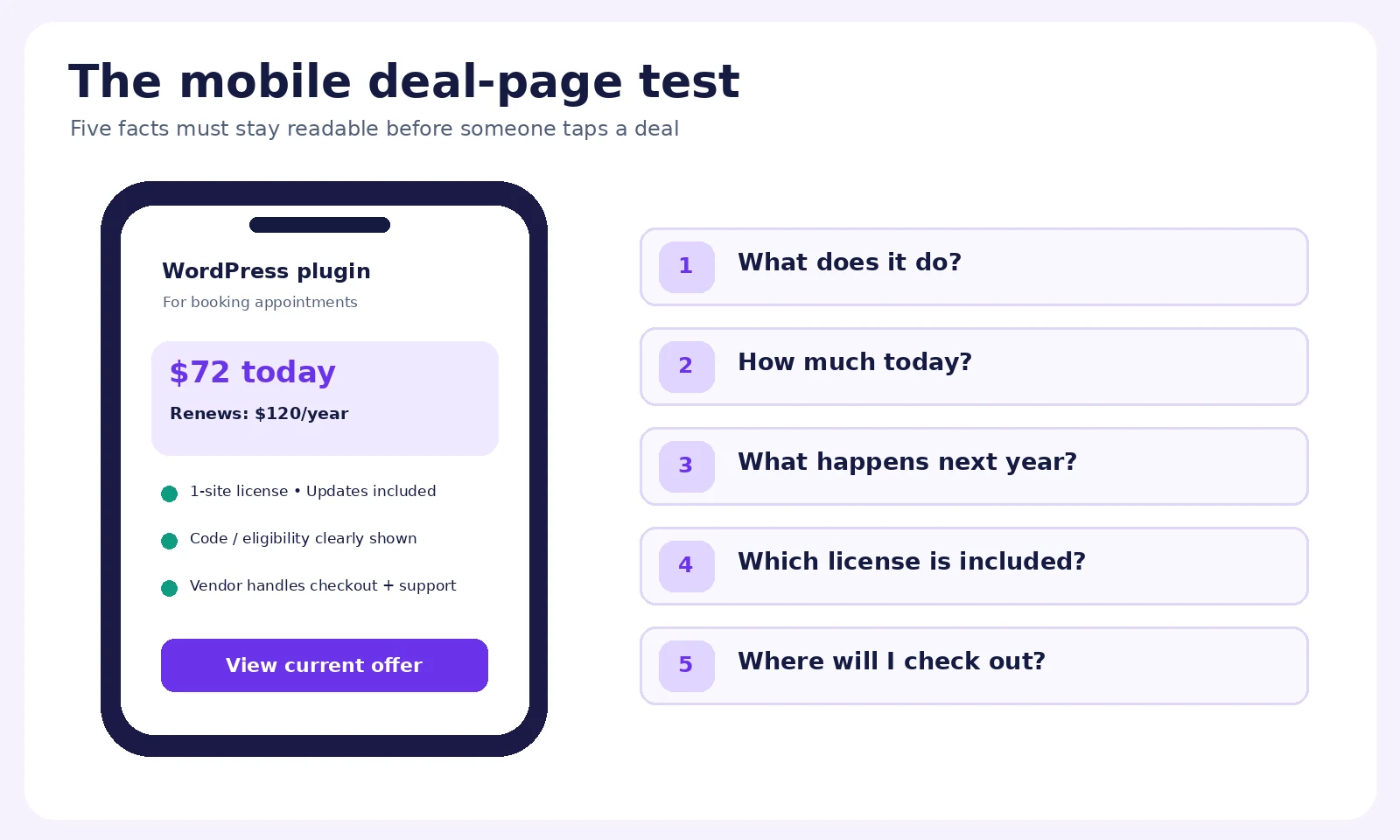
Mobile QA is about the buying decision, not merely responsive screenshots. Ask whether a reader can see:
- Product name and one-sentence fit.
- Verified current price and what it’s compared against.
- License scope and renewal amount.
- One clear CTA and where it leads.
- Coupon requirement, affiliate disclosure, and any essential exclusions.
Try the page with a keyboard and assistive technology, not only a mouse. Descriptive link labels, meaningful image alt text, visible focus states, and honest button states matter. If the price changes when a user selects a license, announce it accessibly and keep the CTA’s destination aligned with that choice.
Visual placement: Include a desktop-to-mobile wireframe showing how the offer facts stay together as the layout compresses.
10. Don’t make the most important facts depend on a popup
Countdowns, exit-intent panels, notification bars, trust widgets, and coupon-copy popups can all serve a purpose. They can also bury the information a customer came to find.
A visitor should not have to close an email signup modal to discover whether a plugin renews annually. Nor should the only explanation of exclusions appear in a floating tooltip too small to use on mobile. If an offer genuinely ends at a specific time, show the time zone and update the page when it ends. A timer that resets every visit communicates false urgency.
For an editorial directory, expired deals should not vanish without context. Replace the expired claim with “Offer ended; check current pricing” and keep useful product information accessible. Record when the offer was last verified. You may retain a genuinely helpful historical comparison while making it unmistakable that the old code is not active.
11. Separate deal-page SEO from selling-page schema
This is particularly important for WPTopper.
Google’s merchant-listing guidance says those experiences are for pages where users can actually purchase a product, not pages that only link visitors to other sellers. A directory or editorial affiliate page therefore should not mark itself up as though WPTopper is the merchant just to chase a shopping rich result. Product-snippet guidance is also geared toward pages focused on one specific product or variants, not broad catalogs.
For this educational article, start with accurate BlogPosting or Article markup when your SEO system supports it, plus normal BreadcrumbList and organization data as appropriate. For WPTopper’s individual editorial reviews, assess whether any product review markup meets Google’s separate requirements. Never invent prices, ratings, availability, or Offer markup to fill schema fields.
Keep visible content and metadata in sync. A blog H1 discussing deal-page design is not the place to attach a fictitious $79 software offer. A deal directory listing that says “Expires tonight” should not remain indexed with the same headline after the offer ends.
How to check a deal before calling it live
The editor should verify the vendor’s current price and the precise license tier, then reproduce the offer conditions in a controlled path where possible. If no checkout access is available, describe the source and limitation clearly. A screenshot from the vendor’s old promotion email does not establish today’s availability.
12. A sample WordPress deal-page structure you can actually use
You don’t need a complicated funnel. Start with one clear page structure and remove anything that makes the buyer guess.
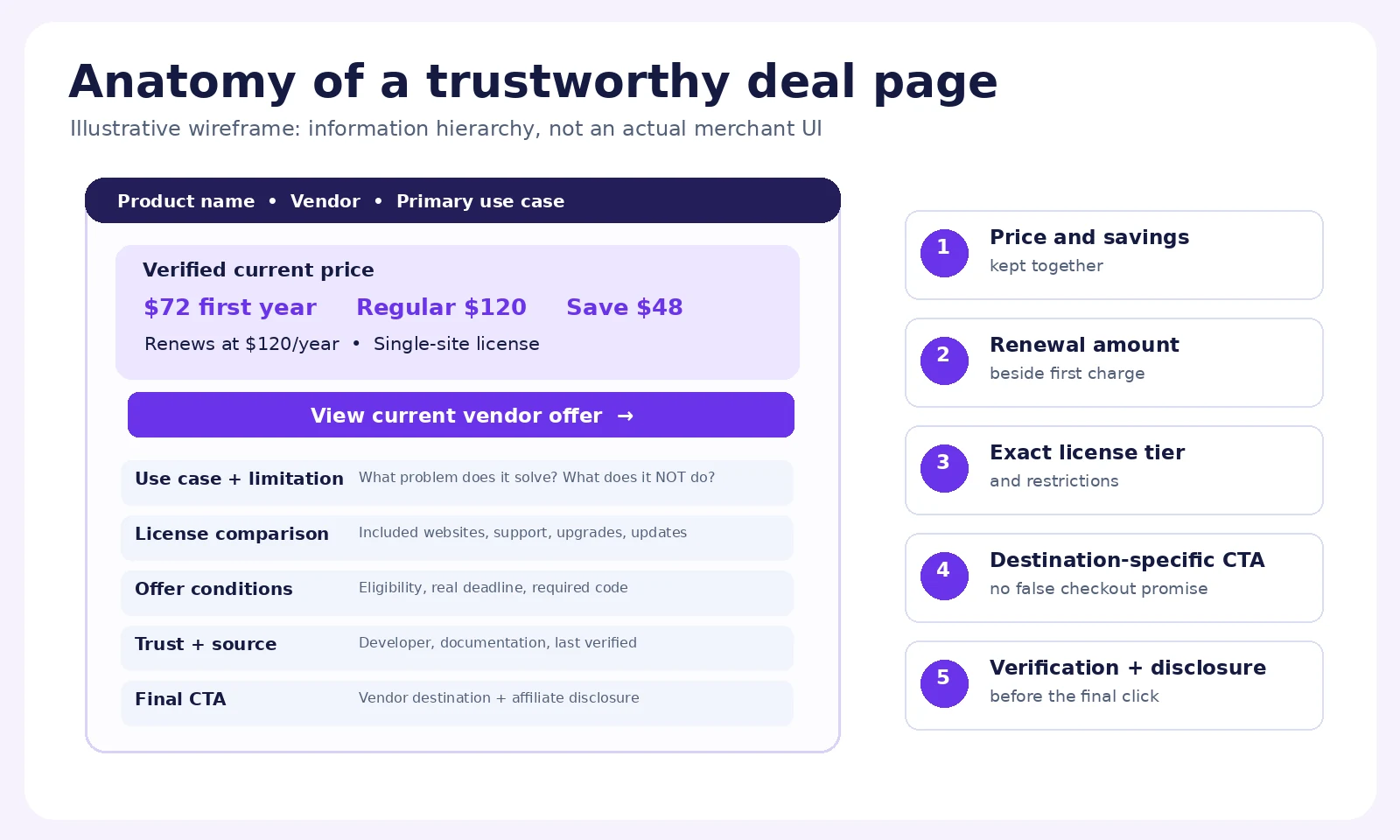
Above the fold: Product name, developer, one-sentence audience fit, current verified price, genuine regular price if relevant, savings, license name, next renewal charge, coupon method, CTA, and a short checkout-destination note.
After the first CTA: A practical description of the job this product solves and two or three proof points. Show a real screenshot or a feature example, not a generic dashboard mockup passed off as an actual product UI.
License comparison: Site count, included features, renewal pricing, support, updates, and any upgrade terms. Include a “Who should choose this?” line for each plan.
Trust and fit: Official vendor information, sourced rating if one exists, maintenance/compatibility notes, limitations, and the refund/support policy.
Offer details: Eligibility, excluded tiers, coupon instructions, start/end dates when verified, stacking, and what happens if the promotion expires.
Final decision: A destination-specific CTA, an affiliate disclosure if applicable, and answers to the two or three real objections customers tend to raise.
Visual placement: The annotated page-anatomy diagram should appear immediately after this structure. Use the image as a checklist, not as evidence that any particular live store has been tested.
13. A 15-minute audit for your next deal listing
Use this workflow on one real product instead of redesigning the entire site first.
Minute 0–3: verify the offer. Open the official seller’s page. Record the product, eligible plan, currency, current price, comparison price, renewal amount, and the last time checked. If any element is uncertain, don’t call the deal verified.
Minute 3–5: check the click path. Follow the CTA to the intended product. Does the URL land on the promised plan? Does it preserve the coupon correctly? Can a reader understand the final charge before payment? If the destination is a vendor pricing page rather than a checkout, label it that way.
Minute 5–8: read the page as a buyer. Can you understand site limits, inclusions, subscription obligations, refund/support options, and one meaningful limitation? If these facts are scattered in six accordions, reorganize them around the decision.
Minute 8–10: try mobile. Are pricing, coupon instructions, disclosures, and the CTA usable at a normal viewport? Does any sticky UI obstruct the content?
Minute 10–12: inspect trust claims. Are ratings sourced? Are product screenshots genuine? Does the company relationship match the disclosure?
Minute 12–15: check the editorial and technical handoff. Verify links, alt text, schema type, last-checked date, canonical URL, and the internal links to WPTopper’s relevant guides. Schedule an offer recheck before the published expiration.
If any test fails, fix the claim or mark the listing unverified. Do not use the success of unrelated offers as proof that this one works.
What the page should help someone decide
There is a trap in measuring deal pages only by outbound clicks. A flashy page can send plenty of people to a vendor’s checkout and still leave them confused, disappointed, or badly matched with the product. A quieter, clearer page may bring fewer clicks but better buying decisions.
Measure clicks as one useful signal, alongside broken-link reports, expired-offer complaints, return visits, engagement with license comparisons, and the quality of the destinations. If the vendor shares attributable conversion data appropriately, use it. Don’t infer a purchase simply because someone clicked “View Offer.”
A deal is valuable when the product fits the project, the terms are clear, and the saving is real. That’s the standard a WordPress deals page should meet before the button asks anyone to leave.
If you’re choosing tools for your site, browse the WordPress products featured by WPTopper and compare your options with our guides to choosing WordPress plugins and deciding between free and premium software. When new articles in this WordFlow series are published, this guide should also link contextually to the discount strategy, coupon setup, and honest-promotions articles through their verified live WPTopper URLs.
Frequently asked questions
What should a WordPress deals landing page include?
At minimum, show the product and vendor, a clear use case, the verified current price, any genuine savings comparison, exact license tier, first-payment and renewal terms, coupon instructions, exclusions, support/refund information, and a destination-specific CTA. Include clear affiliate disclosure if a recommendation generates compensation.
Should a deal page display the regular price and discounted price?
Yes when both prices are accurate and the former price is a legitimate basis for comparison. Don’t invent reference prices to make the discount appear larger, and don’t use an undifferentiated “from” price when only one specific plan qualifies.
Where should the renewal price appear?
Beside the initial promotional price and again where visitors select a license or continue to checkout. It should not be hidden in a footer or an unrelated FAQ. For a directory linking externally, verify the vendor’s current billing terms and identify the vendor as the checkout provider.
Can I use Product schema on a WordPress deals directory?
Choose schema according to the actual page. Google’s merchant-listing experience requires pages where a customer can purchase, rather than pages that only refer to another seller. Single-product editorial reviews may qualify for certain product-snippet features when their content and structured data meet Google’s guidelines. A broad deals guide shouldn’t invent a product offer just to produce rich results.
How many CTAs should a WordPress deal page have?
Enough to help someone act after they have the relevant information, usually a primary CTA near the complete offer and another near the end. Don’t force a fixed button count. Each CTA should clearly match its actual destination.
How do I verify that an external WordPress coupon still works?
Check the vendor’s current offer terms and eligible license, follow the intended link, and test the coupon in a permitted checkout path where practical. Keep the date checked in the listing. If you cannot confirm checkout application, explain the limitation rather than claiming the code is verified.
Sources and further reading
- Baymard Institute — How to Display Price Discounts on the Product Page: https://baymard.com/research-articles/product-page-price-discounts
- Baymard Institute — Current State of Product Page UX: https://baymard.com/research-articles/current-state-ecommerce-product-page-ux
- FTC — Former Price Comparisons, 16 CFR § 233.1: https://www.law.cornell.edu/cfr/text/16/233.1
- FTC — Endorsement Guides: https://www.ftc.gov/business-guidance/resources/ftcs-endorsement-guides-what-people-are-asking
- Google Search Central — Merchant Listing Structured Data: https://developers.google.com/search/docs/appearance/structured-data/merchant-listing
- Google Search Central — Product Snippet Structured Data: https://developers.google.com/search/docs/appearance/structured-data/product-snippet
- WooCommerce — Creating Subscription Products: https://woocommerce.com/document/subscriptions/creating-subscription-products/
- FluentCart — Configuring Product Pricing & Variations: https://docs.fluentcart.com/guide/product-types-creation/configuring-product-pricing
- FluentCart — Creating and Managing Coupons: https://docs.fluentcart.com/guide/marketing-sales-tools/creating-managing-coupons/
Research note: The example prices, coupon codes, license comparisons, and illustrative page wireframes in this article are fictional teaching examples. They are not live WPTopper deals or independently tested store interfaces. Confirm the relevant details before launching your own campaign.



Leave a Reply