
The first sign of a rushed Black Friday campaign usually isn’t a missed deadline. It’s a perfectly good promotional email sending people to a checkout that isn’t ready for the offer.
Someone sees “30% off,” adds a WordPress plugin to the cart, and discovers the code excludes the license they wanted. Another customer buys an annual plan without realizing the renewal will cost more. Support gets the questions; marketing gets the clicks; nobody quite owns the answer.
None of these problems starts on Black Friday. They start weeks earlier, when the team decides to make a banner before agreeing on what the sale actually means.
For 2026, Black Friday falls on Friday, November 27, and Cyber Monday on Monday, November 30. If you run a WordPress plugin company, sell themes, maintain a WooCommerce store, or manage a client site, you still have time to turn a loose promotional idea into a campaign customers can trust. The preparation starts with business decisions, not a countdown timer.
This guide gives you a working plan for the weeks leading up to the sale: the offer, the audience, the website, the emails, the people responsible, and what to measure when the rush is over. The examples are illustrative, not results from WPTopper’s own sales data.
Key Takeaways (TL;DR)
- Plan Black Friday well before launch. Start with the campaign goal, budget, target customers, and approved offer rules.
- Prepare the landing page, pricing disclosures, email segments, support answers, and checkout as one coordinated experience.
- Test coupon boundaries, mobile checkout, payment methods, email delivery, and expiration times before announcing the sale.
- Assign clear owners for launch-day incidents and measure contribution, refunds, and post-sale outcomes, not only orders.
A quick answer: what should happen before Black Friday?
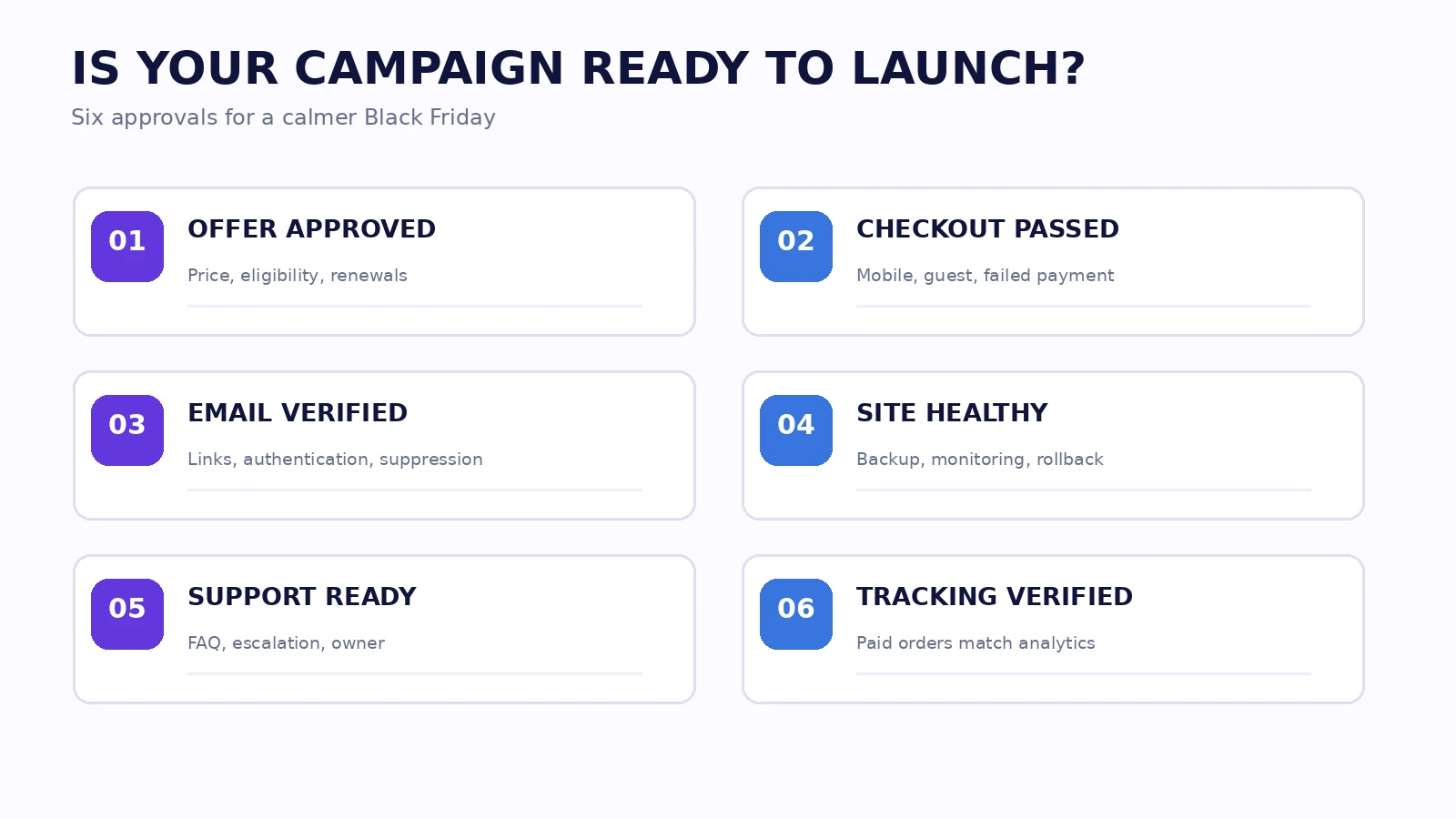
At minimum, agree on six things before your campaign goes public: what you’re offering; who qualifies; what customers will pay now and on renewal; how they’ll receive the deal; whether the full checkout works; and who will fix problems when traffic arrives. Then build the emails, landing page, product explanations, and measurement plan around those decisions.
That order matters. Automattic’s September 2026 agency playbook recommends starting eight to ten weeks out and discussing the business before touching the site. WooCommerce’s own Black Friday checklist similarly treats backend reliability and customer communication as two halves of the preparation, not competing priorities.
1. Agree on what a successful sale means
A discounted order isn’t automatically a new customer. If your plugin normally sells well at full price, a broad coupon can persuade existing prospects to buy more cheaply rather than generate genuinely additional demand. Conversely, an introductory deal may help buyers who have been hesitating because they aren’t sure the software will solve their problem.
Write one primary campaign objective. It might be:
- Acquire qualified new customers: People encountering your product for the first time.
- Encourage upgrades: Existing one-site customers moving to a larger license.
- Increase useful bundle purchases: Buyers who need two tools for one workflow.
- Clear time-sensitive inventory: Physical stock that becomes less valuable after the season.
- Reactivate inactive customers: People with a genuine reason to return, rather than everyone who happens to be on an old email list.
Different goals need different scorecards. Acquiring buyers calls for first-time purchase share and product activation; upgrades need eligible-customer upgrade rate; physical stock may be judged against carrying cost and contribution per unit.
If you can’t explain why you’re willing to give up part of the price, don’t choose a percentage yet. Our related WPTopper guides, WordPress Discounts: How to Run a Sale Without Giving Away Your Profit and How Much Should You Discount a WordPress Plugin or Theme?, go deeper into the economics. This article focuses on getting an actual campaign into shape.
The one-sentence campaign brief
Try this: “We want eligible newsletter readers to buy a suitable annual license by the published campaign deadline, using a clearly stated introductory discount, while keeping a positive contribution margin.”
For example: “We want existing single-site license holders to consider a five-site upgrade before Cyber Monday, using a clearly priced upgrade credit, without discounting their ongoing renewal unexpectedly.” That’s a brief a product manager, developer, copywriter, and support agent can all work with.
2. Build the offer before you build the sale page
A WordPress business may have single-site, five-site, unlimited-site, and lifetime plans. A WooCommerce shop might combine sale products, bundles, shipping rules, and free gifts. One sitewide percentage looks clean on a poster, but these products have different economics and obligations.
Create an offer sheet with a line for each qualifying product or plan. Record the regular price, promotional amount, absolute savings, first-payment or renewal behavior, eligibility, dates, stacking policy, refund policy, and responsible approver. If the offer is a bundle, list what’s included and what happens to each component later.
Illustrative example: A $120 annual plugin is advertised at 25% off. The first charge is $90. If renewals return to $120, put that in the offer sheet and customer-facing copy. A second offer that takes 25% off every renewal is a different commercial decision, even though both banners might say “25% off.”
Avoid the shortcut of setting the same deep markdown on every plan. High-tier licenses can create wider support obligations, and a cheap lifetime license can turn a single discounted payment into years of expected maintenance. Also avoid pretending that a bundle has extra value simply because you’ve placed unrelated products next to each other.
When a smaller offer may work better
If price isn’t the customer’s main concern, try improving what they receive: an onboarding session, migration support, a proven template pack, an extended demonstration, or a more useful license tier. Count the cost of providing those benefits. A “free bonus” that demands ten hours of support isn’t free for the seller.
Choose the offer people will actually understand, not merely the one that looks most dramatic in a thumbnail.
3. Segment people by what they need, not only by who they are
Many email plans split the audience into “new” and “existing.” It’s a start, but a customer who bought a plugin yesterday has a different reason to listen than one whose annual renewal is due later in the year. An agency managing client sites has different questions from a first-time hobbyist.
Useful working segments include:
- Interested noncustomers: People who signed up for updates or tried a demonstration. Explain the specific problem solved and show what’s included.
- Current basic-license customers: Lead with meaningful upgrade value, compatibility, and migration expectations.
- High-value or agency customers: Explain site limits, team workflows, support expectations, and commercial license scope rather than shouting the percentage.
- Recent purchasers: Consider how they will feel about a public discount soon after paying full price. Decide whether a fair adjustment or early access is warranted under your policy.
- Inactive subscribers: Reintroduce the product carefully. A dormant list isn’t permission to flood uninterested people with mail.
Segmentation should never promise eligibility that your store cannot enforce. A coupon restricted to a billing email is not necessarily a genuine first-purchase restriction. If you’re using unique partner codes or account-level offers, confirm the rule against real customer states.
Practical insight: Treat each segment’s biggest unanswered question as a headline. New prospects may ask “Will this work with my theme?” Existing buyers may ask “What changes when I upgrade?” Agencies may ask “Can I transfer licenses to client sites?” Answering those questions can influence the buying decision more than another bold percentage.
4. Give the campaign one reliable home
Your Black Friday page should be the place where every promotional claim can be checked. It doesn’t have to be flashy. It needs to be accurate when someone arrives from email, social, Google, an affiliate recommendation, or a forwarded message.
The essentials are straightforward:
- A clear offer: What is discounted, the actual price, and genuine savings.
- Included products and licenses: No guessing whether an agency or lifetime tier qualifies.
- Eligibility and exclusions: New customers, existing customers, partner audiences, or products excluded.
- Dates and time zone: A real start and end, consistent with the coupon or sale price.
- First payment and renewal terms: Especially for WordPress plugins, themes, and hosting plans.
- Refund and support access: A path to help if payment or activation goes wrong.
- A relevant CTA: Each “Get this deal” button leads to the exact intended product, variation, or verified offer.
If the campaign includes several products, group them by use case instead of constructing a wall of near-identical price cards. “Build your membership site,” “Improve email delivery,” and “Manage client websites” help buyers locate what they need. Only display live prices and reviews that are verified for the specific product.
A countdown can communicate a real deadline. It should not silently restart on every visit. When the promotion ends, close the offer, update the page, and explain what’s available next instead of leaving a stale “Last chance” banner indexed for months.
5. Prepare the actual WordPress checkout, not a screenshot of it
The worst time to discover a coupon conflict is after five thousand subscribers receive an email. Run test purchases before you schedule the first launch message.
WooCommerce: confirm which coupon features you really have
WooCommerce core supports percentage, fixed-cart, and fixed-product coupons, with product, spending, email, and usage restrictions. You enable coupons under WooCommerce → Settings → General and create them under Marketing → Coupons. The documented core system requires shoppers to enter codes at cart or checkout; it does not automatically apply ordinary coupon codes without an extension or customization.
That distinction is important. A campaign email that says “Your discount is already applied” won’t make it true on a core-only checkout. If an extension adds a coupon URL or auto-apply rule, test it as an extension feature, including its interaction with other discount plugins.
Core coupon expiry and future publication scheduling are not the same as a precise start-and-stop rule for every use case. If your campaign promises a specific hour, check your coupon setup and site time zone. Additional extensions may be necessary for precise expiry times.
FluentCart: check the coupon schedule, restrictions, and recurring behavior
FluentCart’s documented Pro coupon screen provides start and end date/time scheduling, product and category rules, email restrictions, total and per-user limits, stackability, and an optional maximum discount amount. Its Make this coupon recurring option matters for subscriptions: an introductory offer and a discount on every renewal are not interchangeable.
FluentCart also documents coupon parameters in supported instant-checkout URLs, so an email can take someone to a checkout with an eligible code pre-applied. But the link still runs validation, and this method is not supported in modal checkout. A link that contains a code isn’t automatically proof that the correct buyer gets the discount.
Platform caveat: These descriptions are based on vendor documentation.
Test the journey from the customer’s side
Try a normal eligible order, a noneligible product, a mixed cart, a second coupon, an expired code, a guest user, a signed-in user, and the same order on mobile. For subscriptions, verify the first charge and the renewal shown to the buyer. For physical stores, add taxes, shipping, stock levels, and different delivery zones.
Don’t stop when the cart total looks right. Confirm payment succeeds, the order is recorded once, the license or download is delivered, and the confirmation email arrives. Then check whether the tracking event fired once, not twice.
6. Audit the parts of your site people forget until they fail
A sale brings attention to the most fragile path on your site: product → cart → payment → delivery. Protect it before the marketing team adds more traffic.
Payments: Check each active gateway, currency, callback, webhook, subscription setup, and failure-message path. Run both success and declined-payment tests where a safe sandbox is available.
Performance: Check page speed and, more importantly, whether checkout remains functional under expected traffic. Cache product pages carefully; cart, account, and checkout pages must not leak another customer’s data or display stale totals. Review host capacity and monitoring with the infrastructure owner instead of assuming the home page loading fast means everything is ready.
WordPress maintenance: Update and test critical plugins with a backup and rollback plan before the campaign freeze. Avoid surprise updates during peak traffic unless they fix an urgent issue. Record WooCommerce/FluentCart, theme, payment, and coupon-extension versions.
Inventory: For physical stores, reconcile quantities across sales channels. WooCommerce’s 2026 peak-season inventory guidance emphasizes a single reliable source of stock truth; selling an unavailable product can become an expensive apology. Test inventory deduction and refunds, too.
Email infrastructure: Purchase emails and marketing emails serve different purposes. Verify both. A working promotional send does not prove that license receipts, password-reset messages, and payment confirmations will arrive reliably.
7. Start the emails early, but don’t spend November shouting
The campaign should build understanding before the biggest discount email hits the inbox. An early useful message might explain the product’s main benefit, show a relevant example, or tell existing customers what an upgrade actually adds. Your audience should have a reason to recognize your brand before the busiest shopping days.
A lean, five-touch framework works for many WordPress product teams:
- Preparation / interest: Help people understand the category, product, and use case. Invite them to choose what updates they want.
- Early access, where genuine: Give a clearly defined audience access before public launch, if that access is real.
- Launch: Make the offer unmistakable. One primary CTA; precise price and terms; no invented expiration.
- Helpful reminder: Answer objections like compatibility, onboarding, license limits, or how upgrades work. Do not resend the same graphic with “Hurry!” added.
- Final call: Send only when a real deadline is approaching, with the exact time zone and a working destination.
Not every subscriber needs all five messages. Suppress recent purchasers and people who have opted out, and reduce unnecessary repeated messages. If a user is already buying, a checkout help message is better than another promotional blast.
Deliverability is part of campaign readiness
Before you schedule the sequence, make sure your sending domain and process meet the requirements of the mailbox providers you rely on. Google’s current Gmail sender guidance requires authentication and low unwanted-email rates; senders of 5,000 or more messages per day to Gmail accounts have additional requirements including authentication and easy unsubscribing. Google began ramping enforcement for noncompliance in November 2025.
Review SPF, DKIM, DMARC where applicable, the one-click unsubscribe requirements for qualifying promotional bulk mail, complaint rates, and list quality. Confirm the actual sending platform is configured correctly. A big list with weak permission or authentication isn’t an asset just because it has a lot of addresses.
For a deeper look at sequence design and campaign mistakes, the next WPTopper articles will cover Black Friday email marketing and organic promotion. This guide stays focused on connecting them to the overall launch plan.
8. Give every campaign task an owner and a fallback
A small team doesn’t need a giant project-management board. It does need to know whose phone rings when something breaks.
| Workstream | Responsible owner | Proof it is ready | Fallback |
|---|---|---|---|
| Offer and pricing | Product/finance lead | Signed-off offer sheet | Pause or narrow offer |
| Coupon and checkout | Store engineer | Passed test orders and renewal check | Disable broken code and fix safely |
| Landing page | Content/web owner | Final mobile and desktop preview | Revert page version |
| Email and segmentation | Lifecycle marketer | Test sends, suppression, links | Pause remaining sends |
| Payments and infrastructure | Technical owner | Gateway, logs, monitoring, backups | Switch to incident response |
| Support | Customer-success lead | FAQ, escalation contacts, published terms | Escalate pricing exceptions |
| Reporting | Analytics owner | Verified events and order reconciliation | Use payment/order records as source |
One person may own several rows. That’s fine. What matters is that “someone will check” becomes “this person has checked, and here’s the evidence.”
Hold a short launch rehearsal: marketing opens the email, a teammate clicks through on mobile, the engineer watches checkout logs, support checks the offer text, and analytics confirms the order is counted once. Then record what failed and who repaired it.
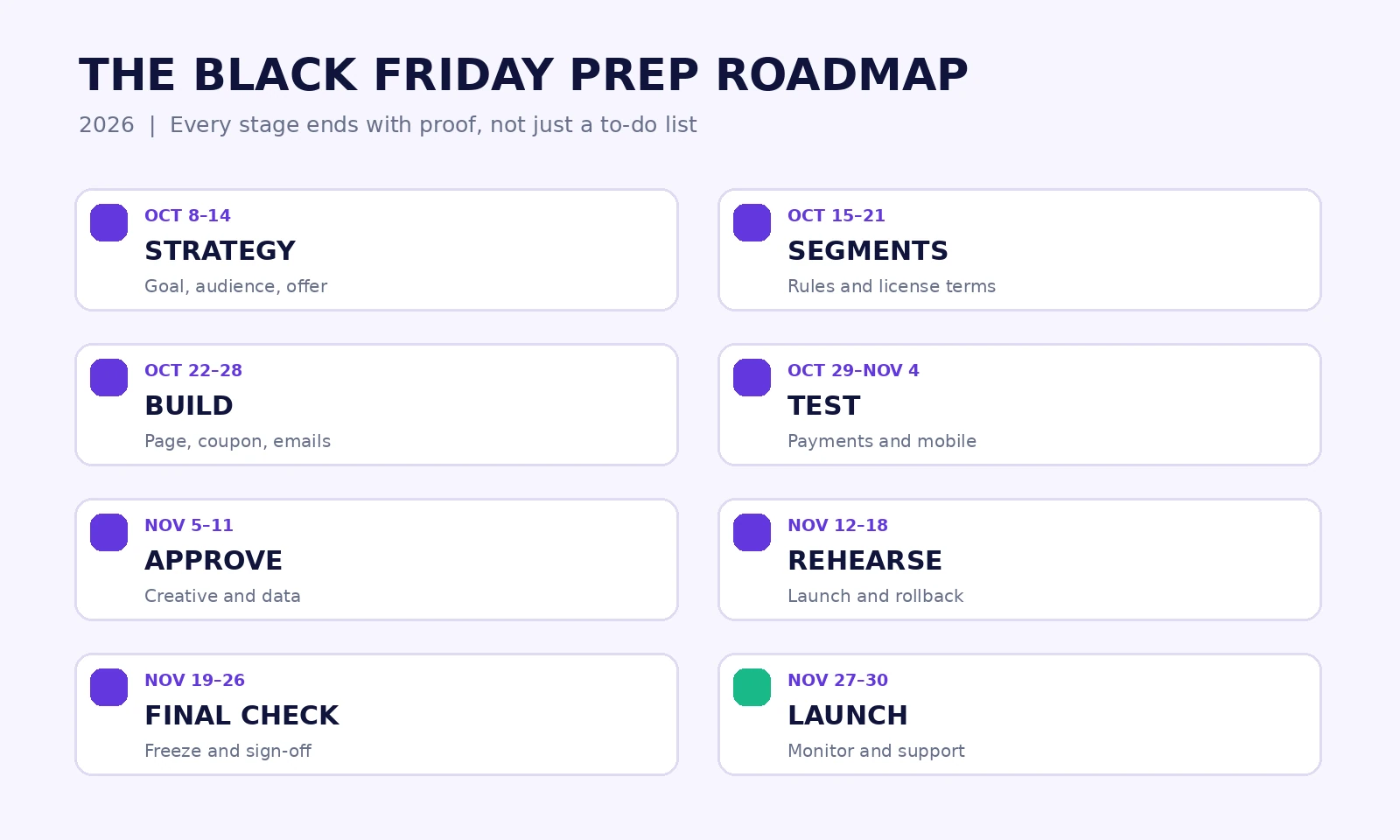
9. A workable 2026 Black Friday preparation calendar
This schedule counts backward from Friday, November 27. Adapt it if your audience lives in multiple time zones, your sale begins early, or Cyber Monday has a different offer.
| Window | Main job | Output you should have |
|---|---|---|
| Oct 8–14: about seven weeks out | Choose goal, audience, products, margin guardrails, and owners | Approved campaign brief and offer sheet |
| Oct 15–21: about six weeks out | Segment contacts, audit product pages, define pricing and renewal rules | Audience plan and accurate offer terms |
| Oct 22–28: about five weeks out | Build landing page, coupon setup, email drafts, and support FAQ | Reviewable first version of the whole campaign |
| Oct 29–Nov 4: about four weeks out | Test payments, checkout, delivery, subscriptions, links, mobile, and analytics | Bug list with owners; working test orders |
| Nov 5–11: about three weeks out | Finish content, list hygiene, campaign tracking, and partner approvals | Approved creatives and sending plan |
| Nov 12–18: about two weeks out | Rehearse launch, verify backup/rollback, train support | Go/no-go checklist and incident contacts |
| Nov 19–26: final week | Freeze nonessential changes, recheck inventory, pricing, timing, and email links | Final sign-off and monitoring dashboard |
| Nov 27–30: BFCM | Launch, monitor, support, check orders, end offers as promised | Incident notes and daily performance snapshots |
| Dec 1–7: after the sale | Reconcile results, onboard buyers, resolve cases, update stale pages | Postmortem and customer follow-up plan |
Late starting? Don’t try to recreate every row. Prioritize an accurate offer, reliable checkout, transactional email, a clear page, support ownership, and basic measurement. Drop elaborate automation and decorative complexity before you drop testing.
10. Run Black Friday like a small launch room
On launch morning, someone should be watching more than social comments. Use a compact monitoring view: checkout starts, successful paid orders, payment failures, coupon errors, email delivery issues, site health, fulfillment or license-delivery errors, and support volume.
Agree on escalation thresholds before launching. “A few failures” isn’t a useful trigger. If multiple paid customers report they cannot download a plugin or all test orders suddenly fail, pause traffic-driving messages and bring in the owner. Document what happened, the time of the issue, the affected product or audience, and the customer resolution.
Don’t change promotional rules impulsively because a dashboard looks different for five minutes. Validate the issue with order records, payment logs, and a reproducible checkout attempt. Conversely, don’t keep sending a broken email campaign while waiting for perfect certainty.
The Black Friday-to-Cyber Monday handoff
Decide in advance whether Cyber Monday continues the same offer, introduces a different eligible product, or ends the promotion. If the rules change, update the offer page, CTA links, coupon schedule, and email copy together. Nothing creates a faster support headache than Friday’s promotion code living inside Monday’s newsletter when the rules have changed.
11. Measure what you gained, and keep helping people afterward
A campaign report often starts with revenue, orders, and coupon redemptions. Keep them, but don’t stop there. Compare performance against a reasonable baseline, consider how much contribution remains after discount and marketing costs, and look at first-time buyers, upgrades, refunds, and support demand.
If you’re using Google Analytics 4, its recommended ecommerce events include view_item, add_to_cart, begin_checkout, purchase, and refund. Promotions can be measured with view_promotion and select_promotion when implemented correctly. GA4 doesn’t magically receive every recommended ecommerce event: Google says these must be configured and validated. Match the order and transaction IDs against real payment records before celebrating a chart.
Here is a simple example of why that matters. Two campaigns can both generate $20,000 in gross checkout revenue. One might include far more refunds, support expense, and discounted renewals. The one with the bigger coupon headline may have created less long-term value. Report the actual economics and avoid pretending a holiday comparison proves causation on its own.
The first seven days after Black Friday are also when new customers need the most help: installation, first-use walkthroughs, license activation, access to support, and a clear explanation of the next renewal. A good onboarding email might do more for retention than an immediate push to buy a second tool. That follow-through deserves its own plan.
12. The final go/no-go checklist
Before the campaign goes live, a responsible owner should be able to answer yes to every essential item below:
- Is the offer economically approved, with eligible products and license tiers listed?
- Do the landing page, banner, emails, and actual checkout describe the same price and deadline?
- Are renewal amounts, exclusions, usage rules, and stacking behavior clear?
- Have eligible, ineligible, mobile, guest, and subscription test orders passed?
- Do all CTA buttons go to the intended product or valid offer destination?
- Are payment confirmation, license delivery, downloads, and email receipts working?
- Are security backups, monitoring, and the rollback owner confirmed?
- Have marketing emails been tested for links, authentication, suppression, and unsubscribe handling?
- Does the support team have the policy and an escalation path?
- Can the analytics owner reconcile purchases and refunds with orders and payments?
- Is there a documented plan to end the sale and update expired deal listings?
- Will new buyers receive onboarding and help after paying?
A failed essential item is a reason to adjust the campaign, not merely a note to fix during the rush. A smaller promotion that works can outperform an ambitious one that sends people into a broken checkout.
After the banners come down, the customer relationship remains
Black Friday can introduce someone to a WordPress product they use for years. Or it can leave them with a receipt, a confusing license, and a coupon code that didn’t match what was promised. The difference rarely comes from the cleverness of the launch tweet. It comes from the work that happened before it.
Start with a solid offer. Explain it clearly. Test the full buying journey. Give your team authority to fix problems. Then judge the result by what the business and the customer actually gained.
WPTopper’s growing WordPress discounts series covers discount strategy, pricing, coupon creation, restrictions, and checkout experience. Each guide should be linked through its verified, publicly available WPTopper URL when published. If you’re shopping for WordPress software yourself, explore WordPress tools on WPTopper and verify the current license and pricing terms before buying. The best deal still has to fit your project.
Frequently asked questions
When should I start planning Black Friday for a WordPress store?
Six to eight weeks is a useful planning window for many small teams; larger operations may need longer. In 2026, Black Friday is November 27, so early October is a practical time to lock the offer and start checking the buying journey. If you’re starting later, protect essential checkout and customer-communication work first.
Is it better to use a coupon or a sale price during Black Friday?
A public offer for every eligible buyer may be easiest as an upfront sale price or automatically applied discount, depending on your platform. A private partner or customer-specific offer can need a restricted code or validated coupon link. Either way, show the final charge and verify the terms.
Can WooCommerce run Black Friday coupons without a paid extension?
Yes. WooCommerce core supports ordinary percentage, fixed-cart, and fixed-product coupons with basic restrictions. Automatic coupon application, advanced audience controls, and some precise time-based behaviors may require extensions or customization. Test the exact store configuration rather than assuming every coupon feature is in core.
Can FluentCart schedule coupons for Black Friday?
FluentCart Pro’s documentation describes start and end date/time controls, product restrictions, usage limits, stacking, and recurring-coupon behavior. Check your installed version, configured time zone, and subscription options before sending a live campaign.
What should my Black Friday emails include?
One clear offer, the relevant buyer benefit, the actual eligible products, pricing and renewal terms, a working CTA, the real deadline, and any important exclusions. Segment your audience and respect unsubscribe preferences instead of blasting the same reminder repeatedly.
How do I measure whether the sale actually worked?
Look at paid orders and revenue, but also contribution after discounts and marketing costs, refunds, first-time customer quality, upgrade rate, and activation. Verify your ecommerce analytics against order and payment records, and compare results with a plausible no-sale baseline.
Sources and further reading
- Automattic for Agencies: Your Black Friday playbook (September 30, 2026)
- WooCommerce: The ultimate Black Friday checklist
- WooCommerce: Managing coupons
- FluentCart: Adding coupons
- WooCommerce: Prepare inventory for peak season (2026)
- Google Gmail: Email sender guidelines FAQ
- Google Analytics: Set up ecommerce events
- Google Analytics: Recommended events
Research note: The example prices, customer situations, and campaign workflows above are illustrative. They are not WPTopper test results or guarantees that every WooCommerce/FluentCart installation has identical settings. Confirm the relevant details before launching your own campaign.



Leave a Reply